Confidential / All product specifications are subject to change without notice.
PCG020C_20170424_TI1003TP
Connection to Indoor LoRa GW web UI
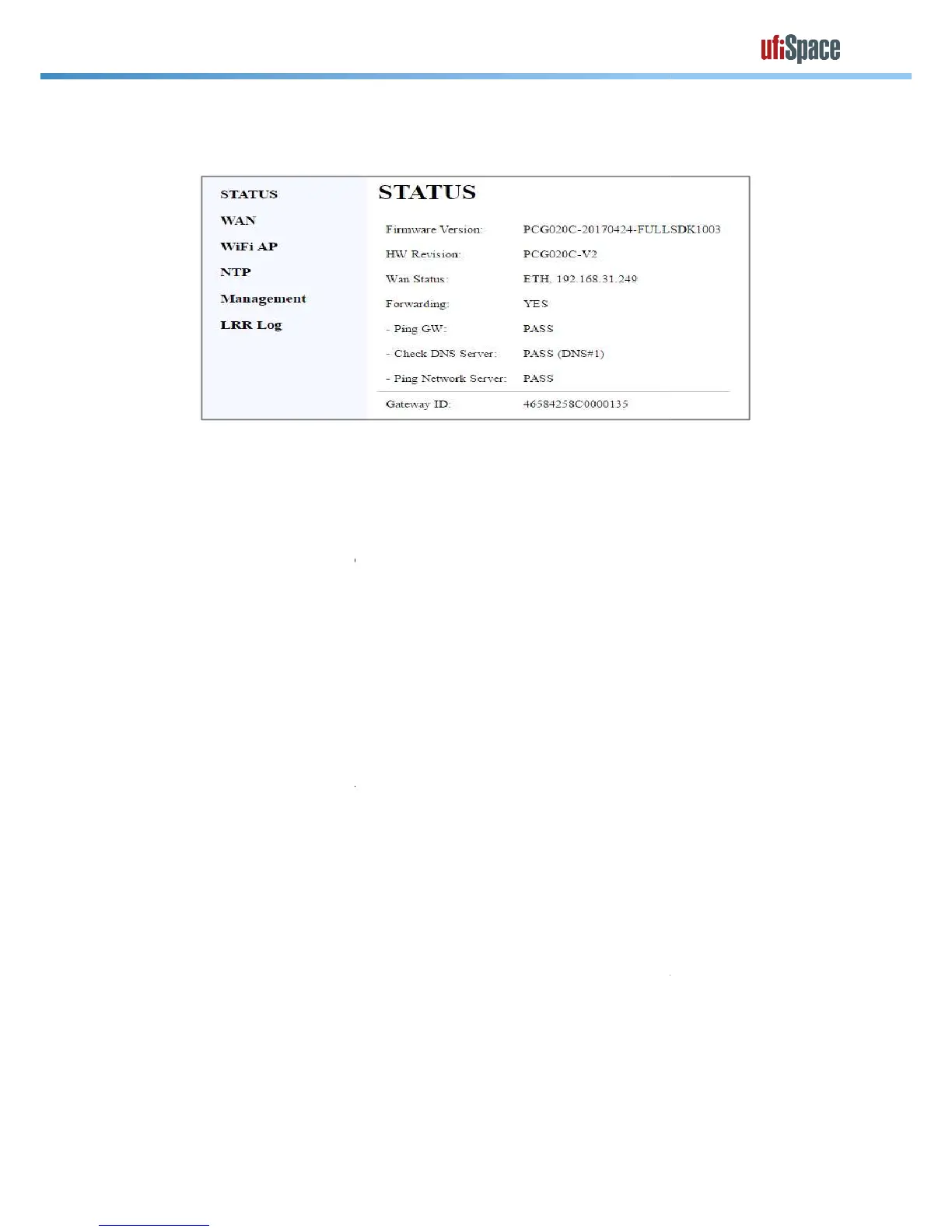
Display current FW version
Display current HW reversion (should not change)
Display current backhaul connection state in the following format:
<WAN Type>,<Current IP address>
“bs_pkt_fwd” process is running.
” forwards RF packets receive by the concentrator to a server
through a IP/UDP link, and emits RF packets that are sent by the server.
Display the ping test result to default gateway
(default GW is unreachable or ICMP
Display the result to ping “8.8.8.8” or “168.95.1.1”
(ping test to ping “8.8.8.8” or “168.95.1.1” is okay)
(ping test to ping “8.8.8.8” or “168.95.1.1” is failed)
Display the result to ping BS Network IP.
(ping test to ping BS Network IP is okay)
(ping test to ping BS Network IP is failed)
BS Network IP is defined in nvram value bs_serv_addr.
“Base Station” menu on the Web and modify the field called“Network
Select [WAN] page for setting WAN configuration
The LoRa service on Indoor
user needs to take the backhaul (WAN) connection per network environment that
installed. Secondary WAN will be used when Primary WAN is dead.
Confidential / All product specifications are subject to change without notice.
PCG020C_20170424_TI1003TP
Connection to Indoor LoRa GW web UI
Display current FW version
Display current HW reversion (should not change)
Display current backhaul connection state in the following format:
<WAN Type>,<Current IP address>
(if WAN connection is not ready)
“bs_pkt_fwd” process is running.
” forwards RF packets receive by the concentrator to a server
through a IP/UDP link, and emits RF packets that are sent by the server.
Display the ping test result to default gateway
(default GW is unreachable or ICMP
Display the result to ping “8.8.8.8” or “168.95.1.1”
(ping test to ping “8.8.8.8” or “168.95.1.1” is okay)
(ping test to ping “8.8.8.8” or “168.95.1.1” is failed)
Display the result to ping BS Network IP.
(ping test to ping BS Network IP is okay)
(ping test to ping BS Network IP is failed)
BS Network IP is defined in nvram value bs_serv_addr.
is “127.0.0.1”. User can modify it by clicking
“Base Station” menu on the Web and modify the field called“Network
Select [WAN] page for setting WAN configuration
will start automatically when
backhaul connection is ready. Hence,
user needs to take the backhaul (WAN) connection per network environment that
installed. Secondary WAN will be used when Primary WAN is dead.
Display current backhaul connection state in the following format:
(if WAN connection is not ready)
” forwards RF packets receive by the concentrator to a server
through a IP/UDP link, and emits RF packets that are sent by the server.
is “127.0.0.1”. User can modify it by clicking
“Base Station” menu on the Web and modify the field called“Network
backhaul connection is ready. Hence,
user needs to take the backhaul (WAN) connection per network environment that



 To Next Page
 Loading...