EasyManua.ls Logo

UfiSpace S9510-28DC - User Manual

UfiSpace S9510-28DC
30 pages
Print Icon
To Next Page IconTo Next Page
Loading...
Hardware Installation Guide
S9510-28DC
Disaggregated Cell Site
Gateway
R1.0
Question and Answer IconNeed help?

Do you have a question about the UfiSpace S9510-28DC and is the answer not in the manual?

Summary

Product Overview

Installation Preparation

Installation Tools

Lists and illustrates the required tools and materials for the installation process.

Installation Environment Requirements

Specifies the power, space, and cooling requirements for the installation environment.

Preparation Checklist

Provides a checklist of tasks and requirements to confirm readiness for installation.

Package Contents and Components

Accessory List

Lists all accessories included in the package with their specifications and quantities.

Component Physical Information

Provides detailed physical specifications (weight, dimensions) for various system components.

System Identification and Overview

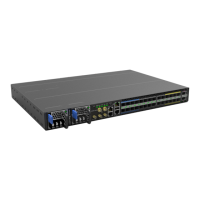
S9510-28 DC DC Version Overview

Provides a visual overview and dimensions of the S9510-28DC DC version.

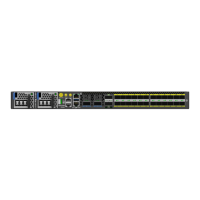
S9510-28 DC AC Version Overview

Provides a visual overview and dimensions of the S9510-28DC AC version.

DC Version PSU Overview

Details the physical characteristics and airflow of the DC Power Supply Units (PSUs).

AC Version PSU Overview

Details the physical characteristics and airflow of the AC Power Supply Units (PSUs).

Fan Overview

Describes the fan modules and their hot-swappable nature.

Port Overview

Details the different port types, form factors, distances, and speeds supported by the device.

Rack Mounting Procedure

Fan Module Installation

Power Supply Unit Installation

Router Grounding Procedure

Power Connection Guide

DC Version Power Connection

Step-by-step instructions for connecting the DC power cable to the PSU.

AC Version Power Connection

Instructions for connecting the AC power cord to the PSU.

System Operation Verification

Front Panel LED Status

Explains the status and meaning of each front panel LED indicator.

PSU FRU LED Status

Details the LED indicators for the Power Supply Unit (PSU) Field Replaceable Units (FRUs).

Fan FRU LED Status

Details the LED indicators for the Fan Field Replaceable Units (FRUs).

Initial System Setup via Serial Connection

Cable Connectivity Guide

USB Extender Cable Connection

Instructions for connecting the USB 3.0 A Type plug to the router's USB port.

ToD Interface Connection

Steps for connecting an Ethernet cable to the "TOD" port for the GNSS unit.

GNSS Interface Connection

Instructions for connecting an external GNSS antenna to the "GNSS ANT" port.

1 PPS Interface Connection

Instructions for connecting an external 1PPS cable to the "1PPS" port.

10 MHz Interface Connection

Instructions for connecting an external 10MHz cable to the "10MHz" port.

Transceiver Connection

Step-by-step guide for installing optical transceivers into the device ports.
Safety Cautions and Warnings

Summary

Product Overview

Installation Preparation

Installation Tools

Lists and illustrates the required tools and materials for the installation process.

Installation Environment Requirements

Specifies the power, space, and cooling requirements for the installation environment.

Preparation Checklist

Provides a checklist of tasks and requirements to confirm readiness for installation.

Package Contents and Components

Accessory List

Lists all accessories included in the package with their specifications and quantities.

Component Physical Information

Provides detailed physical specifications (weight, dimensions) for various system components.

System Identification and Overview

S9510-28 DC DC Version Overview

Provides a visual overview and dimensions of the S9510-28DC DC version.

S9510-28 DC AC Version Overview

Provides a visual overview and dimensions of the S9510-28DC AC version.

DC Version PSU Overview

Details the physical characteristics and airflow of the DC Power Supply Units (PSUs).

AC Version PSU Overview

Details the physical characteristics and airflow of the AC Power Supply Units (PSUs).

Fan Overview

Describes the fan modules and their hot-swappable nature.

Port Overview

Details the different port types, form factors, distances, and speeds supported by the device.

Rack Mounting Procedure

Fan Module Installation

Power Supply Unit Installation

Router Grounding Procedure

Power Connection Guide

DC Version Power Connection

Step-by-step instructions for connecting the DC power cable to the PSU.

AC Version Power Connection

Instructions for connecting the AC power cord to the PSU.

System Operation Verification

Front Panel LED Status

Explains the status and meaning of each front panel LED indicator.

PSU FRU LED Status

Details the LED indicators for the Power Supply Unit (PSU) Field Replaceable Units (FRUs).

Fan FRU LED Status

Details the LED indicators for the Fan Field Replaceable Units (FRUs).

Initial System Setup via Serial Connection

Cable Connectivity Guide

USB Extender Cable Connection

Instructions for connecting the USB 3.0 A Type plug to the router's USB port.

ToD Interface Connection

Steps for connecting an Ethernet cable to the "TOD" port for the GNSS unit.

GNSS Interface Connection

Instructions for connecting an external GNSS antenna to the "GNSS ANT" port.

1 PPS Interface Connection

Instructions for connecting an external 1PPS cable to the "1PPS" port.

10 MHz Interface Connection

Instructions for connecting an external 10MHz cable to the "10MHz" port.

Transceiver Connection

Step-by-step guide for installing optical transceivers into the device ports.

Safety Cautions and Warnings

UfiSpace S9510-28DC Specifications

General IconGeneral
BrandUfiSpace
ModelS9510-28DC
CategoryGateway
LanguageEnglish

Related product manuals