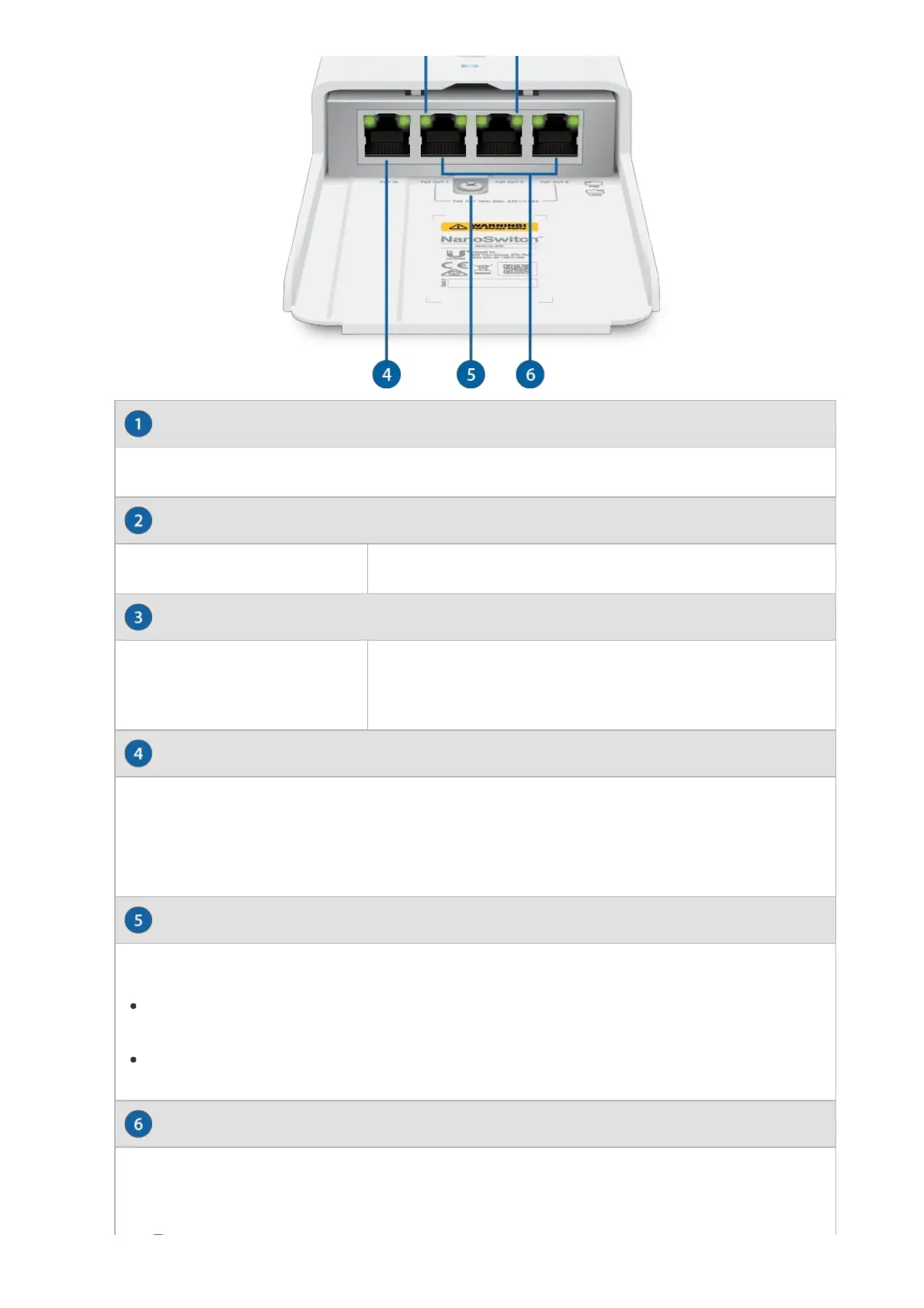
PowerLED
PoELED
LinkLED
PoEInPort
GroundBondingPoint
PoEOut(Ports13)
ThePowerLEDwilllightbluewhenthedeviceisconnectedtoapowersource.
Green Active24VPoE
Green
LinkEstablished
FlashingIndicatesActivity
RJ45portsupports10/100/1000Ethernetconnectionsandsupports24V,2pair
passivePoEtopowertheswitch.Formaximumpowerconsumptionof30W,
werecommendsupplyingpowerwiththePOE2430WGWHPoEadapter
(notincluded).
TheNanoSwitchmustbegroundedinoneofthefollowingways:
UsetheSelfTappingScrewtogroundtheNanoSwitchdirectlytoa
groundedmetalpoleorstructure.
UsetheMachineScrewandNuttoattachadrainwire(notincluded)thatis
connectedtoaremotegroundingblockorstructure.
RJ45portssupport10/100/1000Ethernetconnectionsandprovidepassive
24V,2pairPoEpassthroughforupto30WPoEoutput.
WARNING:PoEisalwaysactive.Beforeconnectingadevicetoa


 To Next Page