6
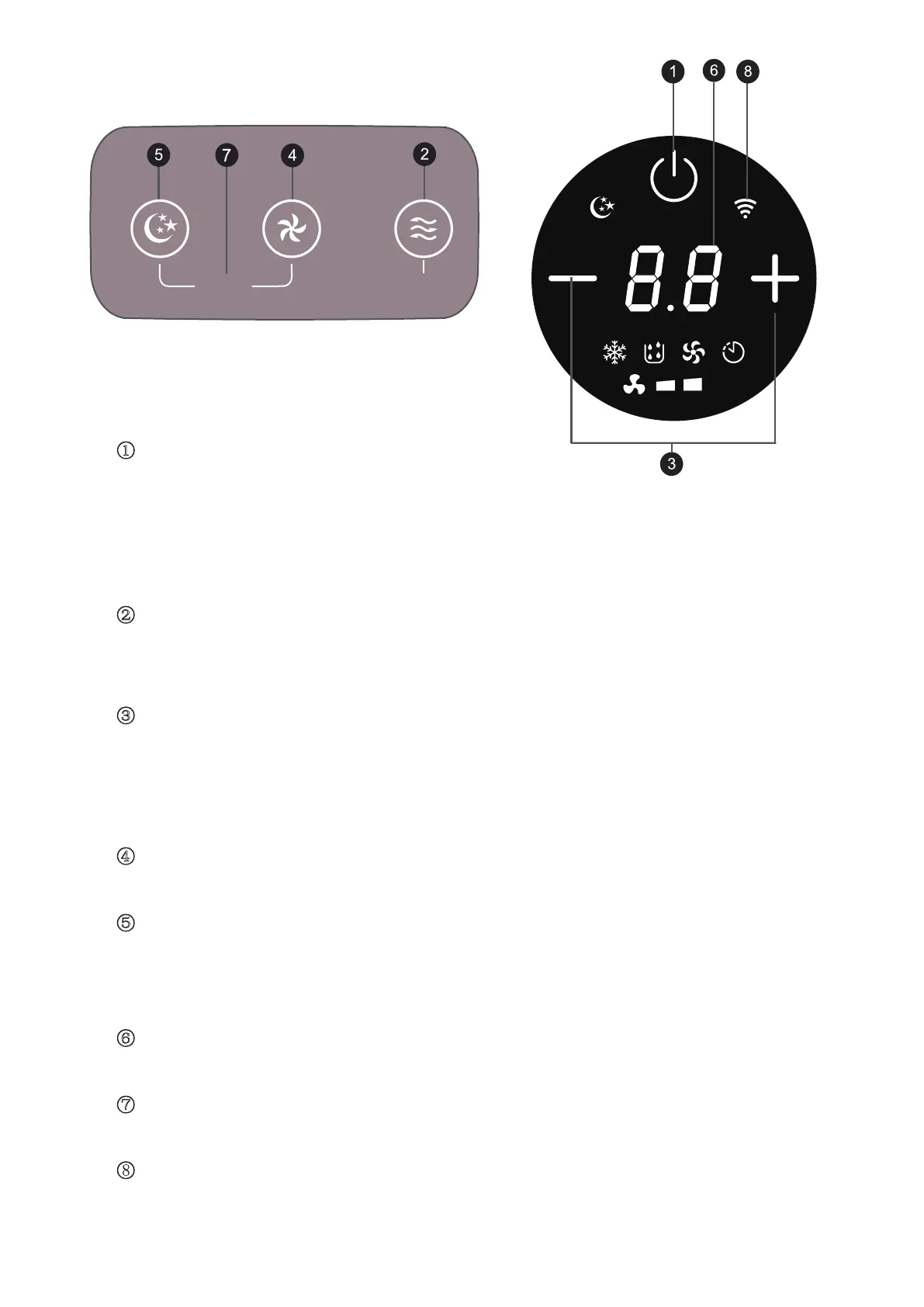
4. OPERATION OF CONTROL PANEL
Swing
3S-Timer
ķ Power
Press this key to turn the device on and off.
When the air conditioner is switched on, thHWHPSHUDWXUHLVVHWWRႏE\ default. The
WHPSHUDWXUHVHQVRUPHDVXUHVWKHDPELHQWt HPSHUDWXUHDQGLIH[FHHGVႏWKHRXWGRRUXQLW
VWDUWVWRZRUNWREULQJWKHWHPSHUDWXUHGRw Q,IWKHDPELHQWWHPSHUDWXUHDOUHDG\EHORZႏ
then the outdoor unit does not start.
ĸ Mode
3UHVVWKLVNH\WRVHOHFWFRROLQJIDQGHKXmidification modes;
,QVWDQGE\WXUQHG RQPRGHE\SUHVVLQJWKLVNH\WRVHWWLPLQJRQRII
Ĺ Temperature/time adjustment
In FRROLQJPRGHSUHVVWKHkey to increase or decrease the temperature;
In timer mode, press the key to adjust tim HWRWXUQRQWXUQRIIWKHPDFKLQHWKHVHWWLQJ
WHPSHUDWXUHDGMXVWDEOHIURPa0ႏ႔
3UHVV8S'RZQNH\DWWKHVDPHWLPHWRWUaQVIHUEHWZHHQႏDQG႔
ĺ
Fan speed
Press the key to choose ORZKLJK fan speed.
Ļ Sleep mode
Press the key t o enter or quit sleep mode. After 20 seconds, all OLJKWV and the GLJLWDO display
turn off and the DLUFRQGLWLRQHUJRHV to sleep. The indoor unit fan continues to run at low fan
speed.
ļ Display window
Check temperature and time from this window.
Ľ
Swing
Press fan speed and sleep mode key at the same time to turn RQRII
VZLQJ
function.
WiFi Function
3UHVVDQGKROGWKH)DQVSHHGEXWWRQIRUVHFRQGVWRFRQQHFWWKHDSSRUGLVFRQQHFWWKHDSS


 To Next Page