-3- SCREEN PP45
9/29
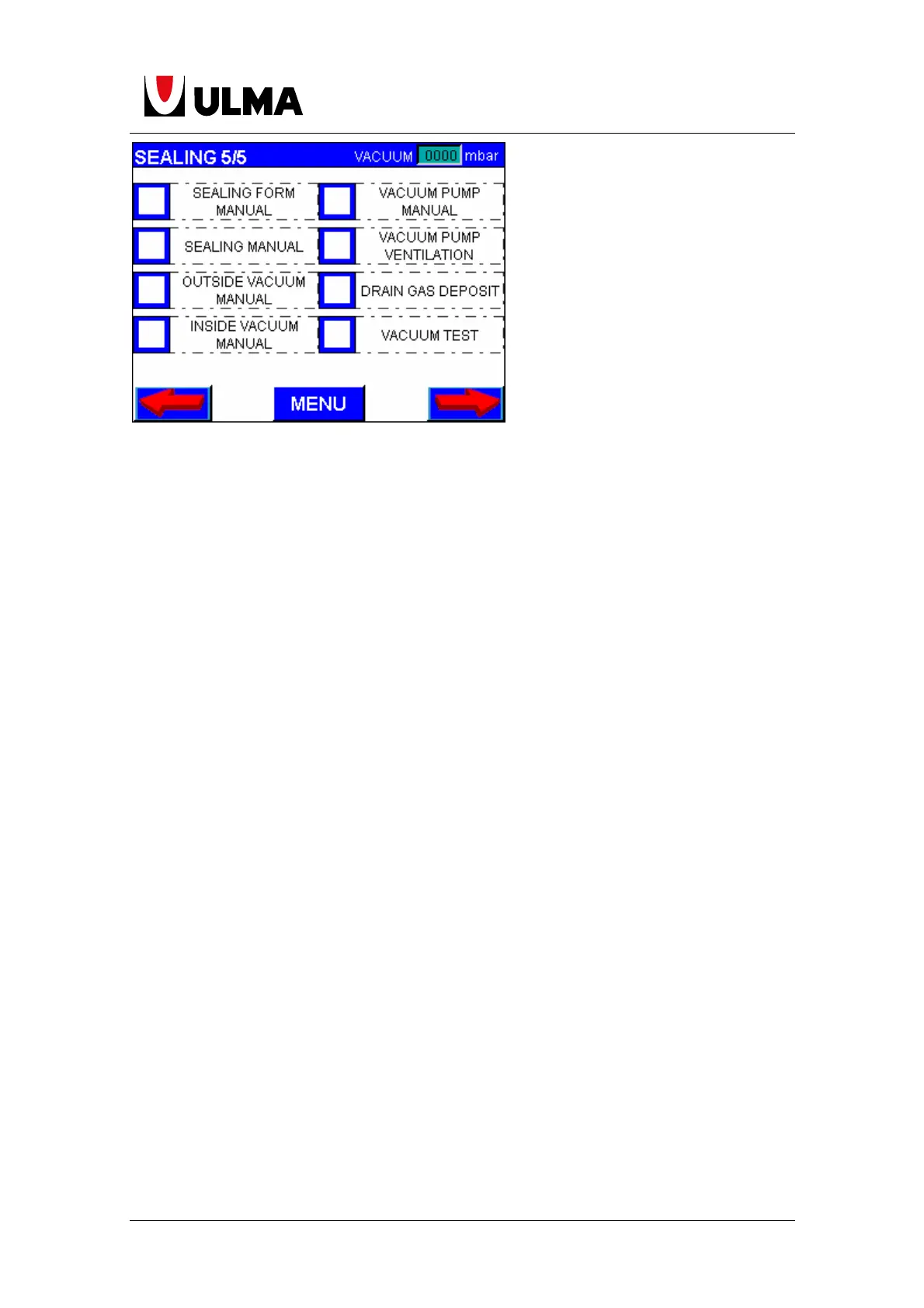
Sealing form manual: The sealing mould lifts. If pressed again it lowers.
Vacuum pump manual: Activates the vacuum pump. Pressing it again it stops the
pump (only if the machine has the vacuum optional).
Sealing manual: If pressed with the tools manually closed, it seals. Once finished the
tools lower.
Vacuum pump ventilation: Activates the vacuum electrovalve on the tank to flush the
vacuum air pump filter. This button must be pressed when the machine is waiting
on automatic cycles (only when the machine has the package vacuum option).
Inside vacuum manual: Activates the inside vacuum. Pressing it again stops it (only if
the machine has the vacuum optional).
Drain gas deposit: Manually operate the gas electrovalve. If pressed the gas
electrovalve is opened.
Outside vacuum manual: Activates the outside vacuum. Pressing it again stops it
(only if the machine has the vacuum optional).
Vacuum test. Operates in manual vacuum mode to check possible leaks. Pressing it
once raises the tools and begins the vacuum. Pressing it again starts the pumps
and maintains the compartment closed. Pressing it again releases the mould and
lowers the tools (only if the machine has the package vacuum option).


 To Next Page
 Loading...