EasyManua.ls Logo

Ultimate Support TELELOCK TS-90 Series - User Manual

Ultimate Support TELELOCK TS-90 Series
2 pages
Print Icon
To Next Page IconTo Next Page
Loading...
warranty information
Ultimate Support Systems offers a Limited Lifetime Warranty on TS-90 SERIES.
For Full Details, Exclusions and Limitations as well as information on Obtaining Warranty
Service, please see full warranty details available online at www.ultimatesupport.com.
To purchase the Ultimate Protection Plus Premium Service and Support Plan,
please visit www.ultimatesupport.com or call customer support at 800 - 525 -5628
for more information.
warranty registration
Visit www.ultimatesupport.com for a quick and convenient process for registering your
new Ultimate Support product. Warranty Registration and Proof of Purchase are required
for warranty fulfilment. Full Limited Lifetime Warranty and Ultimate Protection Plus
Premium Service and Support Plan details are available online.
TS-90 SERIES
TELELOCK
Product Manual
for Ultimate Support
4
970.776.1920 . www.ultimatesupport.com . Copyright 2009, Ultimate Support Systems . All Rights Reserved
Revision 6, 03.21.09 . Product Manual Item #SPK90-M
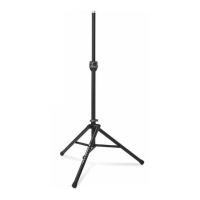
STANDARD
SPEAKER STAND
TS- 90B ITEM #13908
TALL
SPEAKER STAND
TS- 99B ITEM #13910
TALL LEVELING LEG
SPEAKER STAND
TS- 99BL ITEM #13642
Question and Answer IconNeed help?

Do you have a question about the Ultimate Support TELELOCK TS-90 Series and is the answer not in the manual?

Summary

Product Overview and Warranty Information

Ultimate Support TS-90 Series Telelock

Overview of the TS-90 Series Telelock speaker stands.

Standard Speaker Stand TS-90 B

Details for the standard TS-90B speaker stand model.

Tall Speaker Stand TS-99 B

Details for the tall TS-99B speaker stand model.

Tall Leveling Leg Speaker Stand TS-99 BL

Details for the tall TS-99BL leveling leg speaker stand.

Setup Instructions

Step 1: Open Leg Fitting

Open the leg fitting lock lever to begin setup.

Step 2: Orient Stand

Turn stand upside down, pivot legs with label facing front.

Step 3: Adjust Leg Spread

Turn stand upright, adjust leg spread for stability.

Step 4: Adapter Fit

Use the built-in adapter for 1-1/2" or 1-3/8" speaker sockets.

Step 5: Raise and Lock

Line up TeleLock collar, raise center tube, set to LOCK.

Step 6: Lower Speaker

Rotate TeleLock collar to LOWER to lower speaker.

Special Instructions and Usage

Cleaning and Maintenance

Clean stand with a damp cloth or non-abrasive cleaner.

Loading and Stability

Load stand only when upright; check leg collar lock.

Safe Operation Notes

Do not drag loaded stand; release TeleLock collar cautiously.

Accessories and Lighting Tree Conversion

Speaker Stand Mounting Brackets

External and internal brackets for mounting speaker cabinets.

Zippered Tote Bags

Heavy-duty, padded bags for transporting speaker stands.

Lighting Tree Conversion

Convert speaker stands into lighting trees with crossbars.

Overview

The Ultimate Support TS-90 Series TeleLock™ speaker stands are designed for robust and reliable support of speaker cabinets, offering a blend of innovative features, ease of use, and a range of accessories for enhanced functionality. This product manual covers the TS-90B Standard Speaker Stand (Item #13908), TS-99B Tall Speaker Stand (Item #13910), and TS-99BL Tall Leveling Leg Speaker Stand (Item #13642).

Function Description

The primary function of the TS-90 Series stands is to elevate speaker cabinets to optimal listening heights, ensuring sound projection and coverage. The stands are built with "The Strength of Innovation," emphasizing durability and user-friendly design. The TeleLock™ collar is a key feature, allowing for controlled and safe raising and lowering of speakers. The TS-99BL model further enhances functionality by providing a leveling leg for stable setup on uneven surfaces. Beyond speaker support, these stands can be converted into lighting trees with additional accessories, expanding their utility for various live sound and event applications.

Important Technical Specifications

The manual provides item numbers for the different models:

  • TS-90B Standard Speaker Stand: Item #13908
  • TS-99B Tall Speaker Stand: Item #13910
  • TS-99BL Tall Leveling Leg Speaker Stand: Item #13642

The built-in adapter on the stand's top tube is versatile, accommodating both 1-1/2" and 1-3/8" internal diameter speaker sockets. This ensures compatibility with a wide range of speaker cabinets. The adapter can be adjusted to a lower position for 1-1/2" sockets or raised (by depressing push buttons) and locked for 1-3/8" sockets.

For lighting tree conversions, specific accessories are listed:

  • Single-Tier Lighting Tree: Requires LTB-48B (48" Lighting Crossbar, Item #14107).
  • Two-Tier Lighting Tree: Requires LTV-24B (24" Vertical Extension, Item #14108), LTB-48B (48" Lighting Crossbar, Item #14107), and LTB-24B (24" Lighting Crossbar Pair, Item #14106).

Usage Features

The TS-90 Series stands are designed for straightforward setup and operation, incorporating several features to ensure safety and stability:

  • Setup Process:

    1. Open Leg Fitting Lock Lever: Begin by opening the lock lever on the leg fitting.
    2. Pivot Legs: Turn the stand upside down and pivot the legs until the Ultimate Support label faces you.
    3. Adjust Leg Spread: Turn the stand upright and slide the leg fitting to achieve the desired diameter for the leg spread. The leg braces should be parallel to the floor for maximum stability. Close the lock lever.
    4. Adapter Adjustment: The built-in adapter fits both 1-1/2" and 1-3/8" speaker sockets. Use the lower position for 1-1/2" sockets. For 1-3/8" sockets, depress the push buttons and raise the adapter until it locks in the raised position.
    5. Raise Center Tube: Align the TeleLock® collar arrow with "RAISE." Raise the center tube 6-10 inches. Place the speaker cabinet on top of the stand. Then, raise the cabinet to the desired height and set the collar to the "LOCK" position.
    6. Lowering Speakers: To lower speakers, SLOWLY rotate the TeleLock collar arrow to "LOWER" until the speaker begins to descend. To control the descent speed, turn the collar toward the "RAISE" position. When ready to remove the speaker, rotate the collar to "LOCKED."
    7. TS-99BL Leveling Leg: For the TS-99BL model, the third leg can be adjusted to level the stand on uneven surfaces. Untighten the leg telescoping collar, lengthen the leg, and then retighten the knob.
  • Safety and Operational Guidelines:

    • Loading Speakers: ONLY add the speaker when the stand is in a fully upright position with all legs on the floor.
    • Movement: Do not drag the stand while it is loaded, as this can damage fittings and void the warranty.
    • Leg Collar Security: Always ensure the leg collar is securely locked when supporting equipment.
    • TeleLock Collar Caution: Always release the TeleLock collar with caution and stand clear of the load during lowering.
    • Tube Lock: The stand includes a tube lock to prevent accidental pulling out of the center tube.
  • Accessories:

    • Speaker Stand Mounting Bracket (BMB-200K, Item #10766): An external bracket for securely mounting any speaker cabinet with a flat bottom onto an Ultimate Support speaker stand.
    • Speaker Stand Socket Mounting Bracket (TSM-150MK, Item #13421; TSM-138MK, Item #13425): Internal metal brackets for securely mounting any speaker cabinet with a flat bottom onto an Ultimate Support speaker stand.
    • Zippered Tote Bags: Heavy-duty, padded, zippered bags for transport and protection.
      • BAG-90 (Item #15691): Holds one TS-90B (10.5" x 49.5" / 267 mm x 1257 mm).
      • BAG-90D (Item #15693): Holds two TS-90B (14.5" x 49.5" / 368 mm x 1257 mm).
      • BAG-99 (Item #15692): Holds one TS-99B/TS-99BL (10.5" x 60.5" / 267 mm x 1537 mm).
      • BAG-99D (Item #15694): Holds two TS-99B/TS-99BL (14.5" x 60.5" / 368 mm x 1537 mm).

Maintenance Features

Maintenance for the TS-90 Series stands is minimal and straightforward:

  • Cleaning: Occasionally clean the stand with a damp cloth and a non-abrasive cleaner to maintain its appearance and functionality.

Warranty and Support

Ultimate Support Systems offers a Limited Lifetime Warranty on TS-90 Series products. Full details, exclusions, limitations, and information on obtaining warranty service are available online at www.ultimatesupport.com.

For enhanced support, customers can purchase the Ultimate Protection Plus Premium Service and Support Plan by visiting www.ultimatesupport.com or calling customer support at 800-525-5628.

Product registration is available online at www.ultimatesupport.com, which is a quick and convenient process. Warranty registration and proof of purchase are required for warranty fulfillment.

Ultimate Support TELELOCK TS-90 Series Specifications

General IconGeneral
BrandUltimate Support
ModelTELELOCK TS-90 Series
CategorySpeakers
LanguageEnglish

Related product manuals