EasyManua.ls Logo

Ultimate Support TS-80B - User Manual

Ultimate Support TS-80B
2 pages
Print Icon
To Next Page IconTo Next Page
Loading...
warranty information
Ultimate Support Systems offers a Limited Lifetime Warranty on TS-80 SERIES.
For Full Details, Exclusions and Limitations as well as information on Obtaining Warranty
Service, please see full warranty details available online at www.ultimatesupport.com.
To purchase the Ultimate Protection Plus Premium Service and Support Plan,
please visit www.ultimatesupport.com or call customer support at 800 - 525 -5628
for more information.
warranty registration
Visit www.ultimatesupport.com for a quick and convenient process for registering your
new Ultimate Support product. Warranty Registration and Proof of Purchase are required
for warranty fulfilment. Full Limited Lifetime Warranty and Ultimate Protection Plus
Premium Service and Support Plan details are available online.
4
970.776.1920 . www.ultimatesupport.com . Copyright 2009, Ultimate Support Systems . All Rights Reserved
TS- 80 SERIES
THE ORIGINAL
Product Manual
for Ultimate Support
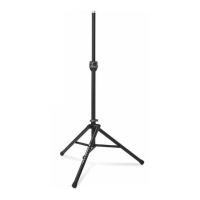
STANDARD BLACK
SPEAKER STAND
TS-80B ITEM #13904
STANDARD SILVER
SPEAKER STAND
TS-80S ITEM #13903
TALL BLACK
SPEAKER STAND
TS-88B ITEM #13906
Revision 6, 03.21.09 . Product Manual Item #SPK80-M
Question and Answer IconNeed help?

Do you have a question about the Ultimate Support TS-80B and is the answer not in the manual?

Summary

Warranty Information

Set-Up Guide

Loosen Leg Fitting Knob

Loosen the leg fitting hand knob to prepare for stand adjustment.

Orient Stand Legs

Turn the stand upside down, pivoting legs so the Ultimate Support label faces you.

Adjust Leg Spread

Turn stand upright and adjust leg spread for maximum stability. Tighten hand knob.

Utilize Speaker Socket Adapter

The built-in adapter fits 1-1/2" or 1-3/8" internal diameter speaker sockets.

Extend Telescoping Collar

Loosen collar knob and raise center tube 6-10". Retighten hand knob.

Place and Height Adjust Speaker

Place speaker cabinet on top, loosen knob, and raise to desired height.

Special Usage Instructions

Cleaning and Maintenance

Clean the stand with a damp cloth; do not lubricate the center tube.

Loading and Handling

Load speaker only when stand is upright. Do not drag the stand when loaded.

Secure and Release Load

Check telescoping collar security and safety pin. Release collar cautiously.

Available Accessories

Speaker Stand Mounting Brackets

External and internal brackets for mounting flat-bottom speaker cabinets.

Zippered Tote Bags

Heavy-duty, padded tote bags for carrying Ultimate Support speaker stands.

Ultimate Support TS-80B Specifications

General IconGeneral
BrandUltimate Support
ModelTS-80B
CategorySpeakers
LanguageEnglish

Related product manuals