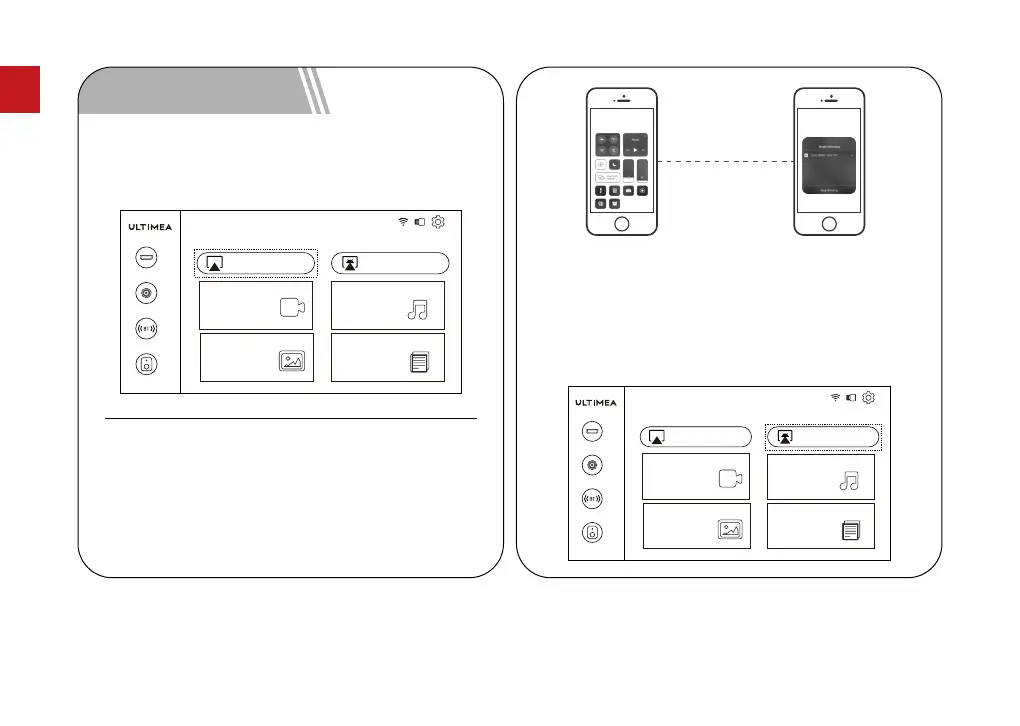
Note: Make sure that the projector and mobile phone
are connected to the same network.
For iOS Device
BT Speaker
Pictures
Video
AirPlay Miracast
Music
Office Suite
BT
AV
HD
Move the projector cursor to AirPlay on the homepage,
select AirPlay and click the "OK" button.
1.
5 Screen Mirroring
The operation steps of the mobile phone are as
follows: No setting is required on the projector.
2.
BT Speaker
Pictures
Video
AirPlay Miracast
Music
Office Suite
BT
AV
HD
Step 1 :Open the Control Center
and tap the Screen
Mirroring on your iOS
device.
Step 2 :Select the device
U0320 to be cast
from the searched
devices.
For Android Device
Move the projector cursor to Miracast on the homepage,
select Miracast and click the "OK" button.
1.
05
EN



 To Next Page