EasyManua.ls Logo

Ultisolar US211M Lite - User Manual

Ultisolar US211M Lite
2 pages
Print Icon
To Next Page IconTo Next Page
Loading...
New Energy Co., Ltd www.ultisolar.com
E-mail : info@ultisolar.com Tel: 0086-0158-6679-7355
Add: 4102, Hanlin Yuan, Zhonggong Town, Licheng, Jinan, Shandong, China
US211M Lite User Manual
I. Definition of the button
From left to right the button is as followed: SET, +,-
II. Display
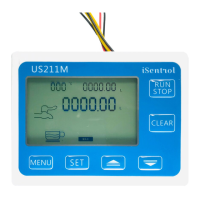
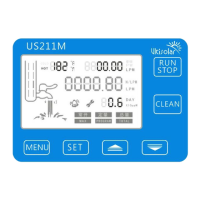
1. Temperature
Range:-99-999, C stands for Celsius, F stands for Fahrenheit; the display unit can be shifted by
pressing + button for one second.
2. Usage time/flow rate
When there is water pass through, it will show the flow rate automatically. When there is no water,
it will show usage time. Unit DAY means days, HRS means hours. The display unit can be shifted
by pressing + button for 5 seconds.
LPM means liter per minute, GPM means Gallons per minute and the display unit can be shifted
by pressing - button for one second.
3. Battery Indicator
When use battery and there is no enough battery, it will blink to remind the user to replace the
battery, if the battery is full, there will be no indication.
4. Animation
When there is water passing through, the animation will be activated.
5. Total
Total means total water passed through. The unit L means liters, G means gallons. The display unit
can be shifted by pressing - button for 5 second.
Question and Answer IconNeed help?

Do you have a question about the Ultisolar US211M Lite and is the answer not in the manual?

Summary

Definition of the button

Display

Temperature

Range:-99-999, C/F display unit shifted by '+' button for one sec.

Usage Time;Flow Rate

Shows flow rate when water passes, usage time otherwise. Units DAY/HRS, LPM/GPM shifted by +/- buttons.

Battery Indicator

Blinks when battery is low, no indication when full. Reminds user to replace battery.

Animation

Animation activates when water is passing through.

Total

Indicates total water passed. Unit L/G shifted by '-' button for 5 seconds.

K Value Setting

Pressure Meter

Operation Conflict

Pressure meter and flow meter functions cannot operate simultaneously.

Power Requirement

Requires AC to DC power adaptor for long-term operation as a pressure meter.

Sensor Power Connection

Unplug hall flow sensor power and connect pressure sensor power when operating as pressure meter.

Clear;Recover to factory setting

Ultisolar US211M Lite Specifications

General IconGeneral
BrandUltisolar
ModelUS211M Lite
CategoryMeasuring Instruments
LanguageEnglish

Related product manuals