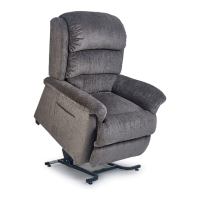
The UltraComfort Power Lift & Recline Chair is a motor-operated appliance designed for household and commercial use, specifically to assist individuals in sitting down and standing up. It offers a range of comfort positions through its patented wellness positioning and lift options. The chair is engineered for strength and reliability, with a focus on user comfort and safety, and each unit undergoes thorough inspection and testing prior to shipment.
Safety Guidelines:
The manual emphasizes several safety guidelines, using specific symbols to denote warnings, mandatory actions, and prohibited actions.
- Warnings (black symbol on a yellow triangle with a black border): Indicate hazardous situations that could lead to death or serious injury. Examples include:
- Care during unpacking to avoid injury or damage.
- Not allowing children or pets near the chair during operation.
- Not allowing children to play with or operate the chair.
- Not flopping into the chair, especially in the lift position, to prevent damage and injury.
- Not allowing anyone to sit on laps, arms, or footrests during operation to prevent tipping and injury.
- Not placing fingers or hands between the seat cushion and inside arm during operation or when plugged in.
- Not retrieving fallen objects from inside or under the chair while plugged in.
- Not operating the chair with obstructions under or in front of the footrest, under the chair, or behind it.
- Not positioning adults, children, or pets too high on the reclined chair to avoid tip-over hazards.
- Not smoking while operating, sitting, or resting in the chair.
- Not immersing electrical components in liquid or spilling liquids on them.
- Not opening electrical components, as there are no serviceable parts.
- Placing the chair at the specified distance from a wall/corner (approximately 18-25 inches depending on the model) to prevent damage and voiding of warranty.
- Not using electrical extension cords; ensuring all electrical products and wires are away from the metal lift frame to prevent crushing, fire hazards, or injury.
- Not operating the chair while intoxicated or under medications that impair mental or physical abilities.
- Consulting a doctor before using the product if medical conditions limit mental or physical capacity.
- Consulting a physician regarding the Trendelenburg position.
- Being aware that placing the chair in the center of a room or too far from a wall can create a tripping hazard due to power wires.
- Periodically inspecting and replacing 9 VDC backup batteries to prevent property damage from leakage.
- Being aware that if the user is unconscious or sleeping, the hand control may inadvertently activate, forcing the user out of the chair.
- Discontinuing use and contacting the provider immediately if any operational problem occurs.
- Not exceeding the stated weight limit to prevent instability and tip-over hazards.
- Consulting the owner's manual and a physician to determine capability of moving or lifting the chair to avoid serious injury.
- Verifying that all objects, hands, and fingers are clear of the arm and open compartment before closing to prevent damage or injury.
- Recognizing that the chair is an electrical device and will be impacted by power failure.
- Reading and understanding the intended use and operation to prevent misuse or lack of proper training from causing serious injury.
- Using extreme care during unpacking, assembling, and disassembling to avoid injury or damage.
- Not exposing the product or components to rain or moisture.
- Not spilling liquid on the system.
- Not reaching for any part of the system that has fallen into water; unplugging immediately and contacting service.
- Unplugging the power supply for cleaning or moving the product.
- Unplugging the system when not in use for long periods.
- Keeping all cords away from heated surfaces and pinch points.
- Not using outdoors; for indoor use only.
- Mandatory Actions (white symbol on a blue dot with a white border): Indicate actions that must be performed to prevent personal injury and/or equipment damage. Examples include:
- Reading the manual before installing or operating.
- Using only the power cord provided and not overloading wall outlets.
- Ensuring the power outlet is readily accessible for quick disconnection.
- Checking skin in contact with heated areas when used near children, invalids, or disabled persons.
- Prohibited Actions (black symbol with a red circle and red slash): Indicate actions that should not be performed under any circumstance to prevent personal injury and/or equipment damage. Examples include:
- Not disposing of the chair in trash.
- Not smoking.
- Not making unauthorized changes or modifications to the system or using unapproved accessories, as this voids warranties.
Important Technical Specifications:
- Power Supply: Standard (115-120V A.C.) wall outlet.
- Battery Backup System: Requires two 9-volt alkaline batteries (not included) for emergency return to a seated position during power failure. Batteries should be replaced after one use and yearly, even if unused.
- USB Charging Port (on some models): 1AMP USB charging port for smart devices like phones or tablets. UltraComfort disclaims liability for damages or data loss to charging devices.
- Weight Capacity: Varies by model:
- UC214: 325 lbs.
- UC542-SMA, UC549-SMA, UC550-JPT, UC559-SMA: 300 lbs.
- UC544-SMA, UC544-MED, UC544-LAR: 350 lbs.
- UC332M, UC332L, UC480, UC520, UC536-MLA, UC542M, UC542L, UC549-MED, UC549-LAR, UC550-M, UC550-L, UC556M, UC559-MED, UC559-LAR, UC772, UC790, UC798-MLA: 375 lbs.
- UC542ME6: 500 lbs.
- UC549-M26, UC559-M26, UC550-M26: 500 lbs.
- Recline Space: Approximately 18 inches for standard models, 25 inches for Stellar Comfort models (may vary by chair model).
Function Description:
The UltraComfort Power Lift & Recline Chair provides various operational modes depending on the model:
Basic Power Lift Chair Operation (Models UC214, UC332-M, UC332-L, UC480, UC536-MLA, UC542-SMA, UC542-M, UC542-L, UC542-ME6, UC544-SMA, UC544-MED, UC544-LAR, UC549-SMA, UC549-MED, UC549-LAR, UC549-M26, UC790):
- Recline: Press and hold the "down" button (S2) until the desired position is reached.
- Return to Seated from Recline: Press and hold the "up" button (S1) until the chair is in a closed seated position.
- Lift: Press and hold the "up" button (S1) until the desired height is reached.
- Return to Seated from Lift: Press and hold the "down" button (S2) until the chair is in the floor, seated position.
- Lift from Reclined Position: Press and hold the "up" button (S1). The chair will move past the seated position and begin to lift.
- Recline from Lift Position: Press and hold the "down" button (S2). The chair will move past the seated position and begin to recline.
- Getting into the chair: Press the "up" button (S1) to raise the chair to a comfortable height for sitting. Then press the "down" button (S2) to lower into a seated position.
- Getting out of the chair: Press the "up" button (S1) to raise the chair to a height that allows easy standing. Return the chair to the seated position after exiting.
- Stopping Motion: The chair can be stopped at any time by releasing the button, allowing for a wide range of positions. Motors automatically shut off at fully extended or retracted positions.
Advanced Power Lift Chair Operation (Models UC550-M26, UC559-M26) with AutoDrive 3.0 Hand Control:
This hand control features "Total Control" for patented positioning technology, "Position Control" with programmable buttons, and "Custom Control" with arrow buttons for micro-adjustments and programming.
- Recline Back: Press and hold button (S1).
- Upright Back: Press and hold button (S2).
- Raise Footrest: Press and hold button (S3).
- Lower Footrest and Lift Chair: Press and hold button (S4). Continue holding to lift the chair if desired.
- Lower Chair from Raised Position: Press and hold button (S5). Continue holding to raise the footrest if desired. Button (S4) also lowers the chair.
- Lift Chair from Seated Position (footrest closed): Press and hold button (S6).
- Lift Chair with Back Open (back down, footrest closed): Press and hold button (S4).
- Close and Lift Chair from Reclined Position (footrest up, back down): Press and hold button (S6). To return to seated, hold until footrest closes, then press (S2) to bring the back up. All 3 motors automatically shut off when the back closes and the chair reaches its highest position.
- Getting into the chair: Press button (S4 or S6) to raise the chair to a comfortable height.
- Getting out of the chair: Press button (S4 or S6) to raise the chair for easy standing. Return to seated position after exiting.
AutoDrive Hand Control Micro Adjustments:
- Recline Back: Button (S1).
- Upright Back: Button (S2).
- Raise Footrest and Seat: Button (S3).
- Lower Footrest and Seat: Button (S4).
- Press and hold the program button (SP) until the backlight flashes (approx. 3 seconds).
- Within 5 seconds, press one of the memory buttons (S5, S6, S8, S10) to save the current position. The backlight will return to non-flashing, indicating storage.
- If a memory button is not pressed within 5 seconds, or a non-programmable button is pressed, the sequence is aborted.
Factory Reset:
Resets all programmed buttons (S5, S6, S8, S10) to factory settings.
- Press and hold program button (SP) until the backlight flashes (approx. 4 seconds).
- Within 5 seconds, press button (S1). The backlight will change to non-flashing.
- Within another 5 seconds, press button (S4). Factory reset is complete.
- If button (S1) is not pressed within 5 seconds, or a different button is pressed, the sequence is aborted.
Hand Control Disable:
Disables all functions on the hand control.
- To disable: Press and hold program button (SP) for 4 seconds until backlight flashes, then press button (S7).
- To enable: Press and hold program button (SP) for 4 seconds until backlight flashes, then press button (S7).
Function Lock:
Disables all button functions except (S7 and S9).
- To lock: Press and hold program button (SP) for 4 seconds until backlight flashes. Then press (S1), (S2), (S3), (S6) in sequence.
- To unlock: Press and hold program button (SP) for 4 seconds until backlight flashes. Then press (S1), (S2), (S3), (S6) in sequence.
Chair Operation Model UC480 BHV (Heat and Massage):
- Hand Control Activation: Press the PWR button to turn on the hand control (green light). Press again to turn off (blue light). A 20-minute timer starts upon activation; press PWR again to restart. Lights dim after 10 seconds of non-use.
- Power Lock Out:
- Lock: Press and hold PWR button for 4 seconds (red light).
- Unlock: Press and hold PWR button for 4 seconds (blue light). Then press PWR again to turn on power.
- Recline/Lower from Lift: Press the down arrow.
- Return to Seated/Lift to Standing: Press the up arrow.
- Massage (Vibrators): Press the MSG button to turn on/off.
- Heat: Press the HEAT button to turn on/off.
- Independent Operation: Heat and massage functions operate independently and are factory set to turn off in 20 minutes. Reactivate by pressing the buttons again. Heat and vibration pause when up/down arrows are activated and resume when released.
Chair Location:
- Place the chair in a convenient location, ensuring enough space between the back of the chair and any wall or obstruction for reclining (18-25 inches).
- Ensure no objects restrict footrest movement. Adjust leg levelers (under the front of the chair) if high-pile carpets obstruct the footrest.
- Keep a telephone or other communication means within reach, especially for battery backup use.
Maintenance Features:
- Routine Checks: The chair requires routine maintenance checks, some of which may require provider assistance.
- Cleaning: Consult the provider for appropriate cleaners and methods.
- Electrical Components: Keep all electrical components free from moisture and liquid spills.
- Wiring Harnesses: Periodically inspect for cuts, damage, fraying, or disconnections. Unplug and contact provider if damage is found.
- Fasteners: Periodically check all fasteners for tightness, wear, and corrosion. Unplug and contact provider if issues are found.
- Pinch Points: Be careful of pinch points and sharp metal parts (wear gloves).
- Batteries: Replace backup batteries after one use and yearly, even if unused. They are intended for one-time emergency use.
UltraComfort provides a Consumer Lifetime and Seven Year Limited Warranty to the original consumer against defects in material or workmanship.
- Lifetime Warranty: Covers the Lift Mechanism, Recline Mechanism, and Chair Frame for the lifetime of the chair. UC544-SMA, UC544-MED, and UC544-LAR chair frames are limited to 5 years.
- Labor Subsidies:
- UC214, UC332M, UC332L: 1 year subsidized labor on above parts.
- UC480, UC520, UC536-MLA, UC542-SMA, UC542M, UC542L, UC542-ME6, UC544-SMA, UC544-MED, UC544-LAR, UC549-SMA, UC549-MED, UC549-LAR, UC549-M26, UC550-JPT, UC550-M, UC550-L, UC550-M26, UC556M, UC559-SMA UC559-MED, UC559-LAR, UC559-M26, UC790, UC798-MLA: 3 years subsidized labor on above parts.
- Three Year Parts Warranty: Covers electrical parts.
- UC214, UC332M, UC332L: 2-year electrical parts warranty.
- UC480SME, UC520, UC536-MLA, UC542-SMA, UC542M, UC542L, UC542ME6, UC544-SMA, UC544-MED, UC544-LAR, UC549-SMA, UC549-MED, UC549-LAR, UC549-M26, UC550-JPT, UC550-M, UC550-L, UC550-M26, UC556M, UC559-SMA, UC559-MED, UC559-LAR, UC559-M26, UC772, UC790, UC798-MLA: 3-year electrical warranty.
- Labor Subsidy: 1 year subsidized labor on electrical parts for all models.
- Replacement of hand control and/or transformer is expected to be done by the consumer.
- Limited Warranty Fourth Through Seventh Year (Pro-rated): For electrical parts after the initial 3-year warranty.
- Year 4: 35% discount off suggested retail price.
- Year 5: 25% discount.
- Year 6: 15% discount.
- Year 7: 5% discount.
- The UC214 is excluded from this pro-rated warranty.
- Terms Applicable to Warranties:
- UltraComfort will repair/replace defective parts at its option, provided parts have not been misused, abused, improperly serviced, damaged in transit/handling, or altered by unauthorized representatives.
- Warranty does not cover costs for unnecessary service calls (e.g., educating consumer, unsatisfactory power connection).
- Exceeding the chair's weight capacity voids all warranties.
- Fabric shading for replacement parts/chairs is not guaranteed.
- UltraComfort pays standard shipping for warranted parts for the first year; consumer is responsible for transportation, handling, and packaging costs beyond the first year.
- UltraComfort is not responsible for costs/expenses for examination of warranted parts.
- All repairs and labor rates must be approved by UltraComfort. Unauthorized repairs void warranties.
- The warranty is the sole and entire warranty, excluding all other warranties, express or implied, including merchantability or fitness for a particular purpose.
- The warranty does not cover or provide for reimbursement of incidental or consequential damages.
- UltraComfort is not liable for incidental or consequential damages or any other damage/loss not in the warranty.
- The warranty provides specific legal rights, which may vary by state.
Product Registration:
Consumers are encouraged to register their product online at www.ultracomfort.com to lock in their warranty and receive important product updates. The registration form requests serial number, product model number, purchase date, first name, last name, address, email, provider name, provider address, and product comments, along with a rating for provider experience.

 Need help?
 General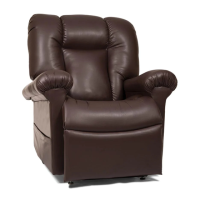


 To Next Page

