When the icon is on, you can press power on/off
icon ends call.
Let the phone auto rotate .
If you set the passwords, you can speak password
unlock the phone.
Set the time of touch &hold short, medium, long.
Enhance web
accessibility
If you install scripts from Google that make their
web content more accessible.
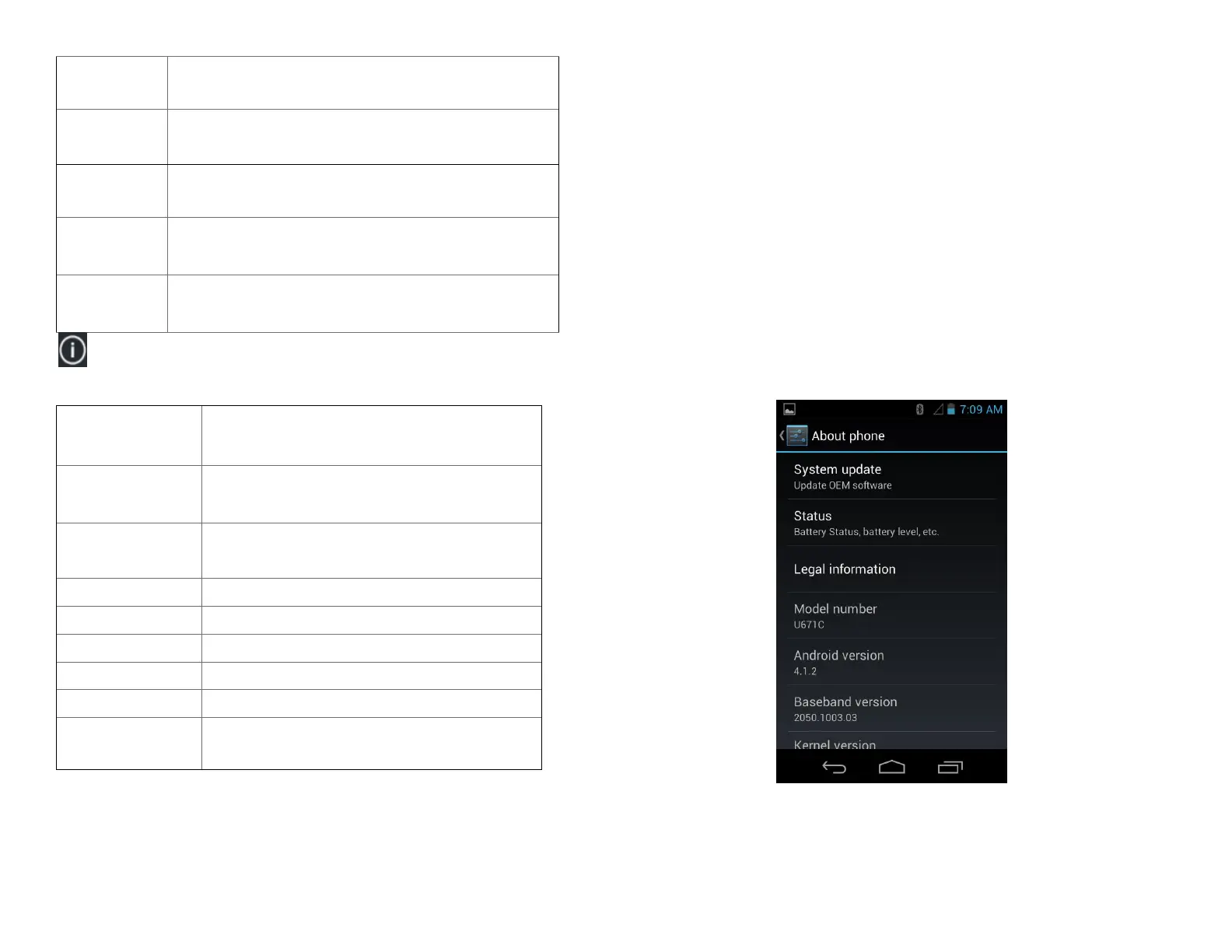
About phone
You can upgrade your system to up-to-date
version.
Information about your Phone number,
signal, etc.
Legal information about Open source
licenses and Google legal.
Check the android version.
Check the baseband version.
Check the Kernel version.
The phone’s build number.
You can check hardware version.
Firmware Upgrade Using
microSD Card
1. Download “update.zip” from supporting site.
2. Insert a microSD card into a PC.
3. Copy “update.zip” to the root directory of the microSD
card.
4. Make sure the target device is power on with a fully
charged battery.
5. Insert the microSD card into the card slot of the target
device.
6. Tap to go to Settings>About phone and tap System
update.
7. Choose the software from the SD card .



 To Next Page