EN
ADJUST TURBO SPEED
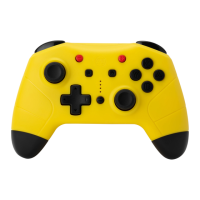
Buttons can be set to the turbo speed (is called for short function buttons) :
A / B / X / Y / L / ZL / R / ZR button
Enable/disable the manual and auto turbo speed function :
Step 1 : Press the button and one of the function button simultaneously, to enable the
manual turbo speed function.
Step 2 : Repeat the step 1, to enable the auto turbo speed function.
Step 3 : Repeat the step 1 again, to disable the manual and auto turbo speed function of
this button.
There are 3 levels of turbo speed
Minimum : 5 shoots per-second, the corresponding channel light flash slowly
Moderate : 12 shoots per-second, the corresponding channel light flash at a moderate rate
Maximum : 20 shoots per-second, the corresponding channel light flash quickly
How to increase the turbo speed :
When the manual turbo function is on, upward the right joystick meanwhile press the
button for 5 seconds, which can increase one level of turbo speed.
How to decrease the turbo speed :
When the manual turbo function is on, downward the right joystick meanwhile press the
button for 5 seconds, which can decrease one level of turbo speed.


 To Previous Page
 Loading...