MAINTENANCE AND INSPECTION OF CARRIER
2. Check oil quantity in the reduction
gears of crawling motor/Filling up
(Change oil every 1,000 hours)
★
Do not rush to work as each section of crawling devices is heated to
a high temperature immediately after the crane operation.
Work after temperature of crawling devices has cooled down.
★
Pressure may be remained inside of the reduction gears of crawling
motor.
Unfasten the filling port plug by 2~3 turns slowly to release the internal
pressure and then remove the plug.
An abrupt removal of the plug may cause the plug to pop out or the oil
to spurt out which is dangerous.
Do not turn your body or face toward the plug.
1
Park the crane on a flat ground.
2
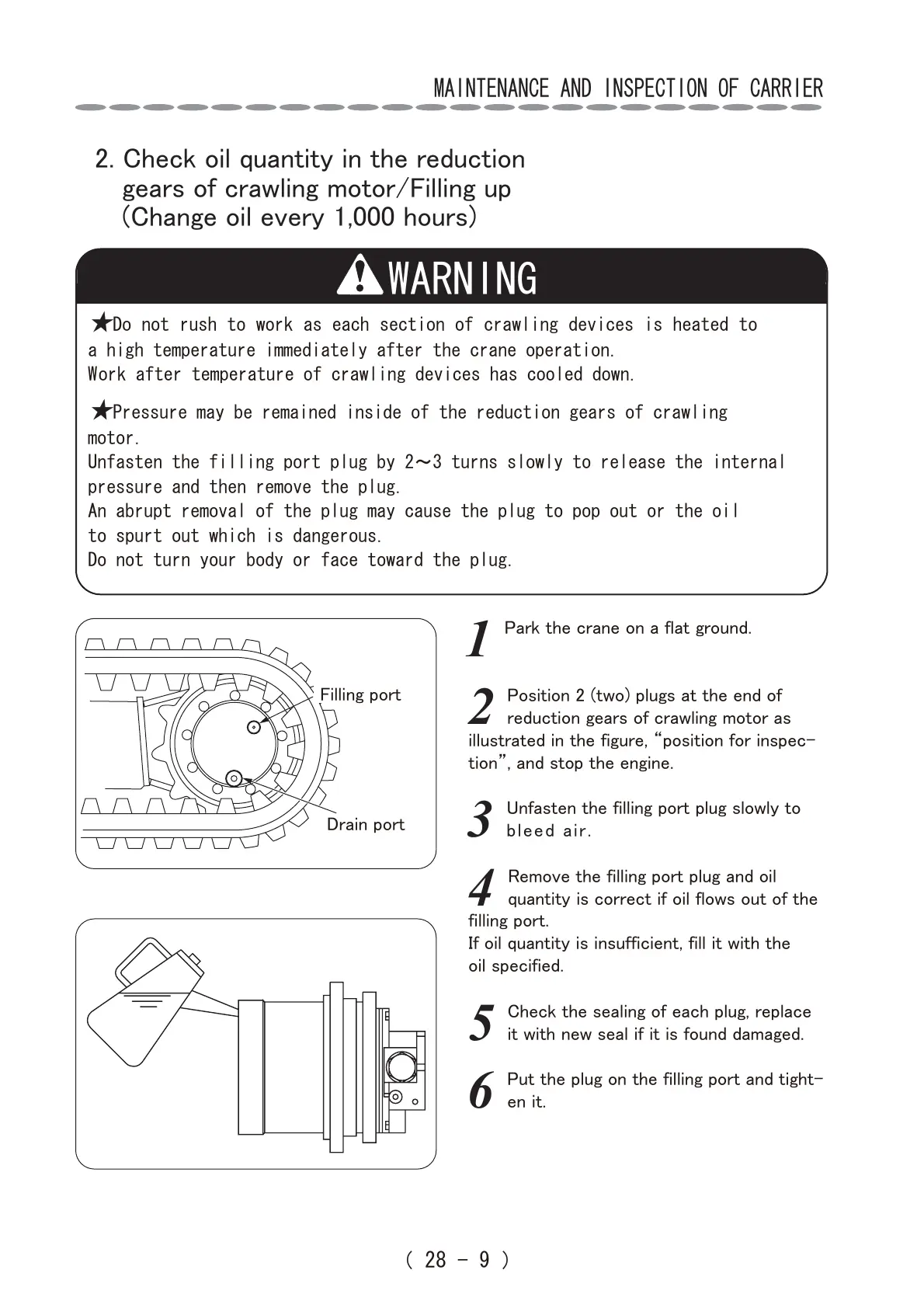
Position 2 (two) plugs at the end of
reduction gears of crawling motor as
illustrated in the figure, “position for inspec-
tion”, and stop the engine.
3
Unfasten the filling port plug slowly to
bleed air.
4
Remove the filling port plug and oil
quantity is correct if oil flows out of the
filling port.
If oil quantity is insufficient, fill it with the
oil specified.
5
Check the sealing of each plug, replace
it with new seal if it is found damaged.
6
Put the plug on the filling port and tight-
en it.
WARNING


 To Next Page
 Loading...