Turn ON the voice switch with the crane on working conditions.
Shift the slewing lever to either direction slightly to read the mode
indicator for blinking figures.
Factory set accelerator rate: 70
Follow the same procedures of steps 3 through 5 to adjust acceleration rate
by increasing and decreasing by the same amount as for slewing, derrick-down,
retraction of boom, extension and retraction of outrigger, and retraction of
high-outrigger. For outriggers, adjustment of either outrigger on this side
or on other side is accepted.
If slewing speed will be within the rated range:
Reason why the accelerator rate should be increased or
decreased by the same amount as that of the slewing:
The slewing speed may not reach the rated speed even if the speed has been set
according to the Engine speed setting table.
This means that derrick-down, retraction of boom, and retraction of high-
outrigger which come to relief pressure before reaching the rated speed in the
same way are out of normal speed or the outriggers have been set to half throttle.
In order to make a correction, the accelerator rate has to be adjusted.
Slewing speed
Stroke of accelerator cylinder
Ia a w w
a a w a
a
w
y .
a w wy .
Ra
Ia aa a
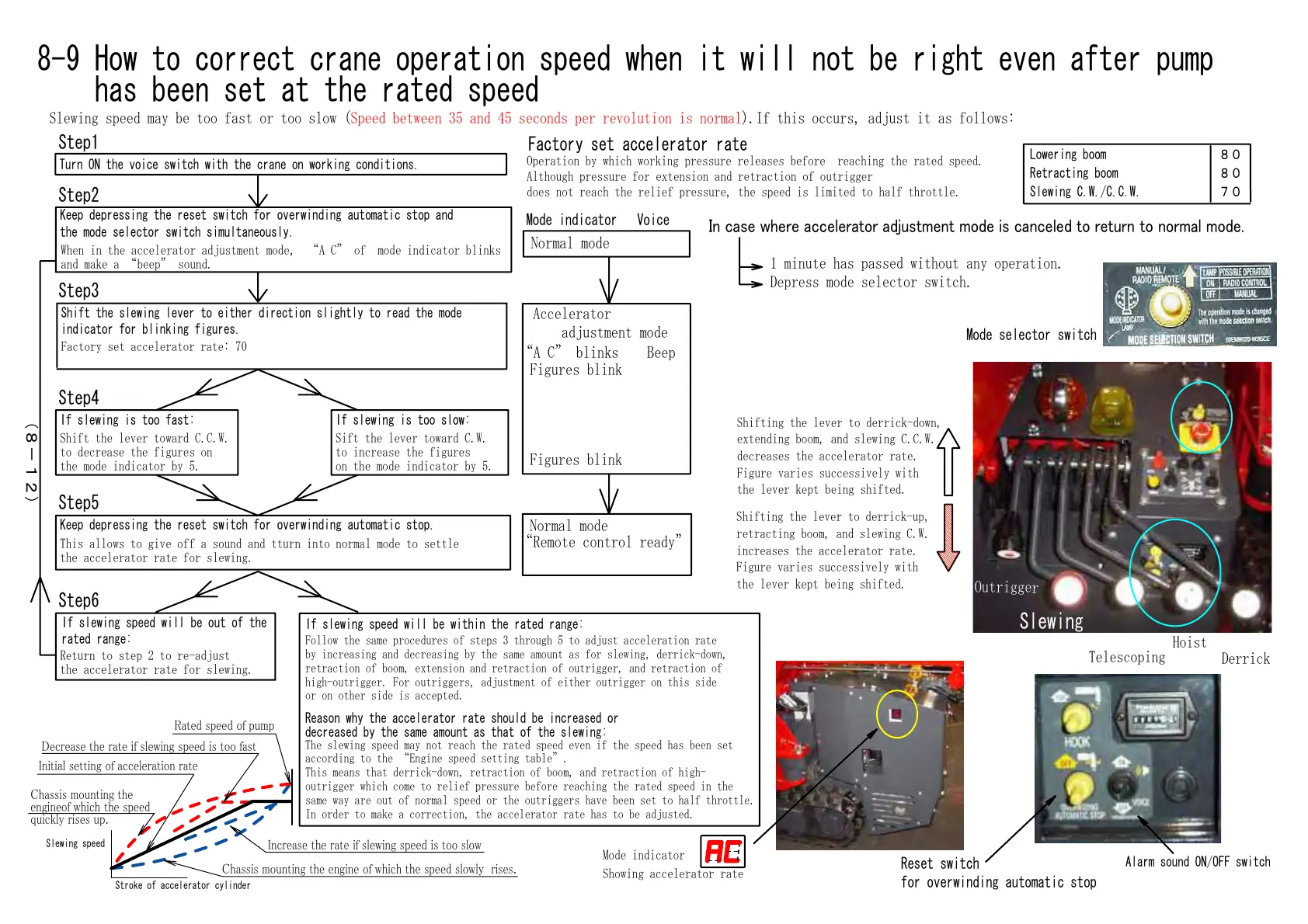
Slewing speed may be too fast or too slow (Speed between 35 and 45 seconds per revolution is normal).If this occurs, adjust it as follows:
8-9 How to correct crane operation speed when it will not be right even after pump
has been set at the rated speed
Step2
Step3
Step4
Step5
Step1
Step6
Return to step 2 to re-adjust
the accelerator rate for slewing.
Keep depressing the reset switch for overwinding automatic stop.
This allows to give off a sound and tturn into normal mode to settle
the accelerator rate for slewing.
If slewing speed will be out of the
rated range:
Keep depressing the reset switch for overwinding automatic stop and
the mode selector switch simultaneously.
When in the accelerator adjustment mode, A C of mode indicator blinks
and make a beep sound.
If slewing is too fast:
Shift the lever toward C.C.W.
to decrease the figures on
the mode indicator by 5.
If slewing is too slow:
Sift the lever toward C.W.
to increase the figures
on the mode indicator by 5.
I cae were accelerator atet oe i cacele to retr to oral oe.
Factory set accelerator rate
Operation by which working pressure releases before reaching the rated speed.
Although pressure for extension and retraction of outrigger
does not reach the relief pressure, the speed is limited to half throttle.
8
8
7
1 minute has passed without any operation.
Depress mode selector switch.
Normal mode
Mode indicator Voice
Lowering boom
Retracting boom
Slewing C.W./C.C.W.
Shifting the lever to derrick-up,
retracting boom, and slewing C.W.
increases the accelerator rate.
Figure varies successively with
the lever kept being shifted.
Shifting the lever to derrick-down,
extending boom, and slewing C.C.W.
decreases the accelerator rate.
Figure varies successively with
the lever kept being shifted.
Hoist
Telescoping
Slewing
Outrigger
Derrick
Mode selector switch
Mode indicator
Showing accelerator rate
A C blinks Beep
Accelerator
adjustment mode
Figures blink
Normal mode
Remote control ready
Figures blink
Reset switch
for overwinding automatic stop
Alarm sound ON/OFF switch
8-12)
Courtesy of Machine.Market


 To Next Page
 Loading...