EasyManua.ls Logo

Uniden D1484 series - User Manual

Uniden D1484 series
20 pages
Print Icon
To Next Page IconTo Next Page
Loading...
© 2013 Uniden America Corp. Printed in Vietnam
Ft. Worth, Texas U01UN538EZZ(0)
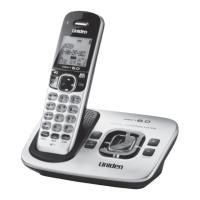
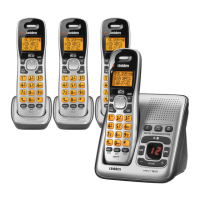
Base with
answering
system and
cordless
handset
For model
numbers:
You should
have (handset/
charger):
D1484-2 1 of each
D1484-3 2 of each
D1484-4 3 of each
D1484-5 4 of each
D1484-6 5 of each
What's in the box?
Not pictured for handset/charger:
x Rechargeable battery (BT-1021)
x Battery cover
x AC adapter (PS-0035)
Accessory handset
and charger
Not pictured for base:
x Rechargeable battery (BT-1021)
x Battery cover
x AC adapter (PS-0035)
x Telephone cord
x If any items are missing or damaged, contact our Customer Care Line
immediately. Never use damaged products!
x Call waiting, CID, CIDCW, and Voice Mail are telephone line services.
Contact your provider for details.
x Need help? Get answers 24/7 at our website: www.uniden.com.
If You... Contact Uniden’s... Phone Number
have a question or problem Customer Care Line*
817-858-2929 or
800-297-1023
need a part or an accessory Parts Department* 800-554-3988
need special assistance due to
a disability
Accessibility Help Line
800-874-9314
(voice or TTY)
* During regular business hours, Central Standard Time; see our website for detailed
business hours.
D1484 Series User's Guide

Questions and Answers

  • Q
    qbrownAug 16, 2025
    How to fix Uniden D1484 when I can't make or receive calls?
    • H
      halexanderAug 16, 2025
      If you can't make or receive calls on your Uniden Cordless Telephone, first check the telephone cord connection. Then, disconnect the base AC adapter, wait a few minutes, and reconnect it. Finally, ensure that the base is properly plugged in.
  • C
    Christopher SchneiderAug 19, 2025
    What to do if Uniden Cordless Telephone handset is not working?
    • D
      Dana YoungAug 19, 2025
      If your Uniden Cordless Telephone handset is not working, charge the battery for 15-20 hours. Also, check the battery connection to ensure it is properly connected.
  • S
    Sheila BrooksAug 22, 2025
    Why is the answering system not working on my Uniden D1484 Cordless Telephone?
    • M
      Michael WileyAug 22, 2025
      If the answering system on your Uniden Cordless Telephone does not work, make sure the answering system is turned on and ensure that the base is plugged in properly.
  • M
    markclarkeAug 25, 2025
    Why do I hear beeping during a call on my Uniden Cordless Telephone?
    • M
      megan33Aug 26, 2025
      If you hear a beeping sound during a call on your Uniden Cordless Telephone, it means the battery is getting low. Check the handset for a low battery alert. Finish your conversation and return the handset to the cradle as soon as possible to charge it.
  • L
    Lance ThompsonAug 28, 2025
    How to reduce noise and static on Uniden D1484 Cordless Telephone?
    • J
      Jeffrey DuncanAug 28, 2025
      If there's a lot of noise or static on the line with your Uniden Cordless Telephone, check for interference from appliances like microwave ovens or TVs, and wireless devices like baby monitors or WiFi equipment. Try moving the handset or base away from the source of interference. Also, move the handset closer to the base. If you use a telecoil hearing aid, turn the T-coil on.
  • J
    Joseph MartinAug 31, 2025
    Why are messages incomplete on my Uniden D1484 Cordless Telephone?
    • J
      Jeffrey BellAug 31, 2025
      If messages are incomplete on your Uniden Cordless Telephone, increase the Record Time. Also, delete messages as the memory might be full.
  • S
    stephaniesmithSep 3, 2025
    Why can’t I hear the base speaker on my Uniden D1484 Cordless Telephone?
    • C
      Charles ClarkSep 3, 2025
      If you can’t hear the base speaker on your Uniden Cordless Telephone, make sure call screening is turned on. Also, change the base speaker volume.
  • W
    williamsonchristopherSep 6, 2025
    Why does my Uniden Cordless Telephone handset say Unavailable?
    • P
      Paul GarciaSep 6, 2025
      If a handset says Unavailable on your Uniden Cordless Telephone, move the handset closer to the base. Also, see if any handset is in Privacy Mode.
  • J
    julie29Sep 9, 2025
    Why can't a handset access the answering system on my Uniden Cordless Telephone?
    • T
      Teresa MendezSep 9, 2025
      If a handset can't access the answering system on your Uniden Cordless Telephone, see if another handset is using the system. Also, make sure the phone is in standby.
  • R
    rhuertaSep 12, 2025
    Why two handsets can’t talk to a caller on my Uniden Cordless Telephone?
    • K
      Kristina MccormickSep 12, 2025
      See if any handset is in Privacy Mode on your Uniden Cordless Telephone.

Summary

Important Safety Instructions

Getting Started

Installing Your Phone

Guides users through the initial setup process, including battery charging and cord connection.

Getting to Know Your Phone

Using the Menu

USING YOUR PHONE

Phonebook, Caller ID, and Redial Lists

Details managing contacts, viewing call history, and accessing recently dialed numbers.

Multi-Handset Features

USING THE ANSWERING SYSTEM

Answering System Options

Details how to configure answering system settings like security code, ring time, and message alerts.

Personalizing the Greeting

Instructions on recording a custom outgoing message or selecting from pre-recorded greetings.

Accessing the Answering System

Explains how to access messages from any handset or remotely using a touch-tone phone.

Getting Your Message

Covers playing new and old messages, restarting, skipping, deleting, and stopping playback.

Using the System Away from Home

Details how to access the answering system remotely using any touch-tone phone.

IMPORTANT INFORMATION

Troubleshooting

Provides solutions for common problems like call issues, no ring, handset malfunctions, and display errors.

Adapter and Battery Information

Rechargeable Battery Warning

Contains important safety warnings and information regarding the use, charging, and disposal of rechargeable batteries.

Uniden D1484 series Specifications

General IconGeneral
Caller IDYes
Call WaitingYes
Display TypeLCD
Battery LifeUp to 10 hours talk time, Up to 5 days standby
IntercomYes
ExpandableYes
Backlit DisplayYes

Related product manuals