EasyManua.ls Logo

Uniden D1780 - User Manual

Uniden D1780
28 pages
Print Icon
To Next Page IconTo Next Page
Loading...
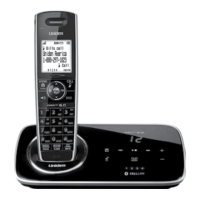
D1780-BT base
with answering
system and
cordless
handset
Battery
cover
Accessory handset
and charger
If you purchased
model number:
You should
have:
D1780-2BT 1 of each
...
...
D1780-12BT 11 of each
* If the model number ends in R,
your package includes a DRX100
range extender. Refer to the
DRX100 User’s Guide for details.
You will also nd:
Not pictured:
x Rechargeable
battery (BT-1025)
x AC adapter (PS-0034)
x Telephone cord
• Ifanyitemsaremissingordamaged,contactourCustomerCareLine
immediately.Neverusedamagedproducts!
• Needhelp?Getanswers24/7atourwebsite: www.uniden.com.
If You... Contact Uniden’s... Phone Number
have a question or problem Customer Care Line*
817-858-2929 or
800-297-1023
need a replacement part or an
accessory
Parts Department* 800-554-3988
need special assistance due to
a disability
Accessibility Help Line
800-874-9314
(voice or TTY)
* Duringregularbusinesshours,CentralStandardTime;seeourwebsiteforde-
tailedbusinesshours.
D1780-BT Series User's Guide
What's in the box?
Not pictured:
x Rechargeable
battery (BT-1025)
x Battery cover
x AC adapter
(PS-0034)
© 2012 Uniden America Corp. Printed in Vietnam
Ft. Worth, Texas U01UN420EZZ(0)

Questions and Answers

Summary

Important Safety Instructions

Getting Started

Phone Installation and Setup

Step-by-step guide for setting up the phone, including charging battery and connecting cables.

CellLink Bluetooth Connectivity

Pairing Your Bluetooth Phone

Procedure to establish a Bluetooth connection between your mobile phone and the D1780-BT handset.

Managing Multiple Bluetooth Phones

Information on managing connections and calls when using the D1780-BT with two Bluetooth phones.

Navigating Phone Menus

Bluetooth Setup Menu Options

Options for managing Bluetooth phone connections, including pairing and downloading.

Advanced Phone Settings

Global and Answering System Configuration

Configuration options for system-wide settings and the answering system.

Core Phone Operations

Making and Managing Calls

Instructions for making, answering, holding, and transferring calls.

Phonebook and Call Waiting

Using the Phonebook

Storing, editing, and retrieving contacts from the phone's internal phonebook.

Special Features

Answering System Operations

Answering System Settings

Configuring ring time, record time, message alerts, language, and call screening.

Managing Answering System Messages

Playing and Controlling Messages

How to play, repeat, skip, delete, and stop messages from the base or handset.

Remote Access and Call Screening

Setting Answering System Security Code

Setting a PIN to access the answering system remotely from any touch-tone phone.

System Access and Troubleshooting

General Troubleshooting Solutions

Solutions for common problems like no calls, no ring, or handset issues.

Advanced Troubleshooting

Installation and Handset Management

FCC Radio Frequency Regulations

Industry Canada Compliance

Limited Warranty Information

Summary

Important Safety Instructions

Getting Started

Phone Installation and Setup

Step-by-step guide for setting up the phone, including charging battery and connecting cables.

CellLink Bluetooth Connectivity

Pairing Your Bluetooth Phone

Procedure to establish a Bluetooth connection between your mobile phone and the D1780-BT handset.

Managing Multiple Bluetooth Phones

Information on managing connections and calls when using the D1780-BT with two Bluetooth phones.

Navigating Phone Menus

Bluetooth Setup Menu Options

Options for managing Bluetooth phone connections, including pairing and downloading.

Advanced Phone Settings

Global and Answering System Configuration

Configuration options for system-wide settings and the answering system.

Core Phone Operations

Making and Managing Calls

Instructions for making, answering, holding, and transferring calls.

Phonebook and Call Waiting

Using the Phonebook

Storing, editing, and retrieving contacts from the phone's internal phonebook.

Special Features

Answering System Operations

Answering System Settings

Configuring ring time, record time, message alerts, language, and call screening.

Managing Answering System Messages

Playing and Controlling Messages

How to play, repeat, skip, delete, and stop messages from the base or handset.

Remote Access and Call Screening

Setting Answering System Security Code

Setting a PIN to access the answering system remotely from any touch-tone phone.

System Access and Troubleshooting

General Troubleshooting Solutions

Solutions for common problems like no calls, no ring, or handset issues.

Advanced Troubleshooting

Installation and Handset Management

FCC Radio Frequency Regulations

Industry Canada Compliance

Limited Warranty Information

Uniden D1780 Specifications

General IconGeneral
TypeDECT telephone
Answering machineYes
Mounting typeDesk
Product colorBlack, Silver
Frequency band1.9 GHz
Depth (imperial)4 \
Width (imperial)5 \
Height (imperial)8 \
Mac compatibilityNo
Dimensions (WxDxH)127 x 101.6 x 203.2 mm
Phonebook capacity100 entries
Redial list capacity10
Call list capacity phonebook50
Backlight colorAmber
Display number of lines1 lines
Standby time168 h
Sustainability certificatesENERGY STAR
Weight and Dimensions IconWeight and Dimensions
Weight910 g

Related product manuals