EasyManua.ls Logo

Uniden LRD850 - User Manual

Uniden LRD850
12 pages
Print Icon
To Next Page IconTo Next Page
Loading...
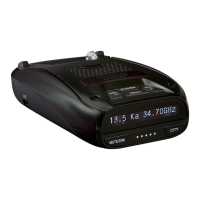
LONG RANGE Radar/Laser Detector
Detailed Users Manual
LRD850
Issue 1, April 2015
© 2015 Uniden America Corporation
Irving, Texas

Questions and Answers

  • D
    Derrick ChapmanJul 27, 2025
    What to do if my Uniden Radar Detector has no display or audio?
    • C
      Claire HarrisJul 27, 2025
      If your Uniden Radar Detector has no display, ensure all connections are secure. If there's no audio, verify that the Voice feature is not turned off.
  • J
    Juan DudleyAug 2, 2025
    What to do if my Uniden LRD850 Radar Detector doesn't turn on when the car starts?
    • J
      johnsonmichelleAug 2, 2025
      If your Uniden Radar Detector LRD850 does not turn on when the vehicle starts, verify that the power cord is securely connected to the unit and properly inserted into the cigarette lighter jack. Also, try changing the fuse in the power cord by unscrewing the cigarette lighter jack to access it.
  • M
    Maxwell JohnsonAug 8, 2025
    Why does my Uniden LRD850 Radar Detector alarm when the car hits bumps?
    • L
      Lauren AllenAug 8, 2025
      If your Uniden Radar Detector alarms when the vehicle hits bumps, check the connections and make sure they are all secure.
  • D
    David StevensAug 14, 2025
    Why didn't my Uniden LRD850 Radar Detector alert me when a police car was in view?
    • G
      Gabriel HamiltonAug 14, 2025
      If your Uniden Radar Detector LRD850 doesn't alert when a police car is nearby, the officer might not have their radar/laser units activated. You should also check that the band is turned on. To do this, press the MENU button and navigate through the options until you reach the bands setting. If the band is turned off, the OLED will display OFF. Turn the band on.
  • D
    dennisburkeAug 19, 2025
    Why does my Uniden LRD850 Radar Detector alarm briefly in the same location with no radar source?
    • A
      Angela LaraAug 19, 2025
      The brief alarms in the same location, even without a visible radar source, may be due to a motion sensor or house alarm operating nearby.

Summary

Product Features

Installation and Powering On

Installation Methods

Instructions for mounting the LRD850 on the windshield or dashboard.

Powering On the Device

Steps for turning on the LRD850 unit and its initial self-check.

Whats in the Box

LRD850 Components and Controls

Key Functions and Operation

Explains the function of each key button and its press/hold actions.

Menu System Configuration

Menu Navigation and Settings

Details menu items for Voice, Band settings, POP Mode, K Band Filter, and Display.

Basic Operations and Features

Performing Common Operations

Step-by-step guide for adjusting volume, muting, brightness, and switching modes.

Highway vs City Mode Explanation

Explains sensitivity differences and X band behavior in Highway and City modes.

Advanced Features and Maintenance

POP Mode and Scan Display

Explains POP mode for short bursts and the scan display indicator.

Alarm Priorities and Maintenance

Covers alert priority order, cleaning, and checking connections.

Firmware Updates and Troubleshooting

Guides on firmware updates and provides solutions for common issues.

Technical Specifications

Receiver, Detector, and Frequency Data

Details receiver types, detector types, frequencies, and antenna specifications.

Dimensions, Power, and Operating Conditions

Covers physical size, weight, temperature ranges, power source, and interface.

Regulatory and Warranty Information

Warranty Terms and Service Procedure

Outlines warranty coverage, limitations, and the process for obtaining service.

Uniden LRD850 Specifications

General IconGeneral
Bands SupportedX, K, Ka, Laser
Display TypeOLED
GPSYes
Red Light Camera AlertYes
Speed Camera AlertYes
Power Source12V DC
FeaturesVoice Alerts, City/Highway Modes, Auto Mute

Related product manuals