4
• Do not place the camera in areas where it will be exposed to extreme
heat or cold. Operating temperature range is -22°F to +140°F (-30°C
to +60°C).
To prevent IR reection:
• Dust or grease on the camera lens will cause IR reection. If there is
dust or grease on the lens, clean it with clean soft cloth and isopropyl
alcohol.
• Make sure that there is no reective surface too close to the camera
lens. The IR light from the camera may reect back into the lens,
causing reection.
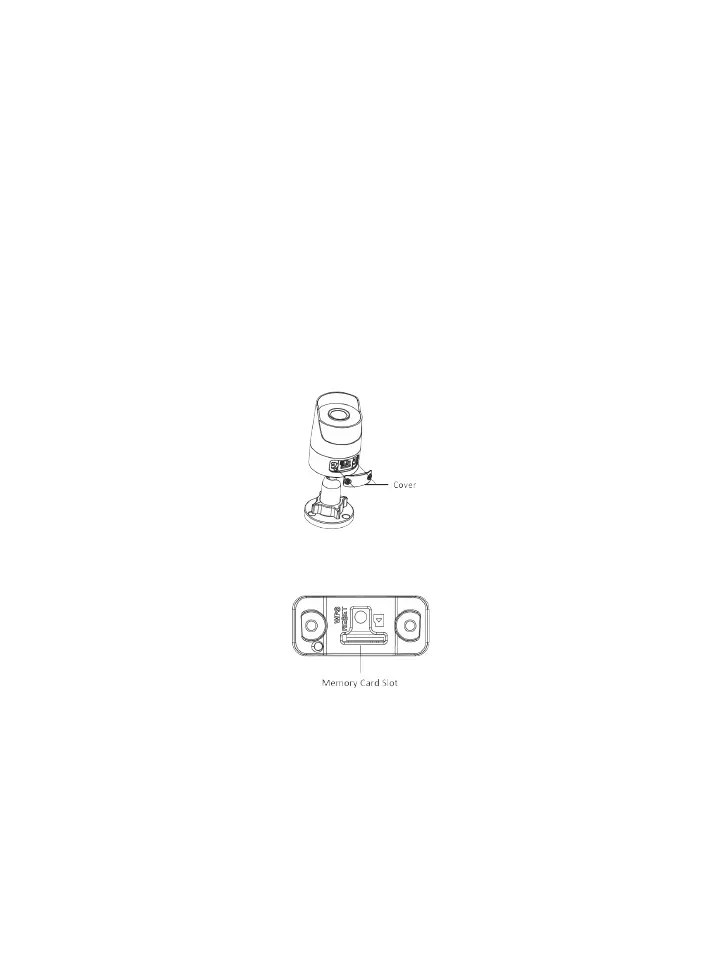
INSTALL MEMORY CARD
1. Unscrew the cover to expose the memory card slot.
2. Insert the memory card.
3. To remove the memory card, press it inwards until it clicks. Release it
and the memory card ejects.
4. Screw the cover back on the camera.
CEILING MOUNT
Illustrations may vary slightly from actual camera.
1. Attach the drill template in the desired mounting location.


 To Next Page