EasyManua.ls Logo

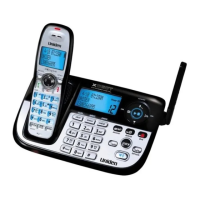
Uniden XDECT 8055 - User Manual

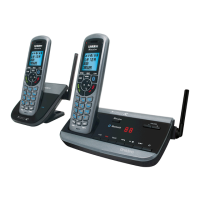
Uniden XDECT 8055
68 pages
Print Icon
To Next Page IconTo Next Page
Loading...
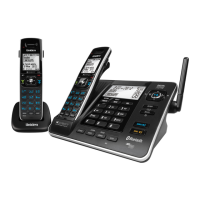
XDECT 8055
Series
For more exciting new products please visit our website:
Australia: www.uniden.com.au
New Zealand: www.uniden.co.nz
XDECT 8055 OM.indb 1 12/8/11 3:02:24 PM

Table of Contents

Question and Answer IconNeed help?

Do you have a question about the Uniden XDECT 8055 and is the answer not in the manual?

Summary

Important Safety Instructions

General Notices for New Zealand Model

Specific notices and disclaimers for the New Zealand market.

Whats in the box?

You might also find

List of optional accessories and related products.

Features of the XDECT 8055 Series

Installing Your Phone

Charge the Battery

Step-by-step guide to charging the handset battery.

Connect the Telephone Cord and Test Connection

Connecting the phone line and verifying the connection.

Install Accessories

Instructions for belt clip and headset installation.

Mounting the Base Unit on a Wall

Guide for wall-mounting the phone base unit.

Set Up the Repeater

Repeater Placement and Testing

Repeater placement, coverage, and testing procedures.

Wall Mounting the Repeater

Guide for wall-mounting the repeater unit.

Getting To Know Your Phone

Base Unit Overview and Keys

Identification of base unit controls and functions.

Handset Overview and Keys

Identification of handset controls and functions.

Reading the Displays

Display Icons Explained

Explains icons shown on the base and handset displays.

Using the Menus

General Menu Navigation and Setup Options

Menu navigation, Base/Handset/Global Setup, Date&Time.

Call Blocking Menu Options

Managing blocked incoming calls and lists.

Entering Text on Your Phone

Using Your Phone

Adjusting Volume and Using Redial List

Caller ID and Call Waiting

Caller ID Menu and Call Waiting Usage

Managing Caller ID entries and handling waiting calls.

Using the Phonebook

Chain Dialing and Finding a Lost Handset

Using Special Features

Do Not Disturb (DND)

Silencing ringers on all handsets for a set period.

Call Blocking Options

Blocking unwanted calls and managing the block list.

Using Voice Message Notification

Multi-Station Features

Expanding Your Phone

Adding more handsets and repeaters to the system.

Conference Calling and Call Transfer

Conducting conference calls and transferring calls.

Privacy Mode and Intercom

Using privacy mode and the intercom function.

Using the Answering System

Answering System Setup and Operation

Configuring greetings, messages, and remote access.

Screening Your Calls

Using the System While Youre Away from Home

Solving Problems

Audio Issues and Interference

Weak Audio and Interference Solutions

Addressing audio quality problems and interference sources.

Handset Management

Registering Repeaters to the Base

Handling Damage and ECO Mode

Handling Liquid Damage

Procedures for dealing with moisture or liquid exposure.

Automatic ECO (Power Save) Mode

Explanation of the power-saving ECO mode.

Important Information

Terms Used In This Guide

Definitions of key terms used in the manual.

Specifications

Technical specifications of the phone.

Battery Information

One Year Limited Warranty

Warranty Service and Procedures

Details on warranty claims, remedies, and service procedures.

Summary

Important Safety Instructions

General Notices for New Zealand Model

Specific notices and disclaimers for the New Zealand market.

Whats in the box?

You might also find

List of optional accessories and related products.

Features of the XDECT 8055 Series

Installing Your Phone

Charge the Battery

Step-by-step guide to charging the handset battery.

Connect the Telephone Cord and Test Connection

Connecting the phone line and verifying the connection.

Install Accessories

Instructions for belt clip and headset installation.

Mounting the Base Unit on a Wall

Guide for wall-mounting the phone base unit.

Set Up the Repeater

Repeater Placement and Testing

Repeater placement, coverage, and testing procedures.

Wall Mounting the Repeater

Guide for wall-mounting the repeater unit.

Getting To Know Your Phone

Base Unit Overview and Keys

Identification of base unit controls and functions.

Handset Overview and Keys

Identification of handset controls and functions.

Reading the Displays

Display Icons Explained

Explains icons shown on the base and handset displays.

Using the Menus

General Menu Navigation and Setup Options

Menu navigation, Base/Handset/Global Setup, Date&Time.

Call Blocking Menu Options

Managing blocked incoming calls and lists.

Entering Text on Your Phone

Using Your Phone

Adjusting Volume and Using Redial List

Caller ID and Call Waiting

Caller ID Menu and Call Waiting Usage

Managing Caller ID entries and handling waiting calls.

Using the Phonebook

Chain Dialing and Finding a Lost Handset

Using Special Features

Do Not Disturb (DND)

Silencing ringers on all handsets for a set period.

Call Blocking Options

Blocking unwanted calls and managing the block list.

Using Voice Message Notification

Multi-Station Features

Expanding Your Phone

Adding more handsets and repeaters to the system.

Conference Calling and Call Transfer

Conducting conference calls and transferring calls.

Privacy Mode and Intercom

Using privacy mode and the intercom function.

Using the Answering System

Answering System Setup and Operation

Configuring greetings, messages, and remote access.

Screening Your Calls

Using the System While Youre Away from Home

Solving Problems

Audio Issues and Interference

Weak Audio and Interference Solutions

Addressing audio quality problems and interference sources.

Handset Management

Registering Repeaters to the Base

Handling Damage and ECO Mode

Handling Liquid Damage

Procedures for dealing with moisture or liquid exposure.

Automatic ECO (Power Save) Mode

Explanation of the power-saving ECO mode.

Important Information

Terms Used In This Guide

Definitions of key terms used in the manual.

Specifications

Technical specifications of the phone.

Battery Information

One Year Limited Warranty

Warranty Service and Procedures

Details on warranty claims, remedies, and service procedures.

Uniden XDECT 8055 Specifications

General IconGeneral
TypeCordless Telephone
TechnologyDECT
Frequency1.9 GHz
DisplayBacklit LCD
Answering MachineYes
Caller IDYes
SpeakerphoneYes
Number of Handsets1
ExpandableYes
Phonebook Capacity200 entries
Handset LocatorYes
Call WaitingYes
IntercomYes
Headset JackYes
RangeUp to 300m outdoors, 50m indoors
Battery LifeUp to 10 hours talk time
Maximum Handsets SupportedUp to 6

Related product manuals