Unidrive M200 /M201 Quick Start Guide 3
Issue Number: 1
4 Electrical installation
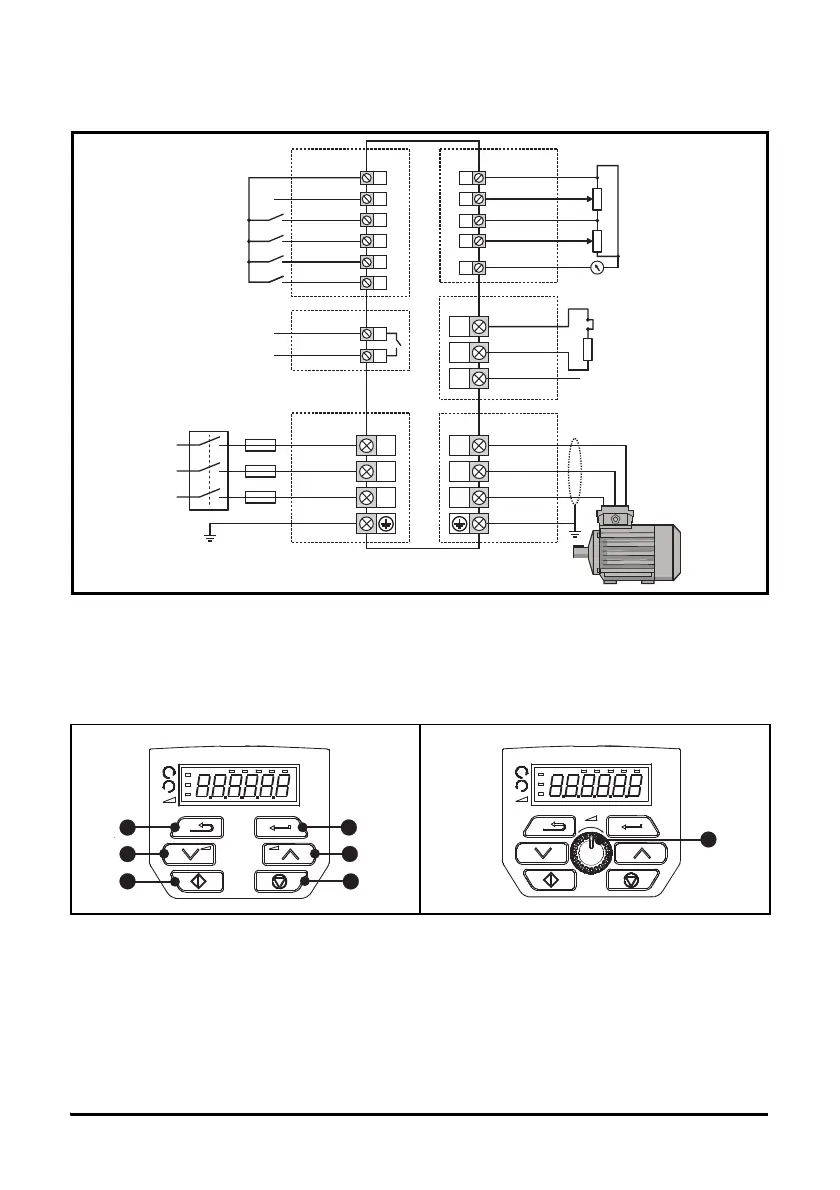
Figure 4-1 below shows an overlay of the electrical connections / terminals available on the drive.
For further information regarding terminal specification, cable sizes etc., refer to the Unidrive M200
/ M201 User Guide.
Figure 4-1 M200 / M201 Overlay of electrical connections
5 Keypad and display
The keypad and display provide information to the user regarding the operating status of the drive and trip
codes, and provide the means for changing parameters, stopping and starting the drive, and the ability to
perform a drive reset.
(1) The Enter button is used to enter parameter view or edit mode, or to accept a parameter edit.
(2 / 5) The Navigation keys can be used to select individual parameters or to edit parameter values.
(3) The Stop / Reset key is used to stop and reset the drive in keypad mode. It can also be used to reset
the drive in terminal mode.
(4) The Start key is used to start the drive in keypad mode.
(6) The Escape key is used to exit from the parameter edit / view mode.
(7) The Speed ref pot is used to control the speed reference in keypad mode (only on Unidrive M201).
Figure 5-1 Unidrive M200 keypad detail Figure 5-2 Unidrive M201 keypad detail
Drive enable
9
10
11
12
Zero frequency
Run forward
13
Run reverse
14
Digital I/O
Analog input 1/
Analog input 2 select
L1
L2
L3
1 ph/3 ph
AC power
supply
Braking resistor
(optional)
U
BR
+
_
V
W
Thermal relay
AC supply
DC bus/Brake
Motor
41
42
Drive ok
Relay
Digital Input 2
24 V user
Digital I/O1
Digital input 3
Digital input 4
Digital input 5
1
2
0V
Analog I/O
Analog input 1+
7
Analog output 1
4
10 V user
5
Analog input 2
Frequency
reference 1
Frequency
reference 2
Frequency output


 To Next Page
 Loading...