
 Need help?
Do you have a question about the Unidrive ZoneLogix Plus and is the answer not in the manual?
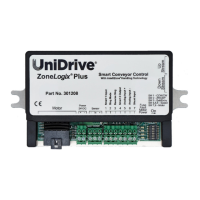
The UniDrive ZoneLogix® Plus Smart Conveyor Control is a sophisticated device designed for managing and troubleshooting conveyor systems, particularly those utilizing Zero-Pressure Accumulation (ZPA) or enhanced accumulation ZIP modes. This control unit, identified by Part # 301208, integrates IntelliZone® Handling Technology to optimize parcel movement and system efficiency.
The primary function of the ZoneLogix® Plus is to provide intelligent control over individual zones within a conveyor system. It manages motor operation, sensor inputs, and communication between adjacent zones to ensure smooth and efficient parcel handling. The control can be configured for various operating modes, including ZPA (Standard Singulation) and ZIP (higher throughput, enhanced accumulation), as well as Slug Mode and Reverse Slug for specific operational needs.
In ZPA mode, the control ensures that parcels do not accumulate with pressure, maintaining a safe distance between items. ZIP mode, on the other hand, allows for increased parcel throughput by optimizing the release of upstream parcels, potentially almost doubling the throughput without increasing conveyor speed. Slug Mode allows for overriding accumulation logic, forcing zones to run continuously, which can be useful for jogging or clearing the conveyor. Reverse Slug mode, either alone or in combination with Slug Mode, allows for controlled coasting or reverse movement of parcels.
The device also incorporates a "Search and Rescue" function to prevent parcels from becoming stranded between photo sensors. This function activates during power-up, after a parcel discharges from a zone, or after the removal of Slug or Reverse Slug signals, ensuring that any potentially stranded parcels are detected and processed.
The ZoneLogix® Plus offers a range of configurable features to adapt to different conveyor layouts and operational requirements. Installation involves mounting the control, selecting the appropriate motor rating, and setting the desired operating speed. Motor selection is crucial and can be configured via DIP switches to match UniDrive motors ranging from 48W to 100W, allowing the control to deliver maximum performance. Speed selection is also managed through DIP switches, enabling precise control over parcel movement. Additionally, an analog input allows for remote, dynamic speed adjustment using a 0-10Vdc differential signal, overriding DIP switch settings if active.
The control's location within the conveyor system (entry, intermediate, or exit zone) is configured via a DIP switch, influencing how it interacts with upstream and downstream zones. Rotation direction (clockwise or counter-clockwise) is also configurable to ensure parcels move from the entry to the exit end of the conveyor.
Communication between adjacent zones is established using 6-wire modular RJ-25 phone cables, allowing for peer-to-peer exchange of request and permission signals. This communication is essential for coordinated parcel movement and accumulation logic. For entry zones, a Smart 1 Input (PNP) can be used to signal that a parcel is ready for input, while a Smart 2 Output (PNP) indicates when the zone is empty and ready to receive. Exit zones use Smart 1 Input to grant permission for discharge and Smart 2 Output to signal that the zone is occupied and ready to discharge. Intermediate zones do not typically use these Smart I/O connections.
A Shunt Input feature is available to increase the control's overvoltage shutdown limit during regenerative operation, providing additional operating margin. This can be particularly useful when the motor and control regenerate energy back into the power supply.
The control also supports configuration as a Basic Motor Control (BMC) or standalone motor control, which can be useful in applications where the motor Run-On-Time needs to be eliminated. This involves specific DIP switch settings and wiring configurations to enable direct motor control via a Slug Mode input.
The ZoneLogix® Plus includes several diagnostic and troubleshooting features to assist with system maintenance. Four LED indicators (Fuse, Fault, Motor, and Power) provide immediate visual feedback on the control's status.
The control also features a Firmware Version Display during startup. The green (power) and red (fault) LEDs turn on, followed by the amber LED flashing to indicate the major and minor revisions of the firmware. This sequence helps in quickly identifying the software version for support and troubleshooting.
Mounting the control assembly to the conveyor frame using bolts helps keep the controller cool, and proper heatsinking is essential to prevent the motor case temperature from exceeding 70°C (158°F). The manual also emphasizes the importance of proper cable routing to prevent damage and tension on connections. The cover, while not waterproof or dustproof, helps reduce damage from foreign objects, and its removal voids the warranty. Regular checks of wiring connections and ensuring proper polarity for the 24VDC power supply are critical for preventing damage and ensuring reliable operation.
 General
| Category | Controller |
|---|---|
| Input Voltage | 24 VDC |
| Output Voltage | 24 VDC |
| Humidity | 5% to 95% non-condensing |
| Communication Ports | Ethernet, RS485 |
| Certifications | CE, UL |

 To Next Page