Precautions Introduction Front Panel Operation and PerformanceRear Panel
ON DI P O N DIP
1 2 3 4 5 6 1 2 3 4 5 6 7 8
PUSH PUSH
~110V 60Hz
~220V 60Hz
21 3 4
Figure 2
PUSH PUSH
Audio inputs and loop-thru
connectors-tow-channel models
Binding Posts-two-channel
models
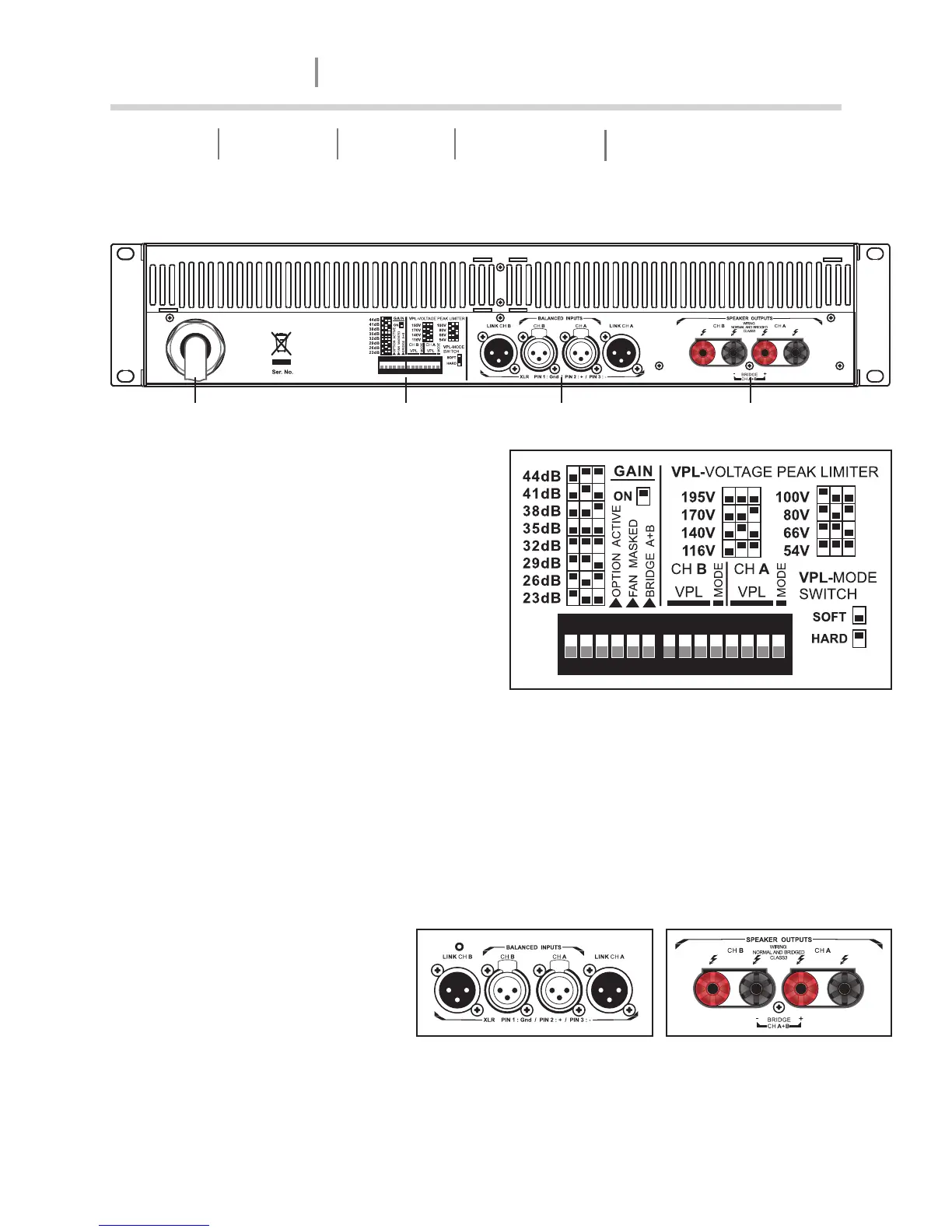
1. AC line cord - Mains input 115V or 220V
operation (Not selectable
2. The DIP - switch features - The following
features may be adjusted using the DIP-
switches on the rear panel of the amplifier.
Gain - Globally setfor all channels, from
+23dB to +44dB in 3dB steps.
Option active - Not currently
implemented.
Fan Masked - When on, engages the
intelligent fan feature; fan speed is
Rear Panel Control
ON DIP ON DIP
1 2 3 4 5 6 1 2 3 4 5 6 7 8
4. Output connectors - TD14000 offered with Binding Post connectors for speaker outpu
connection.
Bridge A+B - Switches the channel pairs into bridge mode operation An automatic -6dB
gain compensation is applied.
VPL - The Voltage Peak Limiter provides optimum peak voltage settings for each channel.
Level selections vary by model within the TD14000 amplifier.
Mode - Select VPL mode to either Hard or Soft operation. For channels driving sub-woofers
and low-frequency drivers, it is recommended to use the Hard setting for optimal operation.
For mid-and-high-frequency drivers, always select Soft.
3. Input connectors - This
amplifier is equipped with XLR-F
input connector, two-channel
models also offer parallel(”loop-
thru”) XLR-M output connectors
for daisy-chaining multiple
amplifiers from the same signal
source
lowered when no signal is present.
4
AMPLIFIER
TD-14000


 To Next Page
 Loading...