6 |
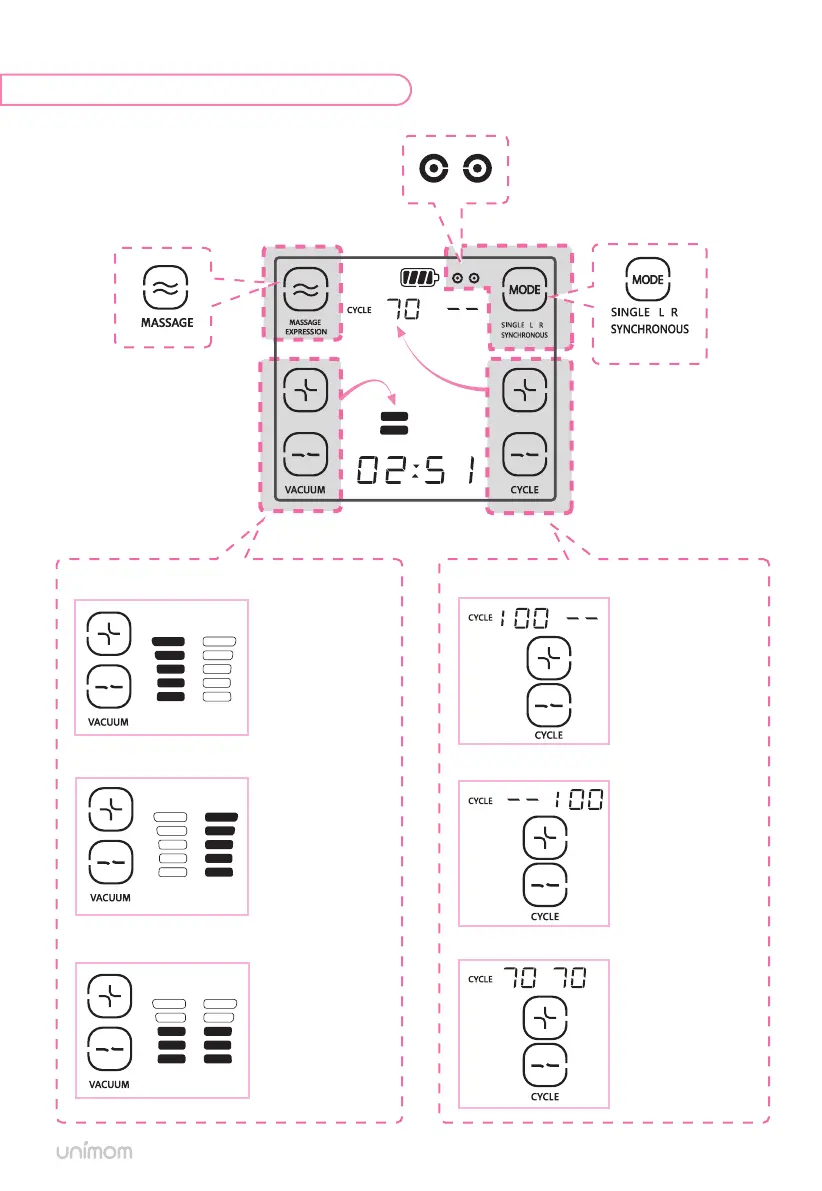
[Massage Mode]
[Pumping Mode Change]
Left display
+ Increase ↑
- Decrease ↓
Right display
+ Increase ↑
- Decrease ↓
Simultaneous display
+ Increase ↑
- Decrease ↓
Left number
+ Increase ↑
- Decrease ↓
Right number
+ Increase ↑
- Decrease ↓
Simultaneous number
+ Increase ↑
- Decrease ↓
- Single Left Mode [SINGLE L]
– Single Right Mode [SINGLE R]
- Synchronous Mode [SYNCHRONOUS]
– Alternate Mode [ALTERNATE]
Pumping indicator
will blink as per current side usage
Massage Mode
A L T E R N A T E
A L T E R N A T E
Vacuum control button
(5 levels)
Cycle control button
(60~100 cycles/min)
SINGLE Left Mode
SYNCHRONOUS / ALTERNATE Mode
SINGLE Right Mode
SINGLE Left Mode
SYNCHRONOUS / ALTERNATE Mode
SINGLE Right Mode


 To Next Page