| 5
FUNCTIONS
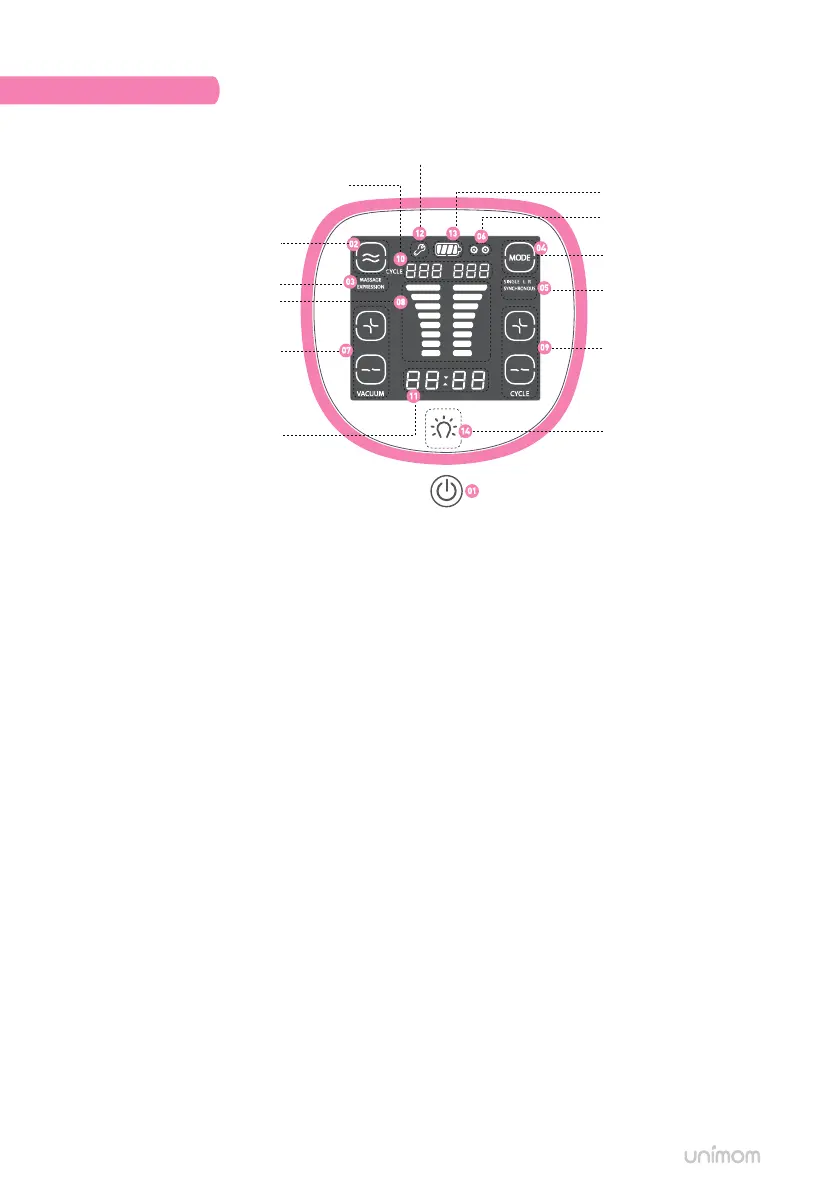
Massage / Expression button
A/S mode indicator
Massage / Expression mode display
Vacuum button
Usage time display
Vacuum level display
Cycle button
Cycle display
Mode button
Pumping side indicator
Battery indicator
Mode display
Night light button
Power button
ALTERNATE
[01] Power button: Turn on/o the device.
*Memory function: The last mode setting used before turning o the device will be automatically
stored when turning back on the device.)
[02] Massage / Expression button: Select Massage or Expression mode.
[03] Massage / Expression mode display: Current mode will appear on the screen.
[04] Mode button: Mode setting of Single Left Single Right, Synchronous, or Alternate mode.
[05] Mode display: When pressing the mode button [04], the selected mode will appear on the screen.
- Single Left Mode [SINGLE L].
- Single Right Mode [SINGLE R].
- Synchronous Modes [SYNCHRONOUS].
- Alternate Mode [ALTERNATE].
[06] Pumping side indicator: Pumping side indicator will blink showing current side used.
[07] Vacuum button: Press the [+] button to increase the vacuum level and the [-] button
to decrease the vacuum level.
[08] Vacuum level display: Press the vacuum button [7] to display the current level on the screen.
- Massage mode up to 5 levels.
- Expression mode up to 8 levels.
[09] Cycle button: The number of cycles per minute will increase by pressing the [+] button and will decrease
by pressing the [-] button.
- Massage mode cycle/min : 60 ~ 100.
- Expression mode cycle/min: 26 ~ 42.
[10] Cycle display: Press cycle button [8] to display cycle/min on the screen.
- When using [SINGLE L], numbers will be displayed on the left.
- When using [SINGLE R], numbers will be displayed on the right.
- When using [SYNCHRONOUS] or [ALTERNATE] modes, numbers will be displayed on both sides.
[11] Usage time display: Usage time will be displayed.
[12] A/S mode: Contact manufacturer if A / S mode is displayed on the screen.
[13] Battery indicator: Remaining battery life will be displayed.
[14] Night light button: Adjustable 3 levels of night light functions.


 To Next Page