QUICK START GUIDE - eVscope et eQuinox
INSTALL
Requirements
- Avoid directly exposing the eVscope/eQuinox to wind.
- Use the eVscope/eQuinox on stable ground.
- Use the eVscope/eQuinox under a clear sky.
- Locate the eVscope/eQuinox away from direct streetlight.
- For better results, avoid a full moon.
Install your eVscope/eQuinox and power it on
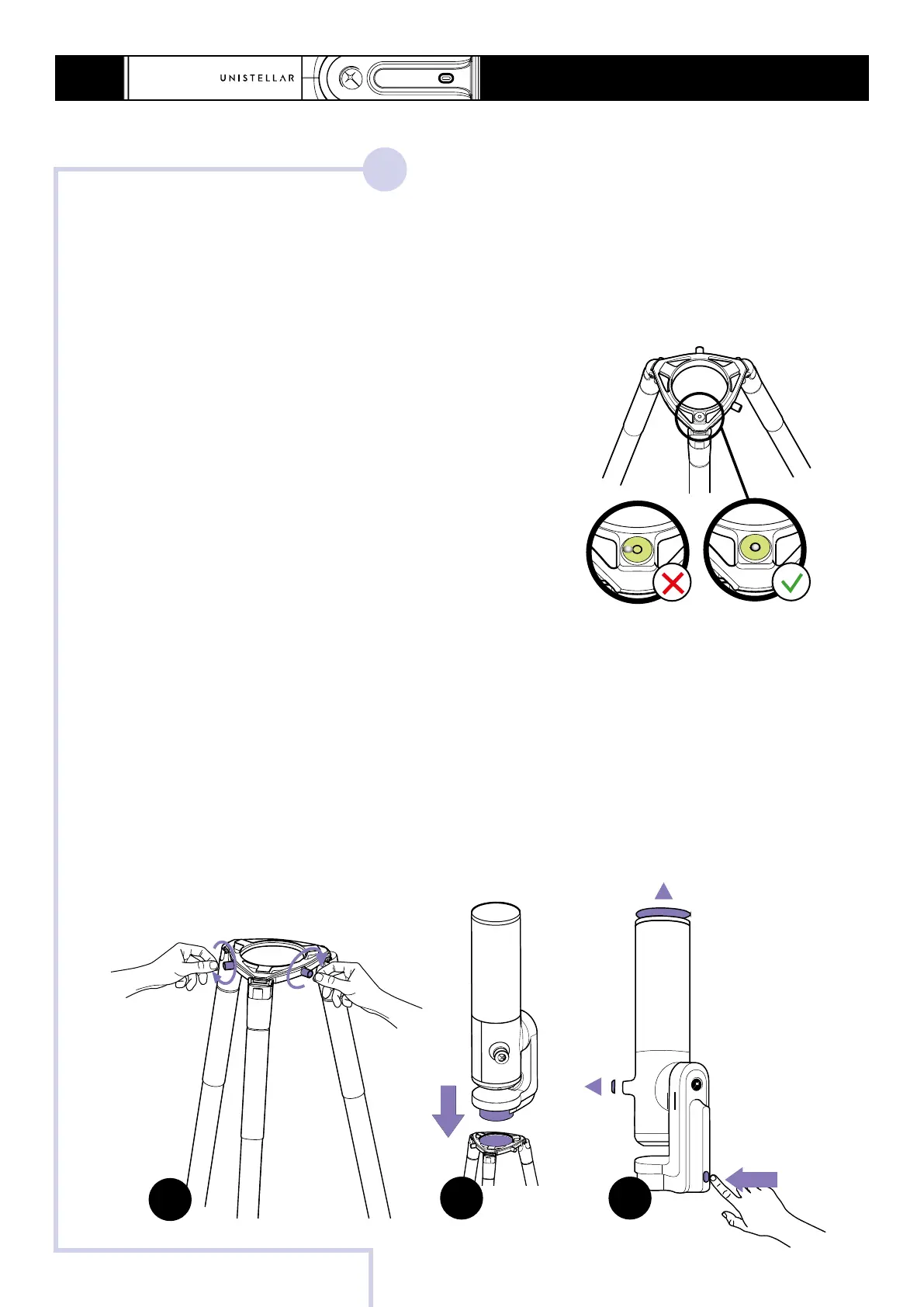
A - Loosen the tripod screws at the crown of the tripod.
B - Install your eVscope/eQuinox vertically on the tripod. Tighten the screws at the crown
of the tripod to secure your eVscope/eQuinox. Be careful not to tighten too hard as it may
damage the thread.
C - Start the eVscope/eQuinox by pressing the On button for 2 seconds. The LED is first
purple then red. Remove the cap covers on both the eVscope/eQuinox tube and eyepiece.
Set up the tripod
- Open the legs of the tripod and adjust the height.
- Adjust the legs to put the bubble level within the
black circle.
- Check that the tripod legs are properly secured.
Note: each time you move your eVscope/eQuinox,
we recommend resetting the bubble level.
1.
2
2 sec
A
B
C
PRESS
ON



 To Next Page