EasyManua.ls Logo

UNITED RT12 - User Manual

UNITED RT12
2 pages
Print Icon
To Next Page IconTo Next Page
Loading...
OPERATOR MANUAL
FIRST EDITION
10/2022
RT12 Rotary Trimmer
To avoid damaging the trimmer, never immerse it in water or other liquids.
Do not use abrasive cleaners on the trimmer.
Dust the trimmer with a soft cloth, using extreme caution when cleaning near the
blade.
Care and Maintenance
1. Push in on the red tabs towards each
other on each end of the guide rail.
Remove the red tabs. (You may need a
athead screwdriver for this step)
2. Carefully remove the cutter set by lifting
the guide rail and sliding off the cutting
blade head.
3. Carefully slide the new cutting blade
head onto the guide rail. Lower the
cutter set back onto the base. Be sure
to set the blade on the outside of the
cutting shield.
4. Push the red mounting tabs back into
place to secure the guide rail.
Replacing the Cutting Blade Head
TM
Question and Answer IconNeed help?

Do you have a question about the UNITED RT12 and is the answer not in the manual?

Summary

Replacing the Cutting Blade Head

Prepare Guide Rail for Blade Removal

Guides user to prepare the guide rail for blade removal by pushing red tabs.

Remove Old Cutting Blade Head

Explains how to carefully lift and slide off the old cutting blade head from the guide rail.

Install New Cutting Blade Head

Details sliding the new cutting blade head onto the guide rail and setting the blade.

Secure Guide Rail

Describes pushing the red mounting tabs back to secure the guide rail.

Safety Precautions

Read Operating Instructions

Emphasizes the importance of reading all operating instructions before use.

Child Safety

Warns against child use and advises keeping the product out of reach of children and pets.

Intended Use

Specifies that the trimmer is designed for cutting paper only, not other objects.

Keep Clear of Blade

Advises keeping hands and loose items away from the blade to prevent injury or damage.

Jam Clearing Warning

Warns against using pointed objects to dislodge debris to prevent injury or damage.

Stable Surface Operation

Instructs to always use the trimmer on a flat, level, and sturdy surface.

Mounting Prohibition

Prohibits hanging or wall-mounting the trimmer.

Indoor Use Only

States that the product is intended for indoor use only.

Operation Guide

Insert Paper

Guides the user to insert paper under the clamping bar before cutting.

Position Paper

Instructs on adjusting the paper to the proper position for an accurate cut.

Perform Cutting Motion

Details sliding the rotary blade head forward or backward to cut the paper.

Overview

The United RT12 Rotary Trimmer is a versatile and reliable tool designed for precise paper cutting in various settings, from home offices to professional environments. This manual provides comprehensive instructions for its safe operation, maintenance, and replacement of components, ensuring long-term performance and user safety.

Function Description

The primary function of the United RT12 Rotary Trimmer is to accurately cut paper. It utilizes a rotary blade head that slides along a guide rail, allowing for clean and straight cuts. The trimmer is designed to handle multiple sheets of paper simultaneously, making it efficient for tasks requiring repetitive cuts. Its measuring grid and paper guide assist in positioning the paper correctly for precise results.

Important Technical Specifications

The United RT12 Rotary Trimmer boasts several key specifications that highlight its capabilities:

  • Paper Length: It can accommodate paper up to 12.5 inches (318mm) in length, making it suitable for common paper sizes like letter, legal, and A4.
  • Paper Stack Height: The trimmer can cut a stack of paper up to 5/128 inches (1mm) thick.
  • Sheet Capacity: It is capable of cutting up to 10 sheets of 20# (75gsm) paper at once, which is ideal for small to medium-sized cutting tasks.
  • Blade Type: The trimmer uses a rotary blade, known for its self-sharpening properties and safety features, as the blade is enclosed within the cutting head.
  • Back Gauge Scale: It features both inch and millimeter scales, providing flexibility for users accustomed to different measurement systems.
  • Paper Clamp: The trimmer includes an automatic paper clamp, which securely holds the paper in place during cutting, preventing shifting and ensuring accuracy.
  • Table Size: The cutting table measures 12.8 inches (325mm) in width and 8.25 inches (210mm) in depth, offering ample space for various paper sizes.
  • Dimensions: The overall dimensions of the trimmer are 17.25 inches (438mm) in width, 9.5 inches (241mm) in depth, and 2.625 inches (67mm) in height, making it compact enough for desktop use.
  • Weight: Weighing 2.8 lbs (1.27kg), the trimmer is lightweight and portable, allowing for easy relocation and storage.
  • Base Material: The base is constructed from steel, providing durability and stability during operation.

Usage Features

The United RT12 Rotary Trimmer is designed for ease of use and safety:

  • Simple Operation: To operate, users simply insert paper under the clamping bar, adjust it to the desired position using the measuring grid and paper guide, and then slide the rotary blade head forward or backward to cut. The blade cuts in both directions, enhancing efficiency.
  • Precision Cutting: The integrated measuring grid and paper guide ensure accurate alignment, allowing for precise cuts every time. The automatic paper clamp further contributes to accuracy by preventing paper movement.
  • Safety First: The rotary blade is enclosed within the cutting head, minimizing direct contact with the blade and reducing the risk of injury. The manual explicitly warns users to keep hands away from the sharp blade and never use the trimmer without the clamp bar or blade guard in place.
  • Indoor Use Only: The product is intended for indoor use, protecting it from environmental elements that could affect its performance or durability.
  • No Lubrication Required: The cutting blade does not require lubrication, simplifying maintenance and preventing potential damage from improper lubricants.
  • Avoid Obstructions: Users are advised to remove paper clips and staples before trimming to prevent damage to the blade and ensure smooth operation.
  • Stable Surface: For optimal performance and safety, the trimmer should always be used on a flat, level, and sturdy surface.

Maintenance Features

Proper care and maintenance are crucial for extending the life of the United RT12 Rotary Trimmer:

  • Cleaning: The trimmer should be dusted with a soft cloth. Extreme caution is advised when cleaning near the blade to avoid injury.
  • Avoid Liquids: To prevent damage, the trimmer should never be immersed in water or other liquids. Exposure to moisture can harm internal components and affect performance.
  • No Abrasive Cleaners: Abrasive cleaners should not be used on the trimmer, as they can scratch surfaces or damage components.
  • Blade Replacement: The manual provides clear, step-by-step instructions for replacing the cutting blade head. This process involves pushing in red tabs on the guide rail, removing the old blade head, and sliding on a new one. Users may need a flathead screwdriver for this task. It is crucial to ensure the new blade is set on the outside of the cutting shield for proper function and safety.
  • Preventing Jams: Users are warned not to attempt to dislodge jammed debris with a pointed object, as this can cause personal injury or damage to the trimmer.
  • Regular Inspection: Although not explicitly stated as a maintenance feature, the emphasis on safety precautions implies that users should regularly inspect the trimmer for any signs of wear or damage, especially concerning the blade guard and clamping bar.

By adhering to these usage and maintenance guidelines, users can ensure the United RT12 Rotary Trimmer remains a reliable and efficient tool for all their paper cutting needs.
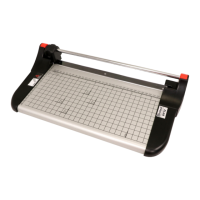
UNITED RT12 Specifications

General IconGeneral
BrandUNITED
ModelRT12
CategoryTrimmer
LanguageEnglish

Related product manuals