7?A<
@
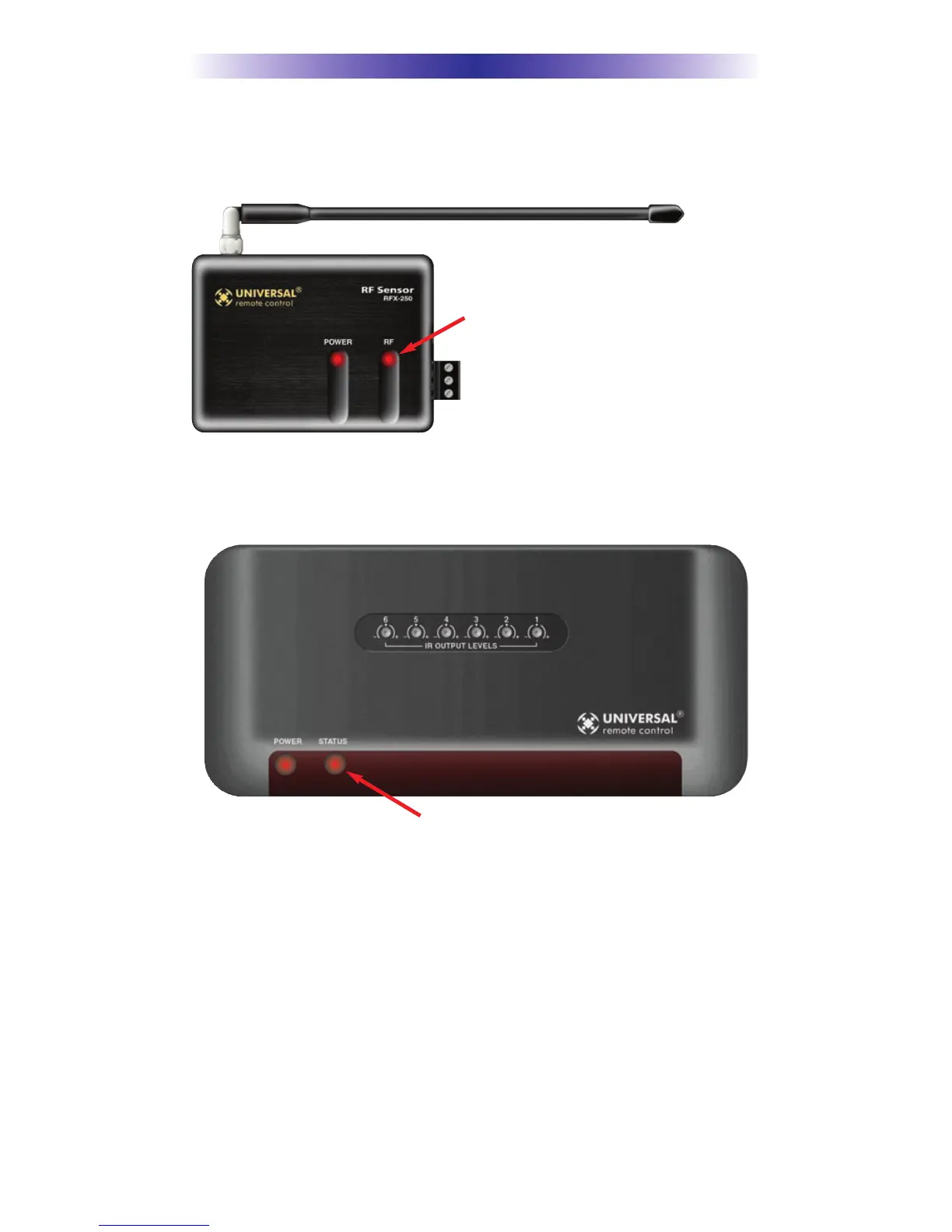
5. Observe the RF LED of the RFX-250. Cup your hand over the RFX-250’s
RF LED. If it is glowing or flickering you must relocate the RFX-250 to a
location where the LED doesn’t flicker.
6. Observe the STATUS LED of the MRF-350. It is a little more sensitive
than the RFX-250. If you see any flickering of this LED, move the RFX-
250 to a new location.
If your installation location simply doesn’t offer you any choice and
you are detecting interference everywhere you place the RFX-250 you
have three last resort options:
a. Remove the RFX-250’s antenna. This will reduce the range
enormously, but may still be enough for this client.
b. Extend a wire to another room. Try this over the floor first,
before attempting to conceal the wire.
c. Admit defeat and install a “pointing again” IR repeater system.
If no buttons are pressed on any remote
control, no valid RF transmissions are
being received. The flickering or glowing
RF LED warns you that the RFX-250 is
detecting RF interference generated or
reflected near this location. MOVE the
RFX-250 to a new location.
The flickering or glowing STATUS LED warns you that the RFX-250 is detecting RF inter-
ference generated or reflected near this location. MOVE the RFX-250 to a new location.


 To Next Page