EasyManua.ls Logo

UP Edge - User Manual

UP Edge
6 pages
Print Icon
To Next Page IconTo Next Page
Loading...
UP
2
Edge Compute
Quick users guide
For more information about your UP board, software, accessories and peripherals, please visit
www.up-community.org
1
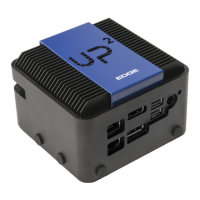
The UP Squared edge compute is your IoT and AI development platform, running Ubuntu. You’ll
connect your monitor, keyboard, mouse, and Ethernet, and use this platform to write your code.
Your UP Squared Edge Compute system
Whats in your kit
UP Squared system(Ubuntu 16.04 OS USB Camera USB Drive Power Supply
& OpenVINO™ Toolkit) (Only for AI Vision Kit)
You’ll need the following, not included:
A monitor with either HDMI or DisplayPort
USB keyboard and mouse
Ethernet cable (or optional WiFi, purchased separately)
Question and Answer IconNeed help?

Do you have a question about the UP Edge and is the answer not in the manual?

Summary

UP Squared Edge Compute System Overview

Whats Included in the Kit

Getting Started with Your UP Squared

Connecting Peripherals

Connect monitor, keyboard, mouse, and Ethernet cable to the UP Squared system.

Powering On the System

Connect the power supply to the board and an outlet for operation.

Logging In to the OS

Use default credentials 'upsquared'/'upsquared' to log into Ubuntu.

Starting Development Tasks

Begin IoT development or launch the AI development guide from the desktop.

Important Safety Precautions

UP Squared Technical Specifications

China RoHS Compliance Information

Summary

UP Squared Edge Compute System Overview

Whats Included in the Kit

Getting Started with Your UP Squared

Connecting Peripherals

Connect monitor, keyboard, mouse, and Ethernet cable to the UP Squared system.

Powering On the System

Connect the power supply to the board and an outlet for operation.

Logging In to the OS

Use default credentials 'upsquared'/'upsquared' to log into Ubuntu.

Starting Development Tasks

Begin IoT development or launch the AI development guide from the desktop.

Important Safety Precautions

UP Squared Technical Specifications

China RoHS Compliance Information

UP Edge Specifications

General IconGeneral
Microphone Preamps2
Bit Depth24-bit
Direct MonitoringYes
CompatibilityWindows, macOS
Headphone Output1
Phantom PowerYes