HDMI USB INTERNET
COAX IN AUDIO SCART OUT HDMI USB
INTERNET D. AUDIO POWER
ON!
HDMI
INSTALLATION / INSTALLAZIONE
2
1
3
HDMI
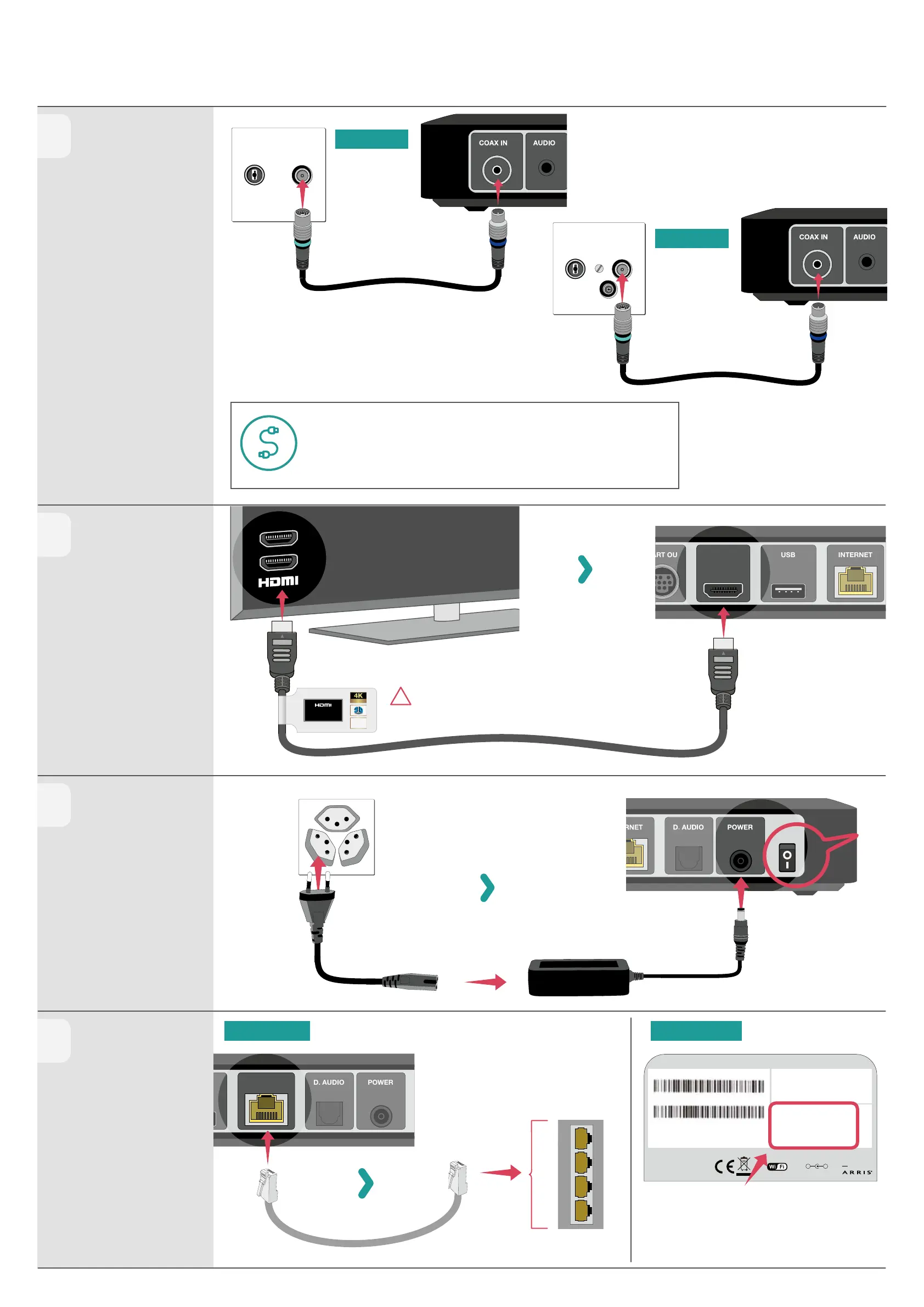
Verwende ausschliesslich das mitgelieferte Highspeed HDMI-Kabel.
Veuillez n’utiliser que le câble highspeed HDMI fourni.
Utilizzare solo il cavo highspeed HDMI fornito.
Please only use the high speed HDMI cable provided.
Achtung: Verwende zwingend DEINE Connect Box!
Attention: utilisez absolument VOTRE Connect Box !
Attenzione: devi utilizzare per forza IL TUO Connect Box!
Please note: You must use YOUR Connect Box!
Wähle den benutzten HDMI-Eingang auf dem TV aus.
Sélectionnez l’entrée HDMI utilisée sur le téléviseur.
Selezionare l’ingresso HDMI utilizzato sul televisore.
Select the used HDMI input on the TV.
HIGH SPEED
with ETHERNET
AUDIO RETURN
CHANNEL
Ultra HD
!
OPTION LAN OPTION WIFI
TG3492LG-LC
Visit http://192.168.0.1
Settings password
hf t6ypxySkLy
CM MAC: E457400196FA
S/N: A5AP73559866
US Pat. www.arris.com/legal,
other patents pending.
© ARRIS 2017-2018,
All rights reserved.
Made in China
MANUFACTURED BY
CERTIFIED
12V
- +
...3.3A
WiFi Network Name (SSID)
UPC1234567
WiFi password
abcdef123456
4
OPTION A
OPTION B
INT
1
2
3
4
Wi Login-Daten benden sich auf der Unterseite der Connect Box.
Les informations de connexion wi- se trouvent sous le modem.
I dati per il login Wi-Fi si trovano sul fondo del modem.
Wi Login details can be found on the underside of the modem.
Längeres Kabel nötig? Gratis bestellen:
Besoin d’un câble plus long ? Gratuit sur :
Ti serve un cavo più lungo? Ordinalo gratis:
Need a longer cable? Order for free:
upc.ch/new-cable
Antennenkabel anschliessen
Connecter le câble d’antenne
Collegare il cavo antenna
Attach aerial cable
HDMI-Kabel verbinden
Connecter le câble HDMI
Collegare cavo HDMI
Connect HDMI cable
Netzteil einstecken
Brancher le bloc
d’alimentation
Inserire l’alimentatore
Plug in the power supply unit
Verbindung zur
Connect Box herstellen
Connecter avec la Connect Box
Collegare con il Connect Box
Connect to Connect Box



 To Next Page
 Loading...