FERNBEDIENUNG
TELECOMANDO
TÉLÉCOMMANDE
REMOTE CONTROL
2
OK
T V
T V
31
5 64
8
0
97
2
10 9 8
7
6
5
11
4 3
1
1
1
1
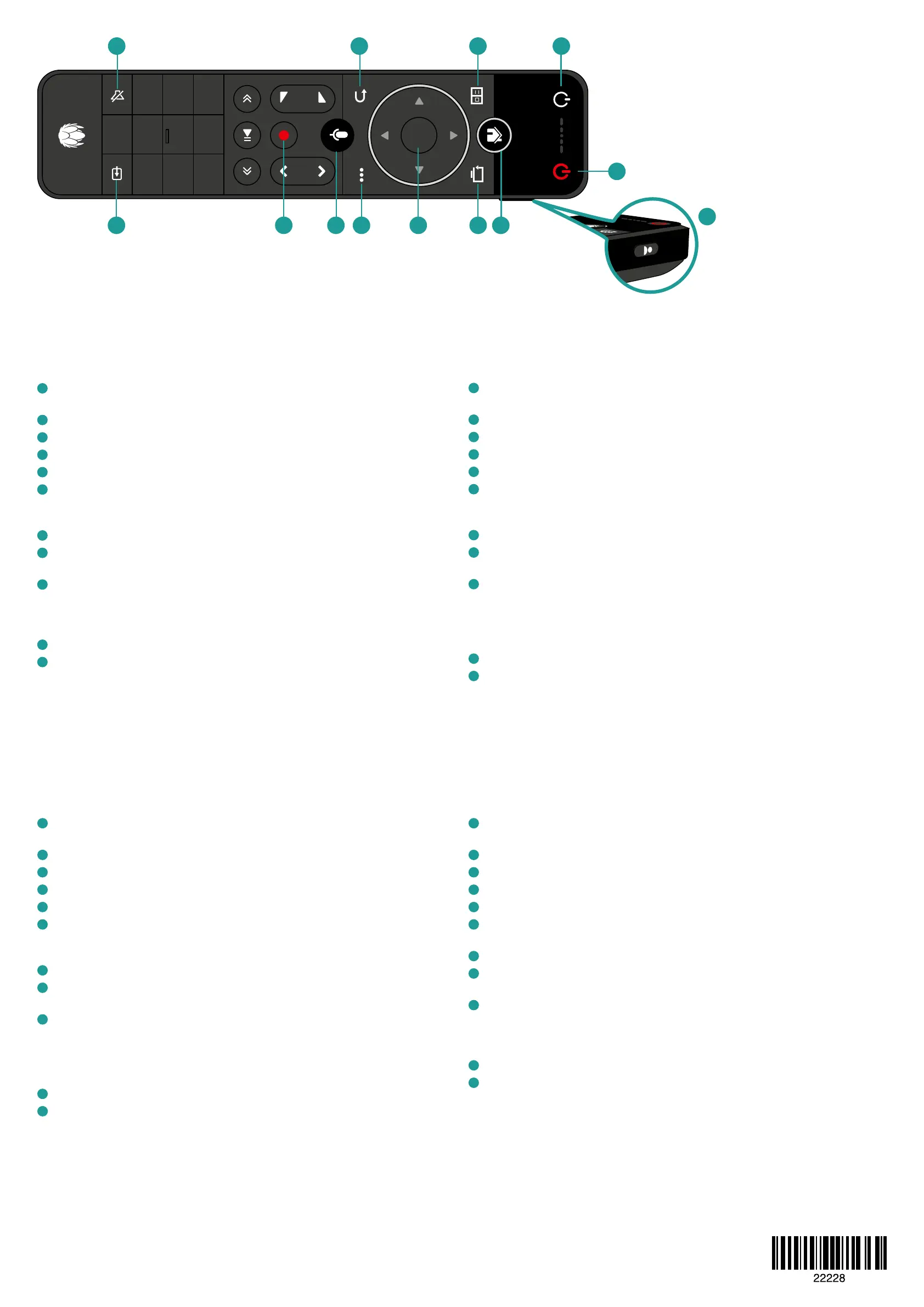
TV-Gerät: Ein- und Ausschalten / Stummschaltung / Quelle (wenn mit TV gekoppelt).
Koppeln über: Einstellungen —> Bild & Ton.
2
UPC TV Box: Ein- und Ausschalten der UPC TV Box.
3
HOME / Menü: Aufrufen des Hauptmenüs.
4
Zurück zu TV: Navigation direkt zum Live-Sender oder zum zuletzt geschauten Sender.
5
TV Guide: Aufrufen des TV-Programms mit Möglichkeit zur Nutzung der Replay-Funktion.
6
Navigationstasten: Navigation hoch, runter, links, rechts und mit OK bestätigen.
Tipp: Durch langes Drücken der Pfeiltasten kannst du schneller navigieren und vor-
und zurückspulen.
7
Zurück: Zurück zum vorherigen Schritt.
8
Optionen: Informationen und Optionen zur laufenden oder angewählten Sendung
aufrufen. Tipp: Über diese Taste kannst du auch Teletext und Untertitel einschalten.
9
Sprachsuche & -steuerung: Durch langes Drücken und gleichzeitiges Sprechen kannst
du nach Filmen & Serien, Sendungen oder Themen suchen oder deine UPC TV Box
steuern. Tipps für Sprachbefehle: Sender wechseln, Menüs aufrufen, im TV Guide
schneller navigieren, vor- und zurückspulen oder Sendungen von Anfang an starten.
10
Aufnahme: Programmiere eine Aufnahme direkt durch Drücken dieser Taste.
11
Prole: Mit der Prolfunktion kannst du zusätzliche User- oder Themenprole erstellen
und individuelle Sender- und Favoritenlisten speichern.
0800 66 88 66 | upc.ch/support
1
Televisore: accendere e spegnere il televisore / funzione mute / fonte (se associato alla
TV). Abbinamento tramite: Impostazioni —> Immagine e suono.
2
UPC TV Box: accendere/spegnere UPC TV Box.
3
HOME / Menù: accedere al menù principale.
4
Torna alla TV: passaggio diretto alla trasmissione in onda o all’ultimo canale visionato.
5
Guida TV: accedere direttamente al programma TV, incl. funzione di Replay.
6
Tasti di navigazione: navigazione verso l’alto, verso il basso, verso destra, verso sinistra e
confermare con OK. Consiglio: tenendo premuto a lungo i tasti di navigazione, è possibile
accelerare la navigazione e mandare avanti o indietro una trasmissione.
7
Indietro: torna allo step precedente.
8
Opzioni: informazioni e opzioni sulla trasmissione in corso o selezionata.
Consiglio: con questo tasto è possibile accedere al teletext o attivare i sottotitoli.
9
Ricerca e controllo vocale: tenendo premuto a lungo questo tasto e impartendo al
contempo un comando vocale, è possibile ricercare lm, serie, trasmissioni o temi
oppure gestire le funzioni dell’UPC TV Box. Consigli per i comandi vocali: cambiare
canale, accedere al menù, navigare più velocemente nella guida TV, mandare avanti
o indietro una trasmissione e guardare una trasmissione dall’inizio.
10
Registrazione: questo tasto consente di registrare una trasmissione.
Proli: con la funzione del prolo puoi creare proli utenti e per argomenti e memorizzare
elenchi di canali e preferiti individuali.
11
1
TV set: Switch on and o / Mute / Source (if paired with TV).
Pair via: Settings —> Picture and sound.
2
UPC TV Box: Switch UPC TV Box on and o.
3
HOME / Menu: Access the main menu.
4
Back to TV: Navigate directly to the live channel or to the last watched channel.
5
TV guide: Access the TV listings including the Replay function.
6
Navigation buttons: Navigate up, down, left, right and conrm with OK. Tip: By pressing
down on the arrow buttons you can navigate more quickly and fast-forward or rewind.
7
Back: Back to the previous step.
8
Options: Call up information and options for the current or selected programme.
Tip: You can also use this button to switch the teletext and subtitles on.
9
Voice search & control: By pressing the button and talking at the same time you can
search for lms & series, programmes or topics, or control your UPC TV Box.
Tips for voice commands: Change channels, call up menus, navigate faster in the TV
guide, fast forward and rewind or start programmes from the beginning.
10
Record: Make a recording directly by pressing this button.
Proles: With the prole function you can create additional user or topic proles and
save channels lists and favourites lists.
11
1
Téléviseur : allumer et éteindre le téléviseur/ fonction muet / source (si associée au
téléviseur). Apparier en allant sur : Paramètres —> Image et son.
2
UPC TV Box : allumer et éteindre la UPC TV Box.
3
HOME / Menu : ouvrir le menu principal.
4
Retour à la TV : revenir aux chaînes en direct ou à la dernière chaîne regardée.
5
Guide TV : ouvrir votre programme TV personnel et la fonction Replay.
6
Touches de navigation : naviguer vers le haut, le bas, la droite et la gauche et conrmer
en appuyant sur « OK ». Conseil : maintenir les èches permet de naviguer plus
rapidement et d’avancer ou de reculer.
7
Retour : revenir à l’étape précédente.
8
Options : consulter les informations et les options sur l’émission en cours ou sélectionnée.
Conseil : ce bouton permet également d’activer le télétexte et les sous-titres.
9
Recherche et gestion vocales : en maintenant la touche enfoncée, il est possible
d’eectuer une recherche vocale de lms, de séries, d’émissions ou de thèmes, ainsi que
de contrôler la UPC TV Box. Conseil pour la commande vocale : vous pouvez changer de
chaîne, ouvrir les menus, naviguer plus rapidement dans le guide TV, avancer ou reculer
ou même reprendre une émission depuis le début.
10
Enregistrement : enregistrer en appuyant simplement sur ce bouton.
Prols : avec la fonction de prols, vous pouvez créer des prols par utilisateur ou par
thème et sauvegarder diérentes listes de chaînes et de favoris.
11


 To Next Page
 Loading...