© UPLIFT Desk • 1-800-349-3839 • info@upliftdesk.com • www.upliftdesk.com
7
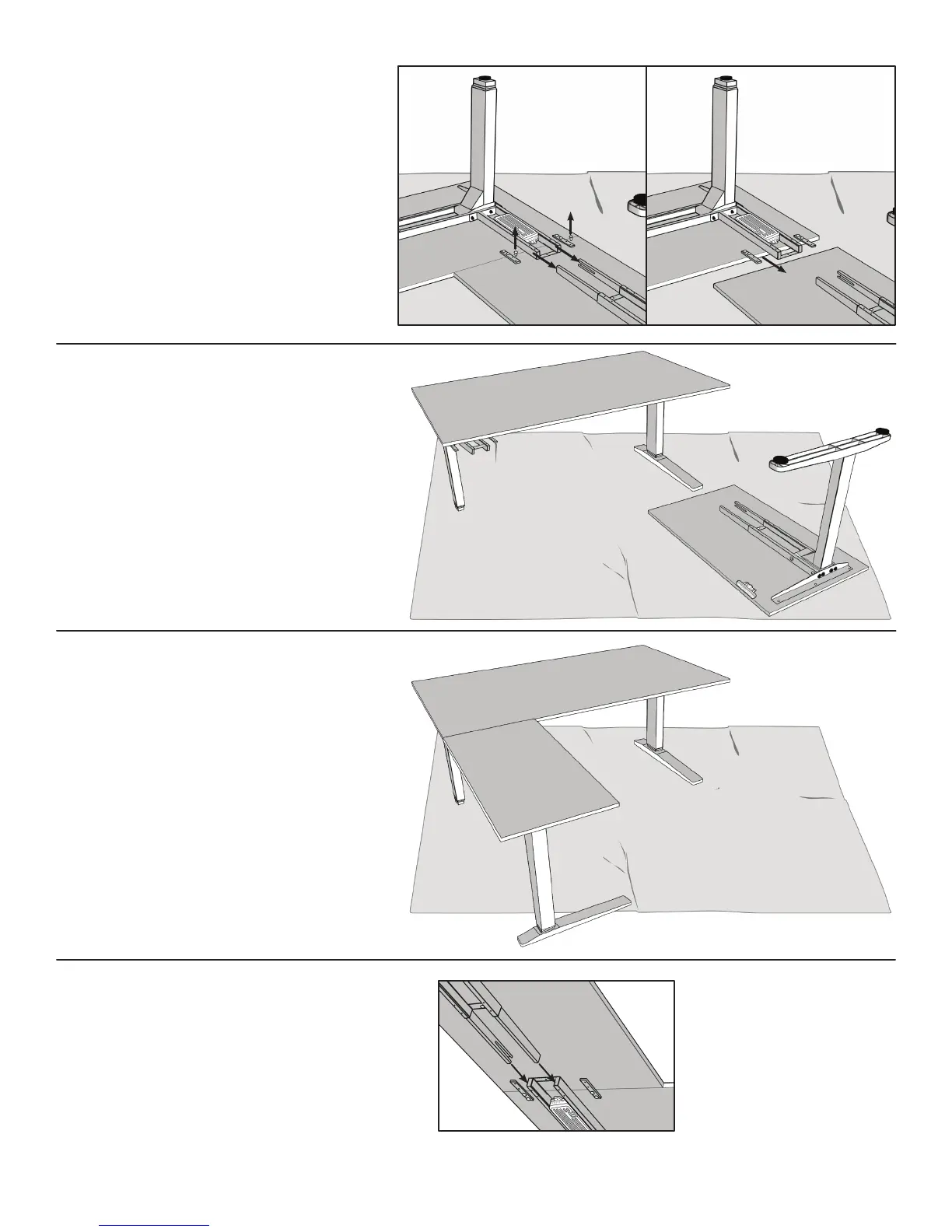
O. For this step, it’s advised that you
usetwopeopletoipovertheframe.
Grasp the Main desk assembly by the
frame and desktop (support both, so
that you don’t stress the screws) and
ipitright-sideup.
P. Flip the Return assembly right-side
up, and rest it CAREFULLY onto the Sup-
port brackets (part 18) and Corner crossbar
end (part 5). Have a second person hold the
Return assembly in place to avoid stress-
ing the Support brackets, and to keep it still
whileyoulayunderneaththedesktonish
assembly.
Q. Slide the Crossbar rails back into the
Corner crossbar end (part 5).
N. Inpreparationtoipoveryour
desk, slide OUT the two Crossbars rails
from the 2-leg assembly and unscrew
the third #10x5/8’’ Wood screw (part 17a)
from each Support bracket (part 18)
on the the Return desktop (part 20),
so the Return assembly is separate
from the Main assembly.


 To Next Page