Set Time and Day
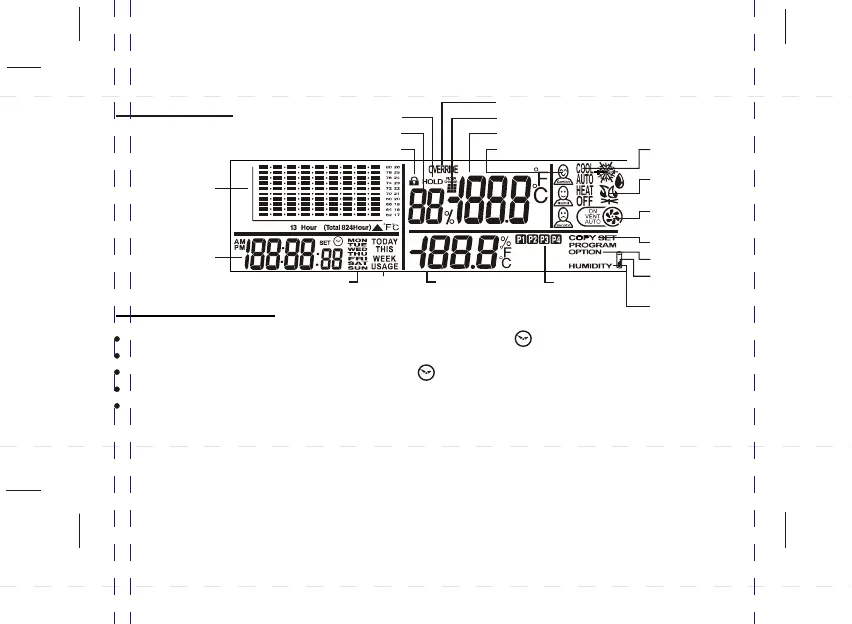
CLOCK
WEEKDAY
TEMPERATURE
TREND GRAPH
KEY LOCK
RELATIVE HUMIDITY
HOLD FUNCTION
OPERATION
MODES
USAGE
MONITOR
SET HUMIDITY
SET / PROGRAM
TEMPERATURE
FILTER CHANGE INDICATION
CURRENT (ROOM) TEMPERATURE
COMFORT ICONS
SYSTEM “ON”
INDICATION
AUTOMATIC
VENTILATION
BATTERY LOW
INDICATION
SET OPTIONS
COPY PROGRAM
LCD Display
5
OVERRIDE INDICATION
PROGRAM
NUMBER
Press SET CLOCK to start time setting. The time and SET symbol will flash.
Use AHEAD or BACK to set the current time.
Press SET CLOCK again. The day and SET symbol will flash.
Use AHEAD or BACK to set the current day.
Press SET CLOCK to exit. (Or, if the HEAT mode is selected, press SET CLOCK twice to exit.
If you press SET CLOCK only once, the thermostat will enter into the Humidifier Control
function; refer to page 11).



 To Next Page