37
Congratulations on purchasing your TV with a lockdown base plate. the
baseplate allows you to secure your television on credenza. Installation of
the base plate requires drilling three M5 holes in the top of the TV credenza
surface. Be sure to follow the instructions carefully so as not to mistake the
drill holes either in position or orientation. Once installed, your base will be
securely mounted while providing a 60 degree swivel for comfortable viewing
from the left,center or right of the screen.
Lockdown Installation ManualBase
1. Introduction
2. Accessories
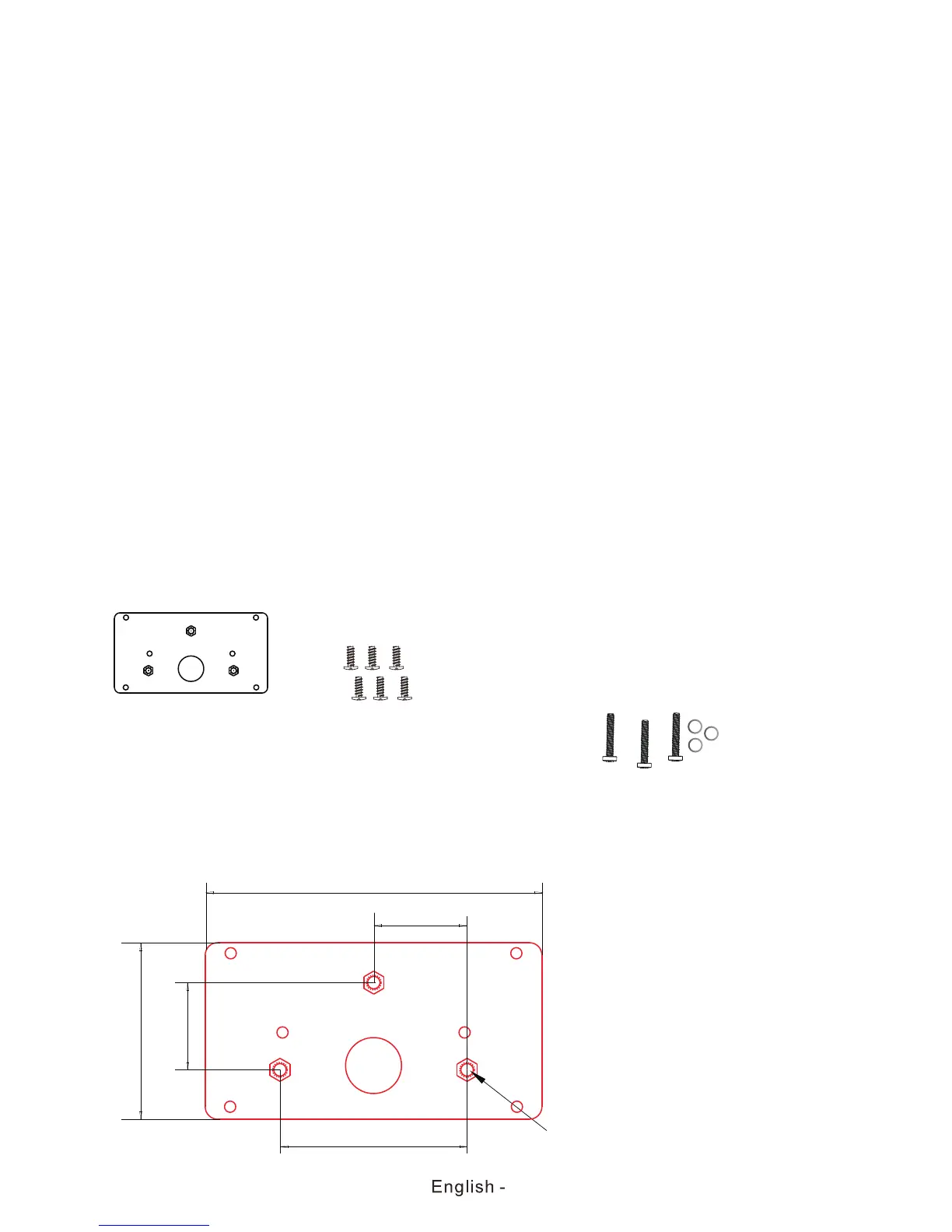
Metal baseplate(metal
baseplates are optionally
pre-installed on TV units)
6pcs ø4x10mm screws for
TV base attachement(For
pre-installed option,
screws will be part of the
assembled base)
Baseplate 1:1 template for
credenza drill hole positioning
3pcs M5 threaded bolts and washers for
lockdown plate installation(No supplied) ,
length of threaded bolt should not exceed 10mm.
Please Note:the 10mm length of threaded bolts
refer to how deep the threaded bolt can go inside
the mounting holes.when you’re buying threaded
bolt, you should add the original 10mm to the
thickness of your mounting plate in order to get
the total threaded bolt length.
134.7mm
75mm
70.8mm
35mm
37.5mm
3-M5


 To Next Page
 Loading...