EasyManua.ls Logo

urmet domus 1183/5 - User Manual

urmet domus 1183/5
12 pages
Print Icon
To Next Page IconTo Next Page
Loading...
sec.4b
−−−−
1
2 VOICE - Technical Manual
Download from www.urmet.com Technical Manuals area.
SECTION CONTENTS
2VOICE COMFORT DOOR PHONE REF. 1183/5 2
DESCRIPTION OF THE DEVICE.......................................................2
Structure .......................................................................................2
Description of terminals ................................................................2
Button functions ...........................................................................2
Led indications .............................................................................2
INSTALLATION .................................................................................3
TECHNICAL CHARACTERISTICS ....................................................3
Cleaning ........................................................................................3
DIP-SWITCH CONFIGURATION ......................................................3
Line terminal settings ...................................................................4
Performance .................................................................................4
Call reception ...............................................................................4
Answering a call ...........................................................................4
Adjusting the ringer speaker (mute) ..............................................4
Supplementary ringer ...................................................................4
Floor call .......................................................................................4
Intercom call forwarding ...............................................................4
Door open led ...............................................................................5
OPTIONALPROGRAMMING ............................................................5
Intercom function .........................................................................5
Call tone programming .................................................................5
Reset ............................................................................................5
KIT FOR TABLE MOUNTING Ref. 1150/50 ......................................6
SECTION 4B
(REV. C)
DOOR PHONE APARTMENT
STATIONS
2VOICE HAND-FREE DOOR PHONE REF. 1183/7 7
DESCRIPTION OF THE DEVICE.......................................................7
Structure .......................................................................................7
Description of terminals ................................................................7
Button functions ...........................................................................7
Led indications .............................................................................7
INSTALLATION .................................................................................8
TECHNICAL CHARACTERISTICS ....................................................8
Cleaning ........................................................................................8
DIP-SWITCH CONFIGURATION ......................................................9
Line terminal settings ...................................................................9
Performance ...............................................................................10
Call reception .............................................................................10
Answering a call .........................................................................10
Adjusting the ringer speaker (mute) ............................................10
Supplementary ringer .................................................................10
Floor call .....................................................................................10
Intercom call forwarding .............................................................10
Door open led .............................................................................10
OPTIONAL PROGRAMMING .........................................................10
Intercom function .......................................................................10
Call tone programming ...............................................................11
Door phone call ring tone ...........................................................11
Connection of a E2BP module to the
door phone
for the centralisation of lights and rollers ...................................11

Question and Answer IconNeed help?

Do you have a question about the urmet domus 1183/5 and is the answer not in the manual?

Summary

2 VOICE COMFORT DOOR PHONE Ref. 1183;5

Device Overview and Features

Covers device description, terminals, button functions, LED indications, and physical structure.

Installation and Configuration

Details installation steps, technical specs, cleaning, and DIP-switch setup.

Performance and Call Handling

Explains performance, call reception, answering, ringer adjustment, and call forwarding.

Optional Programming and Reset

Guides on optional programming, intercom, call tones, and system reset.

Table Mounting Kit

Instructions for using the optional table mounting kit.

2 VOICE HAND-FREE DOOR PHONE Ref. 1183;7

Device Overview and Features

Details device description, terminals, structure, button functions, and LED indications.

Installation and Technicals

Covers installation methods, technical characteristics, and cleaning procedures.

DIP-Switch Configuration

Guide to configuring DIP switches for operating mode and apartment numbering.

Performance and Call Functions

Explains call reception, answering, ringer adjustment, supplementary ringer, and floor call.

Intercom and Programming

Covers intercom call forwarding, optional programming, and call tone settings.

Advanced Integration and Reset

Details E2BP module connection for home automation and system reset.

Summary

2 VOICE COMFORT DOOR PHONE Ref. 1183;5

Device Overview and Features

Covers device description, terminals, button functions, LED indications, and physical structure.

Installation and Configuration

Details installation steps, technical specs, cleaning, and DIP-switch setup.

Performance and Call Handling

Explains performance, call reception, answering, ringer adjustment, and call forwarding.

Optional Programming and Reset

Guides on optional programming, intercom, call tones, and system reset.

Table Mounting Kit

Instructions for using the optional table mounting kit.

2 VOICE HAND-FREE DOOR PHONE Ref. 1183;7

Device Overview and Features

Details device description, terminals, structure, button functions, and LED indications.

Installation and Technicals

Covers installation methods, technical characteristics, and cleaning procedures.

DIP-Switch Configuration

Guide to configuring DIP switches for operating mode and apartment numbering.

Performance and Call Functions

Explains call reception, answering, ringer adjustment, supplementary ringer, and floor call.

Intercom and Programming

Covers intercom call forwarding, optional programming, and call tone settings.

Advanced Integration and Reset

Details E2BP module connection for home automation and system reset.

Overview

Urmet 2Voice Comfort Door Phone Ref. 1183/5 and 2Voice Hand-Free Door Phone Ref. 1183/7

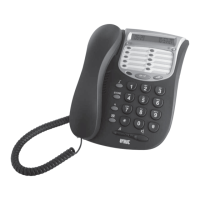
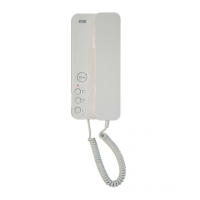
The Urmet 2Voice Comfort Door Phone Ref. 1183/5 and the 2Voice Hand-Free Door Phone Ref. 1183/7 are advanced apartment stations designed for integration into 2Voice door phone systems. Both models, designed by architect Toan Nguyen, feature a perfectly flat surface and a corner-less aesthetic. The Hand-Free model, Ref. 1183/7, further extends functionality by incorporating Urmet mechanical design with simple home automatic control using Yokis models.

Function Description

General Features (Common to both models):

  • Audio Communication: Both devices support two-way audio communication with the door unit. The Comfort model includes a microphone with speaker, electret microphone, and a spiral cable to a single telephone plug on the base, while the Hand-Free model offers a "Push to talk" function for activating audio channels individually.
  • Door Opening: A backlit door opening button with a green LED is present on both models, allowing for convenient door release.
  • Additional Buttons: Both models feature three additional programmable buttons (Ref. 1183/5) or four additional buttons (Ref. 1183/7) for various functions, including intercom calls.
  • Multicolour Indicator LED: A multicolour LED provides visual feedback for various states, including mute, automatic door lock release, open door status, and programming mode.
  • Configuration: Both devices include a configuration dip switch (SW1 for Comfort, SW1-SW2 for Hand-Free) for defining the station number within the apartment and the apartment number within the column.
  • Volume Adjustment: An adjustable volume with mute function is available for both door phone and floor calls.
  • Ring Tones: Both models offer differentiated door phone or floor call with five different ring tones.
  • Supplementary Ringer: Both devices are equipped with terminals (S+, S-) for connecting an external supplementary ringer or relay, which is activated when any call tone is generated.
  • Floor Call: Both models include terminals (CP) for connecting a floor call button. Upon receiving a floor call, the door phone plays the user-selected ring tone.
  • Intercom Call Forwarding: After programming a button for intercom, pressing the audio button followed by the programmed button can forward intercom calls. The system provides confirmation tones (2 beeps) for free indoor stations and warning tones (4 beeps) for busy lines.
  • Open Door LED: This function is active only for the last called door phone on which the door opening button was pressed, corresponding to the last calling door unit. It requires a suitable sensor connected to the door unit.

Specific Features (Hand-Free Model Ref. 1183/7):

  • Hands-Free Operation: The Hand-Free model supports "Hands Free" operation, allowing for communication without lifting a handset.
  • Yokis Integration: This model is designed for simple home automatic control using Yokis modules. It includes dedicated buttons for connecting to Yokis devices (contacts X1, GT and Y1, GT), with a maximum current of 50 mA at 12 Vdc.
  • Audio Activation Button: A dedicated button is used to activate/deactivate audio.

Important Technical Specifications

Power Supply:

  • Voltage: 36-48 Vdc (common to both models).

Current Consumption:

  • In operation: 70 mA max (common to both models).
  • In standby: 3 mA max (common to both models).

Environmental Conditions:

  • Operating Temperature: -5°C to +45°C (common to both models).
  • Max. Humidity: 90% UR (common to both models).

Dimensions (WxHxD):

  • Comfort Door Phone Ref. 1183/5: 90 x 200 x 52 mm.
  • Hand-Free Door Phone Ref. 1183/7: 110 x 80 x 18 mm.

Call Ring Tone Timing (Common to both models):

  • Main call station: 3 s ON (total duration 3 s).
  • Secondary call station: 0.4 s ON, 0.2 s OFF for 5 times (total duration 2.8 s).
  • Intercom: 0.5 s ON, 0.5 s OFF for 3 times (total duration 2.5 s).
  • Switchboard: 0.1 s ON, 0.05 s OFF for 3 times, pause 0.2 s repeated for 5 times (total duration 2.8 s).

Usage Features

Installation:

  • Mounting: Both models can be installed with flush-mounted casings (Mod. 503 or Ø 60mm) or directly on the wall surface. The installation involves fixing a bracket to the mounting box or wall, connecting the door phone, and then attaching the door phone to its plastic base.
  • Table Mounting (Ref. 1183/5): A specific transformation kit (Ref. 1150/50) allows the Comfort door phone to be table-mounted. This involves removing the cover, fixing the base to the support, inserting and blocking the cable, closing the cover, and mounting the feet. The system cable must connect directly to the door phone, not the table-top kit's junction box.
  • Line Termination: A line termination jumper is fitted in both door phones. It should be activated for devices wired at the end of a line where no other section starts from the device terminals.
  • Accessibility: For disabled or special needs users (D1, D2, D3 types), the center of the device should be arranged at a height between 110 cm and 130 cm from the floor, adhering to technical standard CEI 64-21:2016-12.

Programming:

  • Entering/Exiting Programming: Hold the button pressed for longer than 5 seconds. The yellow LED blinks slowly to indicate programming mode. The system automatically exits programming mode and saves parameters after 10 minutes.
  • Intercom Function Programming: Buttons can be programmed for intercom calls to other users in the column or to parallel indoor stations within the same apartment. This involves holding a button, pressing the door opener button on the target station, and confirming the programming.
  • Call Tone Programming: Users can select from 5 different ring tones for door phone and floor calls. This is done by entering programming mode, pressing the button to cycle through tones, and then exiting programming.
  • Reset: To restore default parameters, enter programming mode, hold the button pressed for longer than 5 seconds, and simultaneously press the • and buttons for longer than 3 seconds. The system confirms with two long beeps.

Operation:

  • Call Reception: The apartment station rings with the programmed tone based on the call source (main door unit, secondary door unit, intercom, floor call, switchboard).
  • Answering a Call: Press the button to establish a conversation. The button blinks when pressed. Pressing it again ends the conversation and switches off the display.
  • Adjusting Ringer Speaker: Enter programming mode, press the button to change the ringer volume (HIGH, LOW, MUTE), and then exit programming. The multicolour LED blinks to indicate mute status.
  • Push to Talk Mode (Ref. 1183/7): If communication is disturbed, short pressing the button activates audio from the door unit. Holding the button activates the external audio channel, allowing the user to speak. To listen, press the button.
  • Yokis Centralisation (Ref. 1183/7): With suitable programming of Yokis devices, the Hand-Free model can activate centralised closing of rollers (e.g., with one button) and turning off lights (e.g., with a second button).

Maintenance Features

  • Cleaning: Both door phone models can be cleaned by gently rubbing them with a damp cloth.

urmet domus 1183/5 Specifications

General IconGeneral
Brandurmet domus
Model1183/5
CategoryTelephone
LanguageEnglish

Related product manuals