21
Overdrive On-Off Switch
The Overdrive switch can be used to turn overdrive on or off. The switch can be
a latching switch (toggle switch, latching push-button, etc.) or a momentary type
switch (spring-loaded push-button switch, spring-loaded toggle switch, etc.)
connected to +12v ignition-switched power and pin 4 (brown) of the vehicle
harness. (The tan wire on pin 12 is for VSS output and shouldn’t be confused
with the brown wire on pin 4 for the O/D switch.) A momentary switch is needed
to use more than 2 states. Optionally, you can add an O/D indicator lamp
between +12v ignition-switched power and pin 2 (white) of the vehicle harness.
This lamp will normally light up when overdrive is off. Also, without adding a
switch, a single-click of the controller’s knob can turn overdrive on and off. This
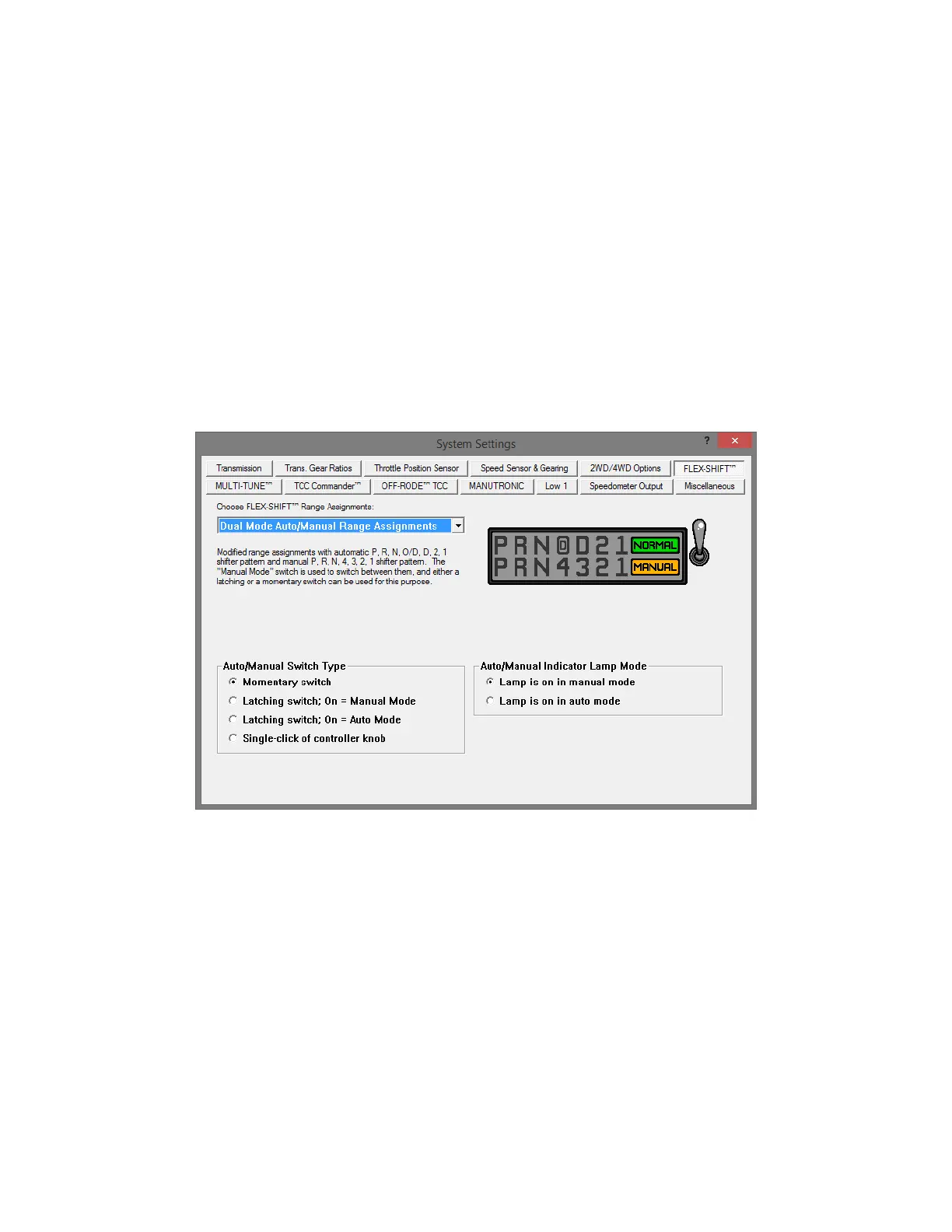
setting can be configured under the “Flex-Shift” tab of the tuning software.
Whenever the O/D or manual state is changed, it will be reflected in a change of
the PRNDL indicator on the home screen display (e.g. PRNO21 will change to
PRND21 or PRN321).
The FLEX-SHIFT Settings window. O/D settings are at the bottom.
To use an LED bulb for the O/D light (without built-in resistors for 12v), connect
the cathode (-) lead to the white wire on pin 2 of the vehicle harness and the
anode (+) lead to +12v ignition-switched power. Put a resistor in series on either
side. We recommend using a 1.2k Ohm resistor, but you can use one with a
lower resistance to make the LED brighter or one with a higher resistance to
make it dimmer. It’s best to stay above 1k Ohm to protect the LED. A 1/4w
resistor or higher is recommended.


 To Next Page