The USA SPEC PA11-VW6 is an iPod interface designed to connect an iPod directly to a Volkswagen (VW) car audio system, allowing for playback, control, and charging of the iPod within the vehicle. It replaces the functionality of a VW CD changer and offers enhanced convenience through its Hybrid Mode.
Function Description:
The PA11-VW6 interface translates commands from the VW CD changer controls into commands that the iPod understands. It directs the iPod's audio output to the VW vehicle audio system for optimal sound quality playback. The device supports charging of the iPod's internal battery, with charging automatically stopping one hour after the iPod is paused to prevent car battery drain. It also allows for the use of a DVD player, satellite radio, or other audio devices in conjunction with the iPod through an Aux Audio Input jack. The product is designed for plug-n-play installation, including all necessary cables, mounting screws, and a user manual.
Important Technical Specifications:
- Compatibility: Compatible with iPod and iPod mini models featuring a dock connector.
- iPod mini firmware version 1.3
- iPod firmware version 2.3 and 3.0.2
- iPod photo firmware version 1.1
- VW Vehicle Applications:
- Cabrio: 98-04
- Beetle: 98-05
- Golf: 98-05
- GTI: 98-05
- Jetta: 98-05
- Passat: 98-05
- Euro Van: 01-04
- Touareg: 04-05
- Radio Requirement: Radios must have a round SCAN button.
- Incompatibility: Not applicable to some 98-99 year models equipped with BOSE or Premier radio that have a 13-pin din plug.
- Text Display: For USA SPEC iPod interface products supporting TEXT display on radio, this feature is continuously supported. However, display of artist and song title information, track search by artist, song title, album, or genre are NOT supported; only the Playlist number and track number are displayed on the radio.
- Cable Replacement: The CAS-VW cable has been replaced by the CAS-VW6 cable to resolve data noise issues with some VW vehicles' pre-wired CD changer cables. The CAS-VW6 cable needs to be plugged into the back of the VW radio and is capable of retaining VW SAT receiver functionality.
Usage Features:
Modes of Operation:
The PA11-VW6 offers two primary modes: Playlist Mode and Direct Mode, with an additional Hybrid Mode and AUX Option.
-
Playlist Mode (DIP switch #2 ON):
- Operates and controls the iPod like a CD changer, allowing access to up to five Playlists on the iPod.
- The iPod screen is NOT locked to "ok to disconnect," and iPod control keys are fully functional. This is a key feature of the Hybrid Mode, which combines Playlist Mode and Direct Mode advantages.
- Users can manually change songs, artists, albums, fast forward, fast reverse, etc., using the iPod's keys while playing at any DISC location on the radio.
- If a Playlist playback is manually interrupted via the iPod's keypad to play a song from a "new category" (folders, Playlist, artist different from the one being played), the interface module memorizes the last played track number of that "new category." When returning to the same DISC on the radio, the interface module will use this memorized track number to resume playback of the related Playlist.
- Playlist naming: Playlists must be named "VW1...", "VW2...", etc., in iTunes, with "VW" in capital letters and no spaces between "VW" and the number. Additional text can follow (e.g., "VW1-Jazz").
- If no designated "VW" Playlists are created, the adapter automatically relates the first five Playlists on the iPod to DISC numbers 1-5.
- If fewer than five designated "VW" Playlists are created, the adapter fills the remaining DISC numbers with the first available Playlists on the iPod.
- The interface does not recognize Playlists with no audio tracks or the "On-The-Go" Playlist.
- Songs on iPod are played at DISC 6, with track order determined by the iPod's default order.
- Selecting DISC 1 to DISC 5 allows playback of 5 Playlists if the adapter's AUX option is not selected.
- Playback starts from the "Now Playing" song at DISC 6 by default when connected. If a Playlist was playing before connection, it will continue to play and repeat at DISC 6, switching to "All" when fast forward is pressed.
- To select a Playlist, press DISC UP (Λ) or DISC DOWN (V) buttons. The selected Playlist will begin playing, and its number and track number will be displayed.
- After the last song in a Playlist, playback restarts from the first track of that Playlist.
-
Direct Mode (DIP switch #2 OFF):
- Allows searching and selecting music directly on the iPod, just as in portable use.
- The sound plays through the car stereo.
- Track up/down, fast forward, and reverse buttons on the radio control music playback.
- All control functions on the iPod are available.
- When the iPod is connected, its screen goes blank briefly before returning to normal.
- Set the source to CD changer on the radio; iPod music will play at DISC 5 and Track 1.
- Adjust VOLUME, BASS, TREBLE, etc., as with other program sources.
-
AUX Input Option (DIP switch #1 OFF):
- The PA11-VW interface adapter can connect two audio sources, including the iPod.
- The additional audio source connects to the RCA input jack labeled AUX INPUT.
- The audio source at AUX INPUT can be accessed at CD 6 Track 1 after selecting the CD changer source on the radio.
- CD 1 to CD 4 are for accessing Playlists, and CD 5 is for accessing all songs on the iPod.
- When the "AUX INPUT" option is selected and the AUX button is pressed, the radio will display "CD 6 Track 1," providing access to the audio source connected to the AUX INPUT port.
Playback Function Controls (in Playlist Mode):
- SCAN: Pressing the scan button plays each track in the current Playlist for 10 seconds. If pressed at DISC 6, it plays all songs on the iPod for 10 seconds each.
- Random (Shuffle): Pressing the "RDM" (or "P scan" on some models) button plays songs and Playlists in random order.
- Repeat: Repeat of a song being played is not supported.
- Track Up/Down:
- "NEXT" button advances to the next track.
- "PREV" button goes to the beginning of the current track. Pressing "PREV" twice goes to the previous track.
- Rapid presses of track up/down buttons may cause uneven track number changes and short audio bits.
- If the VW radio displays a maximum of two digits for track number, track 100 will show as 01, 101 as 02, etc.
- Fast Track Search (x10): "FWD" (fast forward) or "REV" (fast reverse) buttons advance or retreat through tracks in increments of 10. Search stops at track 1 when the end of the Playlist is reached, then continues by increments of 10.
- Fast Forward/Fast Reverse Play:
- Press and hold fast forward or reverse buttons for more than 4 seconds to jump to the last or first track of the Playlist. This cancels scan mode if active.
- In random mode, pressing and holding forward/backward buttons skips through the current track at speed.
- During fast forward, when the end of the current track is reached, the iPod plays the next random track at normal speed. During fast backward, when the start of the current track is reached, the track plays again at normal speed. To continue fast forward/reverse play, release and press the button again.
- Changing Source: When a source other than the iPod (AM/FM, CD, Cassette) is selected on the radio, the iPod will pause.
Connecting and Disconnecting:
- Connecting iPod: Turn the VW radio ON before connecting the iPod. The iPod will take approximately 30 seconds to configure to external control mode, with its screen displaying changes until complete, then showing "iPod VW OK to disconnect."
- Disconnecting iPod: If the iPod is disconnected during playback in iPod mode, the radio automatically switches to AM/FM mode. After disconnecting, the iPod screen returns to the normal menu. Pressing and holding the Play/Pause button on the iPod may expedite this return.
- Mode Alteration: Disconnect the iPod from the PA11-VW before switching DIP switch #2 for mode alteration.
Installation:
- Remove the radio from the dash.
- Plug the round din plug on CB-PVW to the PA11-VW interface adapter (labeled "RADIO").
- Plug the black rectangular connector on CB-PVW cable to the factory prewired connector for the CD changer (disconnect existing CD changer if present).
- Connect auxiliary devices to the AUX input jack on the PA11-VW adapter box if the additional AUX option is selected (DIP switch #1 set to "OFF").
- Set DIP switch #2 to "OFF" only if Direct Mode is preferred.
- Plug the CB-PA14 cable to the PA11-VW adapter box (labeled "iPod").
- Reinstall the radio to the dash.
- Important: Use only the iPod connection cable provided with the PA11-VW interface adapter. Cables from other sources may damage the iPod.
SAT Cable Installation (for VW Equipped with SAT):
To retain SAT reception, three wires on the factory SAT connector need to be moved to the white connector on the USA SPEC cable.
- Unplug the 12-pin blue factory SAT connector from the back of the radio.
- Disassemble the connectors by pushing the inner piece through the open hole and raising the horizontal bar to release the latch.
- Pull out wires at pin #1, #3, and #7 from the factory SAT connector using a tool. Raise the key on each pin and insert them into pin #1, #3, and #7 of the white connector on the USA SPEC connector.
- Assemble the white connector on the USA SPEC cable by pushing the inner piece into the outer piece.
- Plug the white connector on the USA SPEC cable CAS-VW6 to the back of the radio again.
Maintenance Features:
- General Caution: iPods are not designed to withstand extreme temperatures in automobiles. Consult the iPod Owner's Manual for acceptable operation and storage temperatures.
- Device Integrity: Do not disassemble or alter the cable and interface box.
- Connections: Make connections correctly.
- Wiring: Do not cut away the wire sheath or use power for other equipment. Arrange wiring to prevent crimping or pinching.
- Installation: It is recommended to have wiring and installation done by professionals.
- Product Use: Do not use this product for purposes other than stated for the vehicle.
- Warranty: LTI Enterprises Inc. provides a three-year limited warranty against defects in materials and workmanship from the date of manufacture or original installation. Warranty registration is required within thirty days of installation. The warranty does not cover damage from improper installation, operation, accidents, negligence, abuse, shipping, acts of God, removal/reinstallation costs, products without original serial numbers/factory seals, modified products, or products not distributed by an authorized dealer.

 Need help?
 General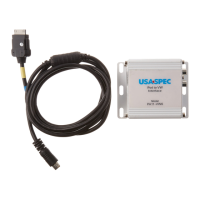

 To Next Page