16
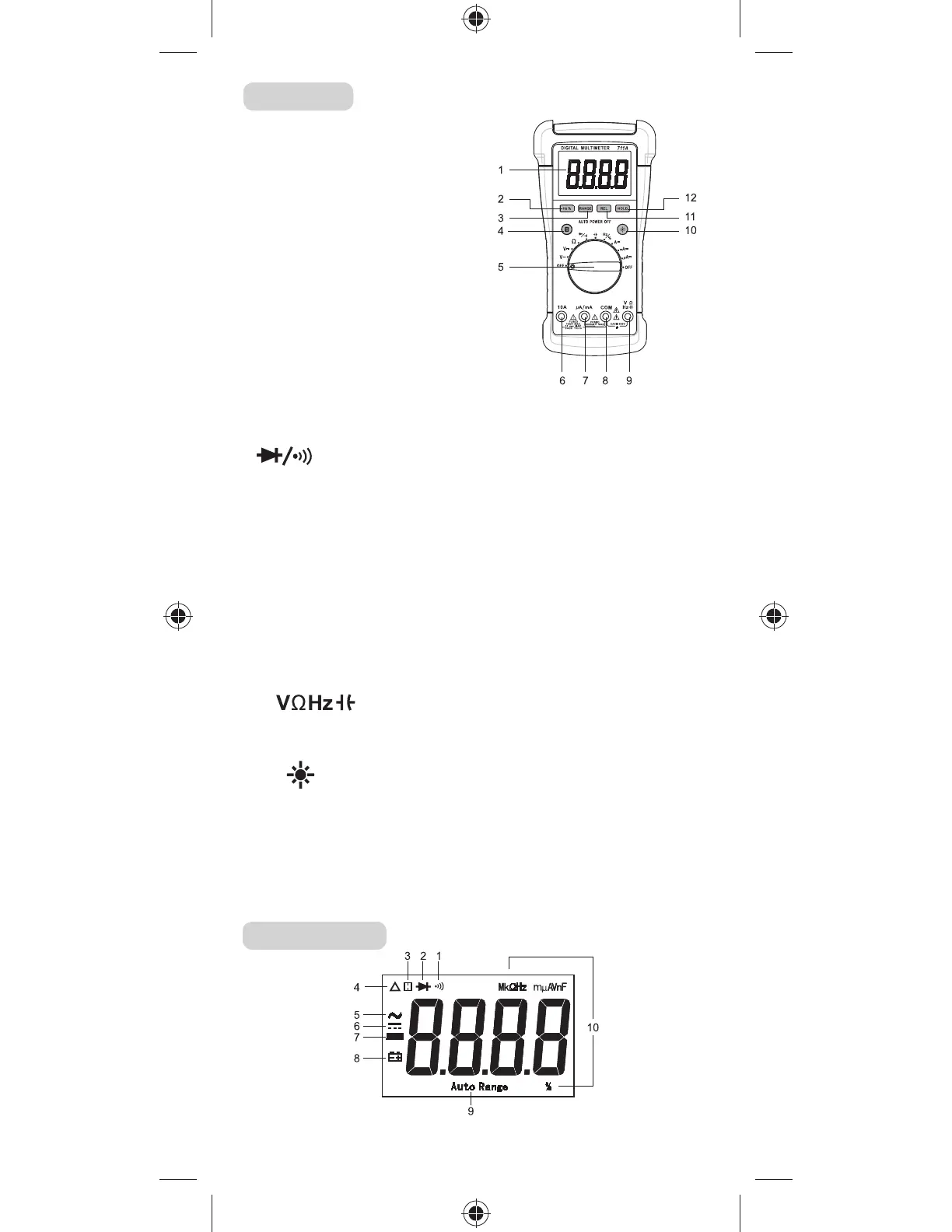
STRUCTURE
1. Display
3 3/4-digit LCD, with a max. reading of 3999
2. " Hz %" Button
When the function/range switch is in ”Hz/%”
position, pressing this button switches the
meter between frequency and duty cycle
measurements.
3. "RANGE" Button
manual range mode as well as to select desired
manual range.
4. "S" Button
In current measurement functions, pressing this "S" button switches the meter between
DC current and AC current measurements. When the Function/Range switch is in
" " position, pressing this button switches the meter between diode and
continuity measurements.
5. Function / Range Switch
6. "10A" Terminal
Plug-in connector for the red test lead for current (400mA - 0A) measurements.
7. "µA/mA" Terminal
Plug-in connector for the red test lead for the current measurements < 400mA.
8. "COM" Terminal
Plug-in connector for the black test lead for all measurements.
9. " " Terminal
.
Terminal Plug-in connector for the red test lead for all measurements except current
measurements.
10. " " Button
Button Press this button to turn on/off the backlight.
11. "REL" Button
12. "HOLD" Button
READING THE LCD


 To Next Page