TO LAMINATE
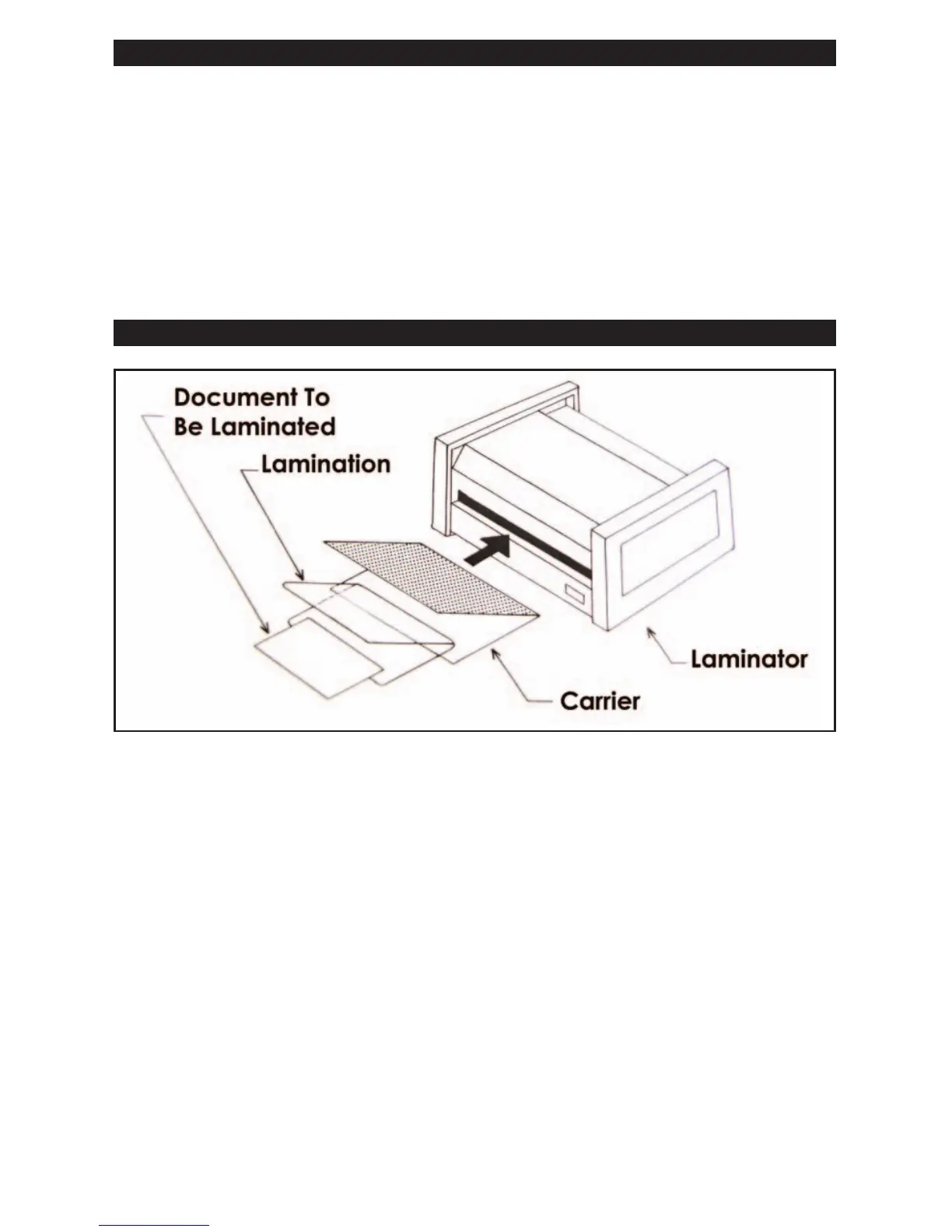
1. Insert the document into the center of a laminating pouch.
2. Insert the pouch, containing the document, into a carrier. Carriers are included
with your pouch purchase and should always be used when laminating.
3. Insert the folded edge of he carrier into the entrance slot of the laminator.
4. The carrier containing the pouch and document will automatically feed into the
laminator and exit the rear.
5. After the carrier cools, remove the laminated pouch. If handled too soon before
the adhesiv
e in the film c
o
ols and har
dens, the finished piece may become
distorted.
6.
U
pen conclusion of laminating, depress switch to “off”.
TO START
Connect cord to power source noted on bottom of laminator. Depress switch to “on” (at front of
laminator).The switch lights up to indicate that power is on. Allow machine to warmup
for 5 Minutes.



 To Next Page