2
Installation
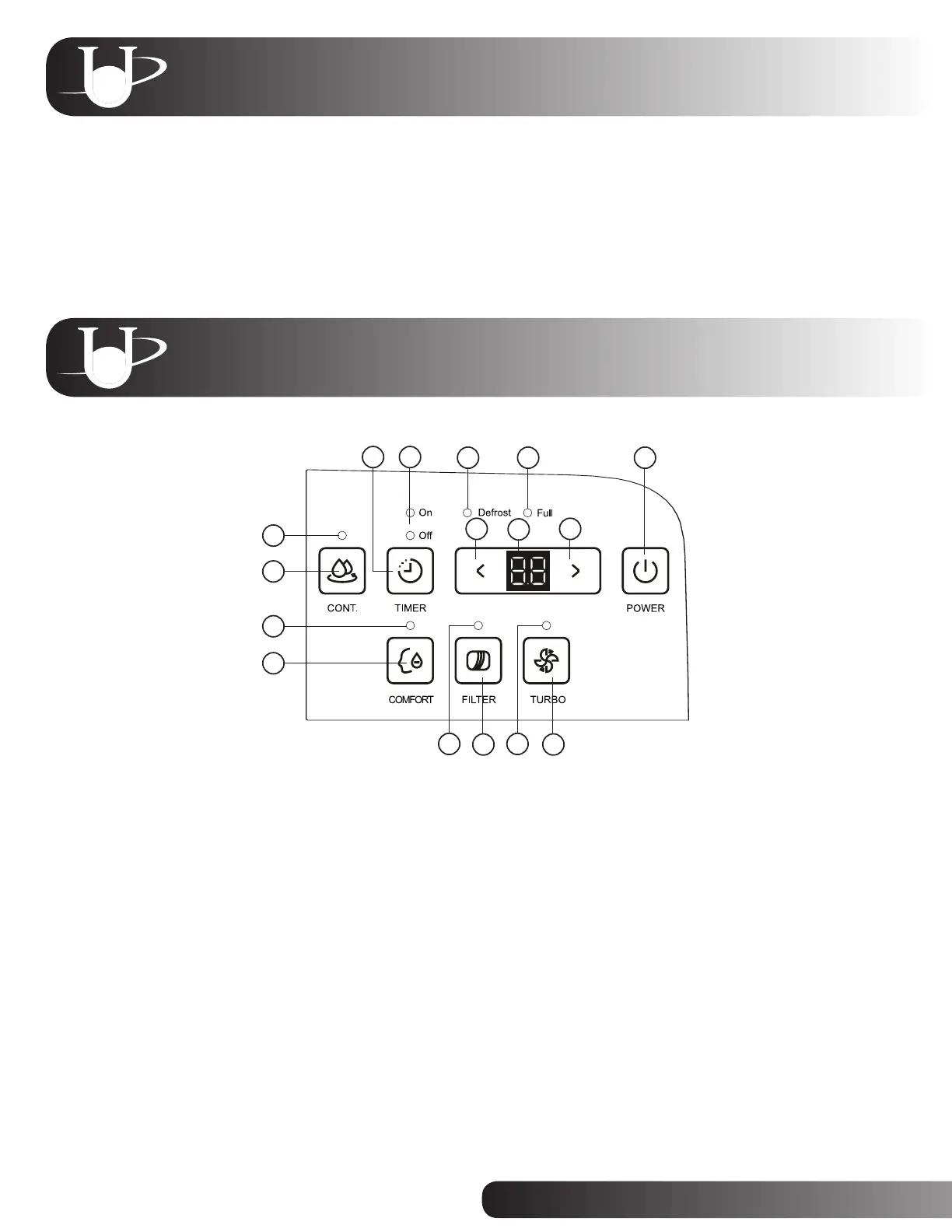
Control Panel
1.Continuousmodelight:Indicatesthedehumidierisoperatingincontinuousmode.
2.Cont.button:Presstoactivateordeactivatecontinuousoperationmode.
3.Comfortmodelight:Indicatesthedehumidierisoperatingincomfortmode.
4.Comfortbutton:Presstoactivateordeactivatethecomfortmode.
5.Filterlight:Indicatesthatthelterneedstobecleaned.
6.Filterbutton:PresstoresettheFilterlightaftercleaningthelter.
7.Turbolight:IndicatesthefanspeedissettoTurbo(high).
8.Turbobutton:PresstoactivateordeactivatetheTurbofanspeed.
9.Powerbutton:PresstoturnthedehumidierONorOFF.
10.Upbutton:Presstosetahigherhumidityortimervalue.
11.Digitaldisplay:Displaystheselectedhumiditylevelorauto-start/stoptimewhilesetting.Thedefaultdisplayshows
ambienthumiditylevel(between30percentand90percent)whiletheunitisON.
12.Downbutton:Presstosetalowerhumidityortimervalue.
13.Fulllight:Indicatesthewatertankisfullandneedstobeemptied.
14.Defrostlight:Indicatestheauto-defrostfunctionisactive.
15.TimerOnandOfflights:Indicatesauto-ONandauto-OFFsettingsareprogrammed.
16.Timerbutton:Presstoactivateordeactivatethetimerfunctionandtoprogramtheauto-ONandauto-OFFsettings.
2
3
4
5 7
6 8
10
13 914
1516
12
11
1
1. Positiontheunituprightonalevel,stablesurfacetominimizenoiseandvibration.
2. Closealldoorsandwindowsinthearea.Theunitismosteffectiveinanenclosedspace.
3. Plugtheunitintoa120-voltpowersource.


 To Next Page