BASIC OPERATIONS
Prepare the connections and power supply.
Load a disc.
Press the Open button to open the disc compartment lid. Load a disc with the label-side facing up. Close
the lid manually. If a single-sided disc is loaded upside-down, the player will display “BAD DISC”.
Start playback.
Press Play/Pause button to start playback (some discs may start playing automatically).
1.
2.
3.
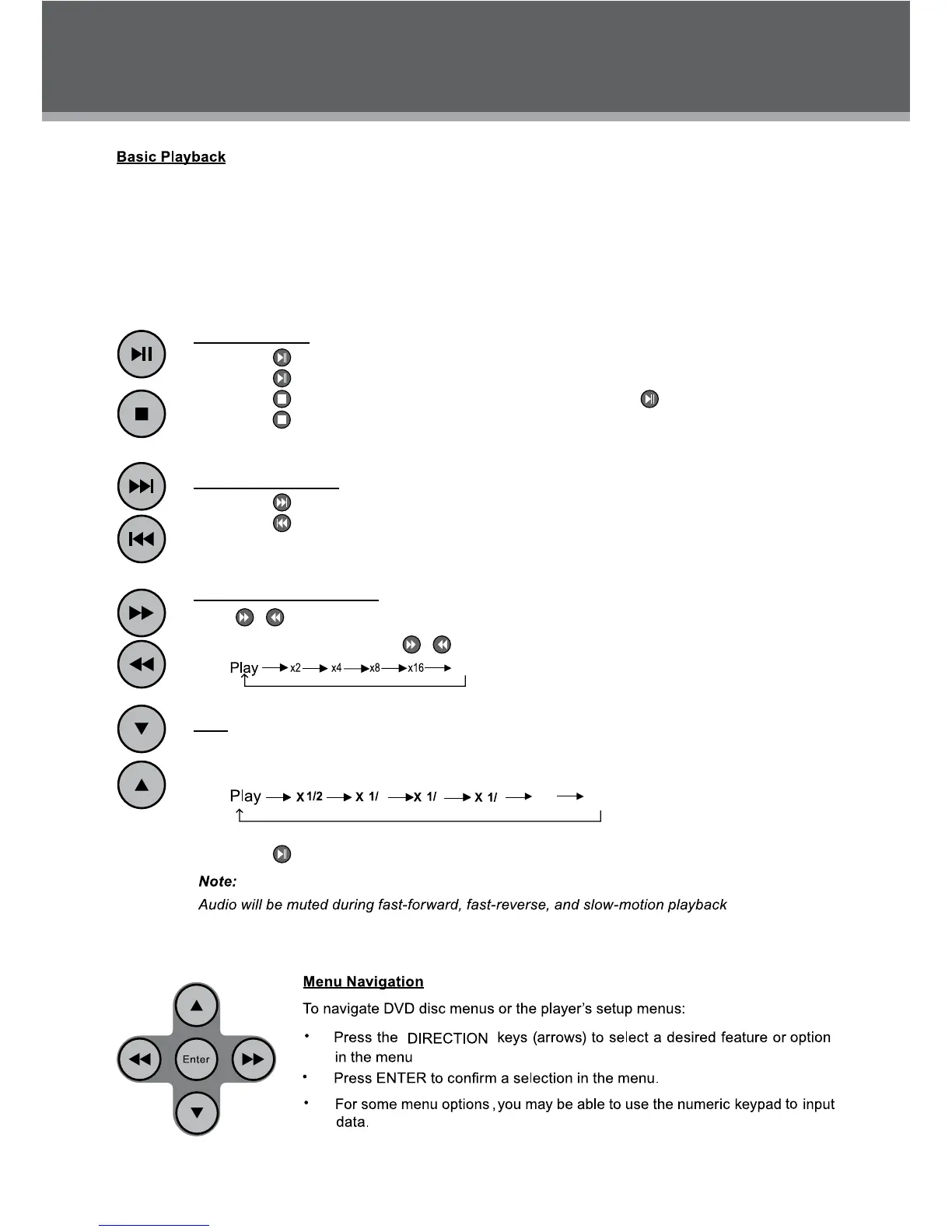
Play/Pause/Stop
Press •
to play the disc for the rst time.
Press •
during playback to pause. Press again to resume playback.
Press •
during playback to stop the disc (“Pre-Stop”). Press to resume playback.
Press •
when the disc is “Pre-Stopped” to stop playback completely. (When is pressed, the
disc will start playing from the beginning.)
Next/Previous (Skip)
Press •
to skip forward one track (DVD, CD, MP3, etc).
Press •
to skip back one track (DVD, CD, MP3, etc).
Forward/Reverse (Search)
Press
/ to fast-forward / reverse through the disc.
Each successive press of • / will change the rate of fast-forward / reverse playback.
Slow
To slow-forward through the disc, press the UP direction button.
Each successive press of UP direction button will change the rate of slow-forward playback.•
Press • to resume normal playback.
x32
x1/7x1/6
54
3



 To Next Page