11
WARNING
: TO REDUCE THE RISK OF ELECTRIC SHOCK, UNPLUG BEFORE
TROUBLESHOOTING.
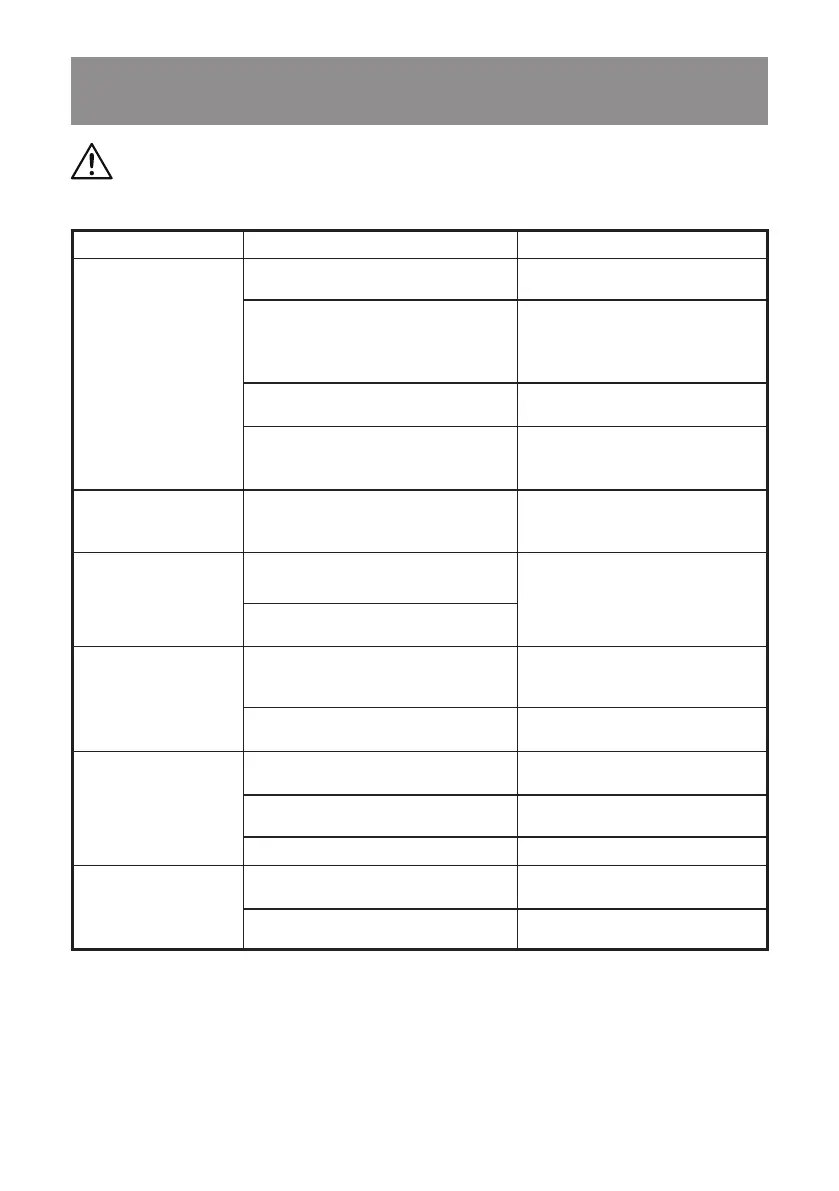
TROUBLESHOOTING
PROBLEM POSSIBLE CAUSE SOLUTION
The air mover will not
operate.
No power supply.
Check the power supply, cord,
breakers, and fuses.
Faulty power cord.
Unplug and check the power cord.
If damaged, have it repaired by
qualied personnel or contact the
after sales helpline.
On/off switch in the wrong position.
Move the switch to the "I" ON
position.
The on/off switch is faulty.
Have the switch replaced by
qualified personnel or contact the
after sales helpline.
The air mover runs but
makes loud scraping
noise.
Damage to the unit has caused
deformed housing or misaligned
centrifugal fan.
Replace the air mover.
The air mover runs but
centrifugal fan does not
rotate.
The centrifugal fan and housing are
jammed.
Replace the air mover.
There is a problem with the switch or
capacitor.
The air mover runs
but with excessive
vibration.
The centrifugal fan has dirt build up.
Have the air mover inspected by
qualied personnel or contact the
after sales helpline.
The centrifugal fan is damaged or the
motor is bent.
Replace the air mover.
The remote control will
not operate.
The remote control is not paired with
the air mover.
Reset the remote control following
the instructions on page 8.
The battery is dead.
Replace the battery or remote
control.
The remote control is damaged. Replace with a new remote control.
The status light on
the remote control no
longer illuminates when
pressed.
The battery is dead.
Replace the battery or remote
control.
The remote control is damaged. Replace with a new remote control.


 To Next Page