7
OPERATION
WARNING
: BE SURE TO READ, UNDERSTAND, AND APPLY ALL THE INFORMATION
IN THE IMPORTANT SAFETY INSTRUCTIONS SECTION AT THE BEGINNING OF THIS
OPERATOR'S MANUAL. DO NOT OPERATE IN AREAS WITH FLAMMABLE GASES, VAPORS,
OR EXPLOSIVE DUSTS IN THE AIR. FLAMMABLE GASES OR VAPORS INCLUDE BUT
ARE NOT LIMITED TO: LIGHTER FLUID, SOLVENT TYPE CLEANERS, OIL-BASED PAINTS,
GASOLINE, ALCOHOL, OR AEROSOL SPRAYS. EXPLOSIVE DUSTS INCLUDE BUT ARE NOT
LIMITED TO: COAL, MAGNESIUM, GRAIN, OR GUN POWDER. TO REDUCE THE RISK OF
HEALTH HAZARDS FROM VAPORS OR DUST, DO NOT USE AROUND TOXIC MATERIALS.
1. Verify that the on/off switch is set to "0" OFF and the power cord is unplugged.
2. Place the air mover in the desired position on a at and stable surface. Ensure there is at least
a foot of clearance on each side of the air mover. Avoid placing the air mover where loose fabric,
sheets, or other objects can get pulled onto the intake grills.
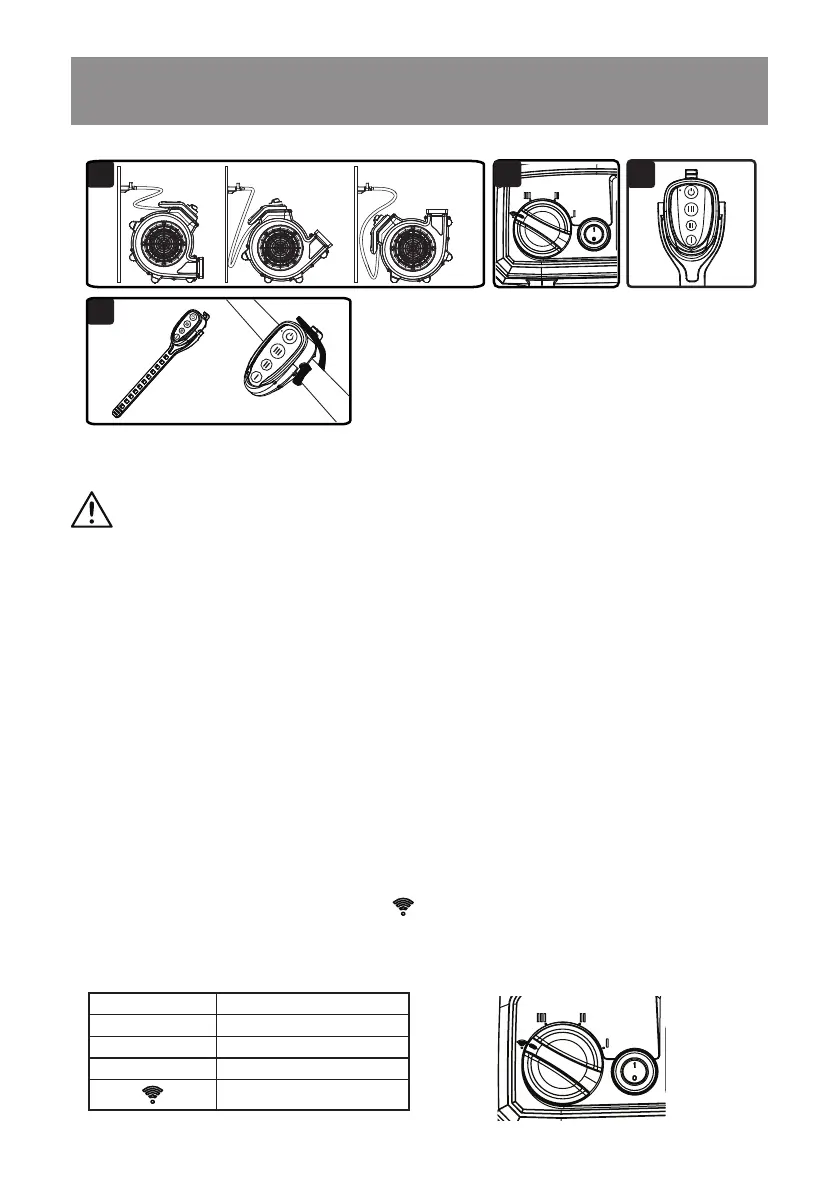
3. Direct air mover at the designated target area, using one of the operational positions (Fig. 1).
4. Plug in the air mover to a suitable power outlet.
5. Press the on/off switch to "I" ON position.
6. When the speed control knob is positioned at either I, II or III, the air mover will begin to operate
at the desired speed. The indicator light on air mover will illuminate green.
7. To change to desired speed, switch the knob between the three positions.
8. When the speed control knob is located at
position, the remote control mode is engaged.
For remote control operation, refer to the Remote Control Mode section.
9. When nished with use, press the on/off switch to "0" OFF position and unplug the power cord
from the outlet. See page 10 for storage instructions.
GENERAL USE INSTRUCTIONS
1
2
3
1
1
4
Position Status
I Low
II Medium
III Maximum
Remote Control Mode


 To Next Page