11
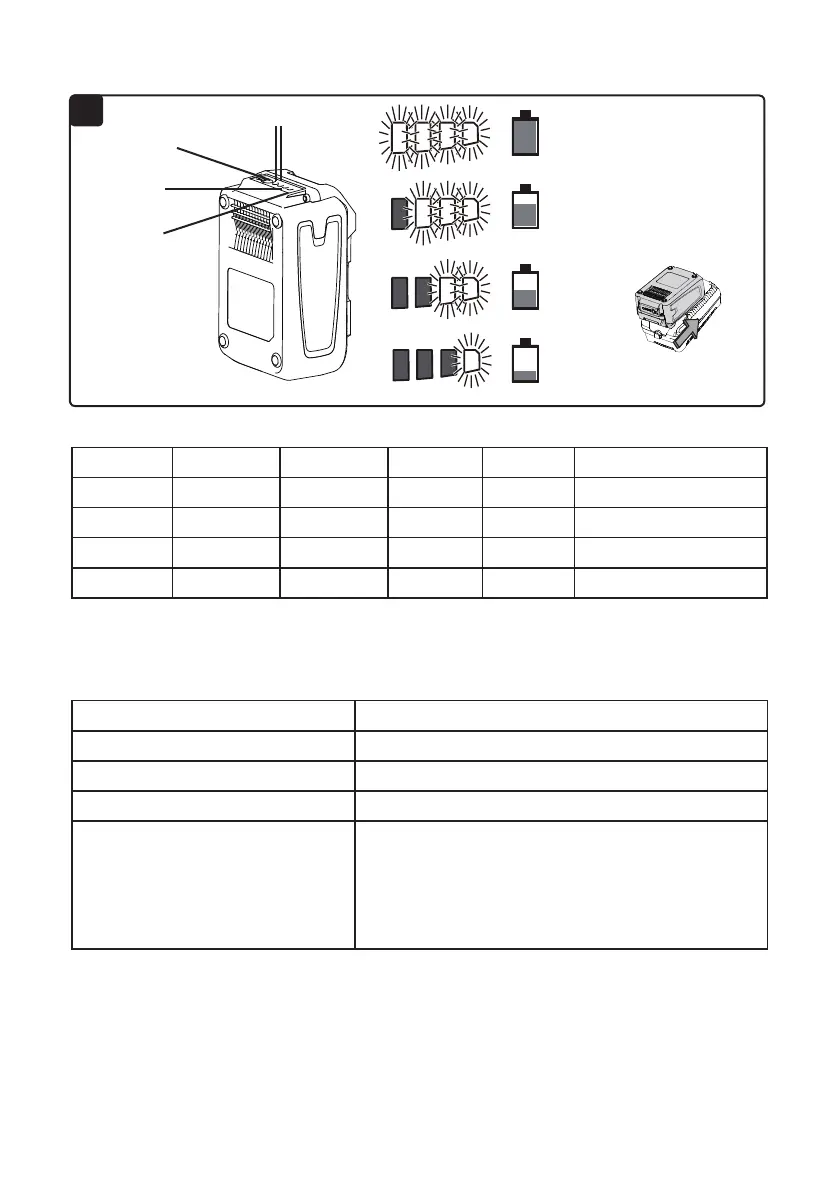
Press button A (Fig. 10) on the battery pack to determine approximate run time remaining.
BATTERY PACK OPERATION
CHARGER OPERATION
Button A
Yellow light
Red light
Two green lights
75-100 %
50-75 %
25-50 %
0-25 %
Green Light Green Light Yellow Light Red Light Capacity Status
ON ON ON ON 75-100% Continue use
OFF ON ON ON 50-75% Continue use
OFF OFF ON ON 25-50% Prepare to charge battery
OFF OFF OFF ON 0-25% Charge battery
Light Indicator On Charger Status
Red light at beginning Pre-charge
Flashing green light Charging normally
Continuous green light Ready for use
Flashing red light
1.Battery temperature is not within the charging
temperature range of 4°C (40°F) and 40°C (100°F).
2.The charging current is too high.
3.Battery may be depleted.
4.Charger may be damaged.
Note! Recharge the battery at a temperature between 4°C (40 °F) and 40°C (100°F). If the
battery pack is hot, allow it to cool down before recharging.
10
WARNING!
To reduce the risk of electric shock, this charger has a polarized plug
(one blade is wider than the other). This plug will t in a polarized outlet only one way. If the
plug does not t fully in the outlet, reverse the plug. If it still does not t, contact a qualied
electrician to install the proper outlet. Do not change the plug in any way.







 To Next Page