16
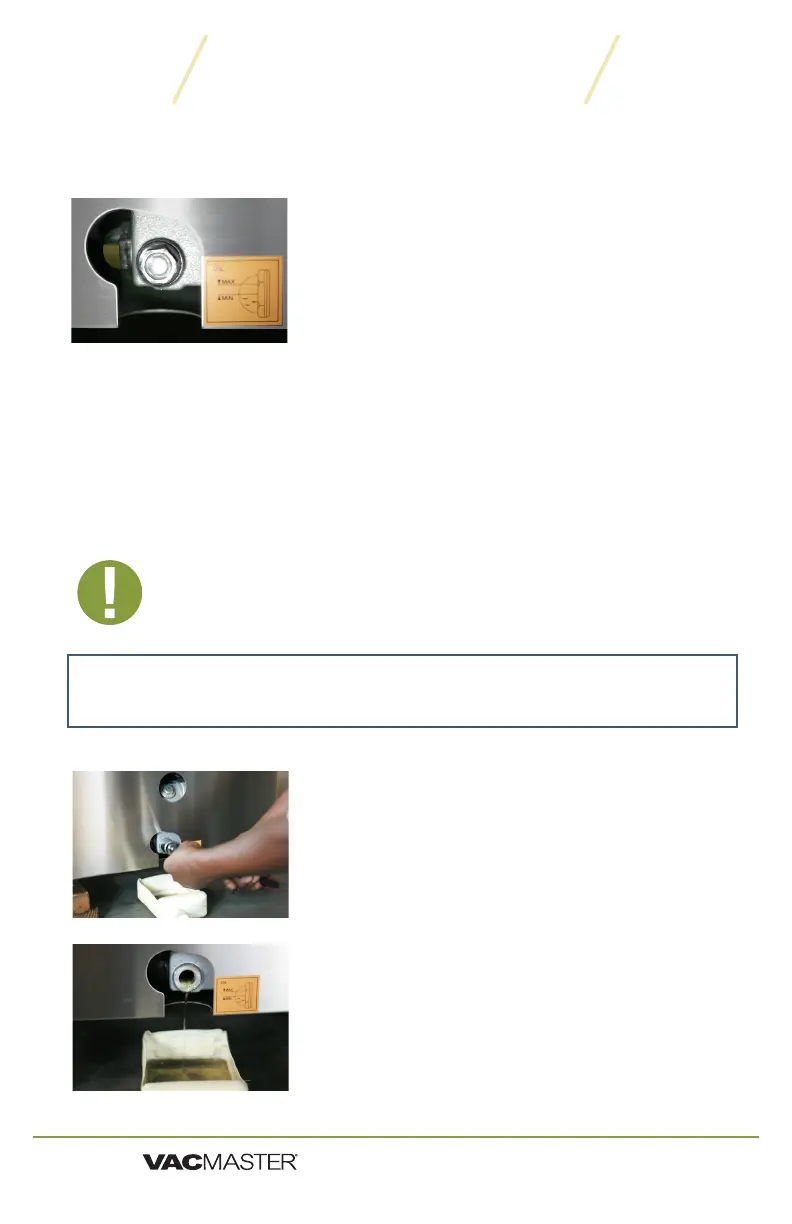
Using the pump site glass, check the oil level and color frequently.
1. Oil must remain between ½ to ¾ of site glass.
2. With use, the pump oil will become cloudy,
dark, or even “milky.” Once oil becomes
discolored, change the oil using new
VacMaster
®
vacuum oil.
Maintaining the Vacuum Pump
• First oil change: one week after use.
•
Remove the oil drain bolt -
bolt on the side of the machine. Place an oil
catch cup under drain bolt. Using your 7/8”
socket wrench, remove the oil drain bolt. Oil will
Capture oil - When oil is completely drained,
replace the drain bolt. Dispose of old oil
properly, according to your local and state
regulations.
Follow the “Adding Oil
to the VP320” instructions on page 3.
NOTE: The VP320 vacuum pump requires periodic oil changes. Follow this
oil change schedule to ensure proper maintenance of your VP320.
IMPORTANT: Make sure the VP320 is turned OFF and unplugged
before adding oil. Do not plug in or use machine until oil has been
Changing/Replacing Oil
Maintenance
Prepare oil in the pump - Run the vacuum process a few times. This will
warm up the oil, allowing it to drain freely and remove any contaminants.
TIP:
ARY, Inc. | 11880 College Blvd Suite 550 Overland Park, KS 66210 | www.VacMasterFresh.com | 800-821-7849
VP320 Chamber Vacuum Sealer | User Guide


 To Next Page