11
ARY, Inc. | 11880 College Blvd Suite 550 Overland Park, KS 66210 | www.VacMasterFresh.com | 800-821-7849
VP680 Chamber Vacuum Sealer | User Guide
2. Fill the pouch and place inside the chamber
Fill the pouch with the product to be vacuum packaged and place the
pouch inside the chamber. Keep pouches that contain liquids or wet
chamber, with the opening of the pouch across the seal bar. Make sure
Note: The entire pouch, including the opening, must remain inside the
chamber.
3. Close the machine lid to vacuum and seal
gauge begins to move.
4. Inspect the pouch
When the lid opens, remove and inspect the pouch.
Vacuum conrmation - Check the quality of the vacuum by looking at
the tightness of the pouch and the product. Look for air pockets or air
leaks. If you notice that the product is not vacuum packaged tightly,
then increase the vacuum time by 5 seconds, vacuum and seal again.
Seal conrmation – Inspect the pouch seal. A positive seal will appear
clear upon inspection. If the seal is spotty or incomplete, increase the
seal time by 0.1 second. If the seal appears white or milky, decrease
the seal time by 0.1 second. Once the settings are determined for your
application, vacuum and seal again. If the product is vacuumed and
sealed tightly, then the process is complete.
5. ED Code - stands for end of demonstration. You are ready for a new cycle.
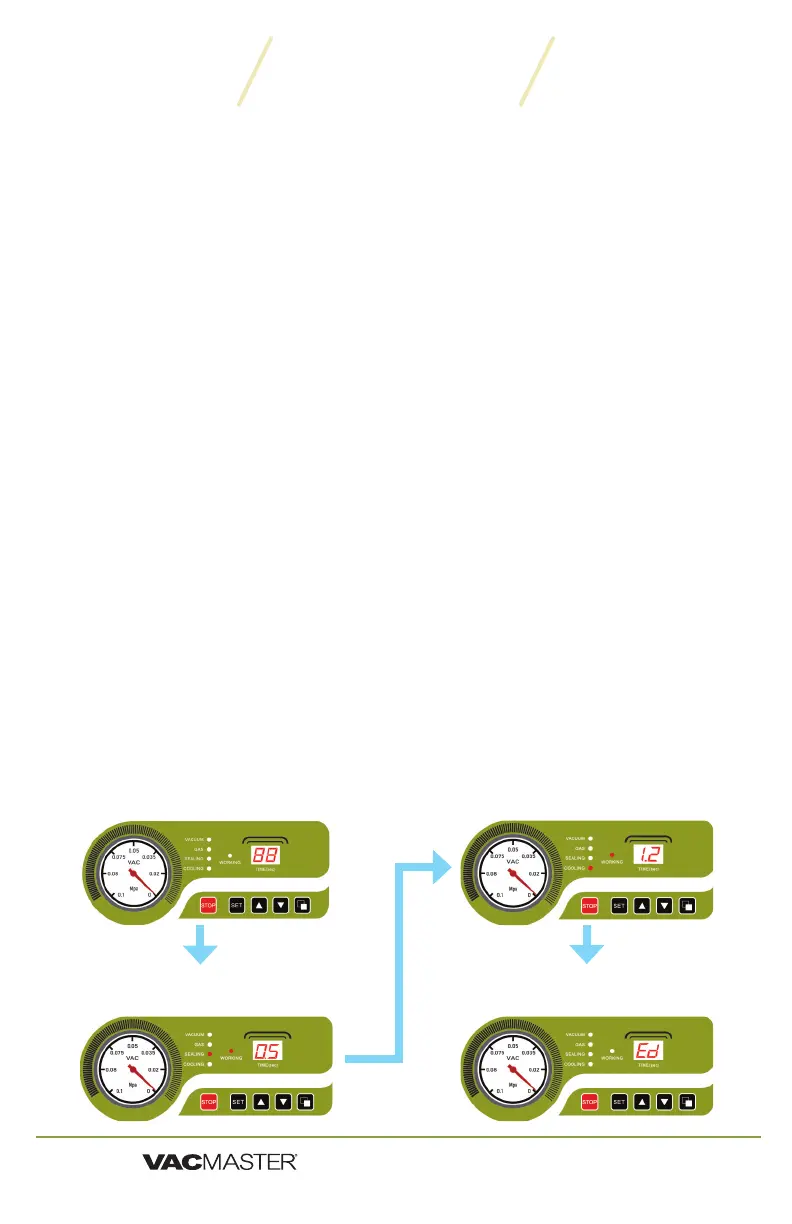
Vacuum Cycle
Runs for a set time - counting down to zero
Sealing Cycle
Runs for a set time - counting down to zero
Cooling Cycle
Runs for a set time - counting down to zero
Lid Release
Indicates the end of the process.
How to Use


 To Next Page