12
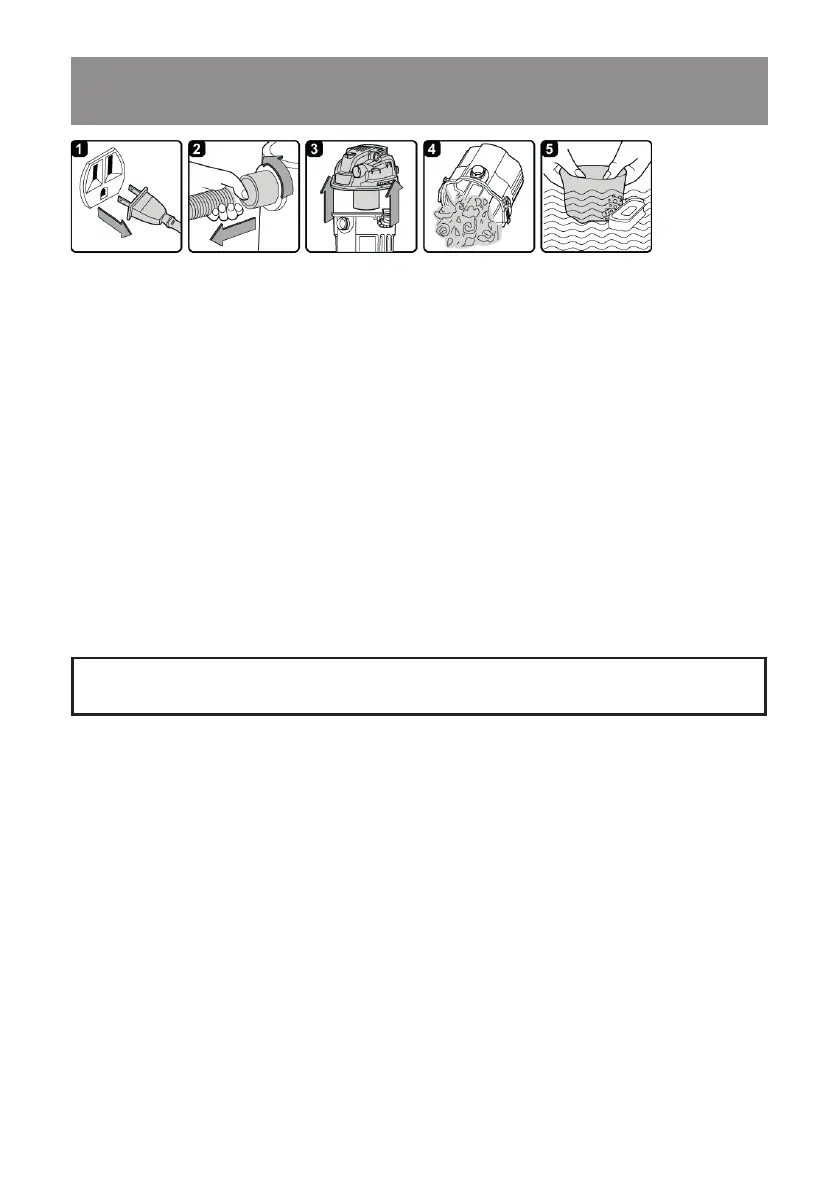
1. Verify that the power cord is disconnected from the outlet. (g. 1)
2. Disconnect the hose from the vacuum. (g. 2)
3. Remove the vacuum from the mounting rack.
4. Undo the latches and remove the power head from the collection tank. (g. 3)
5. Clear all dirt or debris from the collection tank and hose. (g. 4)
6. Clean the foam lter by washing it with water and mild soap. (g. 5)
7. Check the hose, attachments, and power cord to verify that they have not been damaged.
8. Place power head on collection tank and secure latches.
IMPORTANT!
Clean or change the lter regularly for best performance.
ALWAYS USE DUST
FILTER FOR DRY VACUUMING.
If the machine is used without the dust lter, the motor will burn
out and the warranty will be voided. Always keep spare dust lters on hand.
NOTICE!
The lters included are made of high quality materials designed to stop small dust
particles. The dust lter should be used for dry pick-up only. A dry dust lter is necessary to
pick up dust. If the dust lter is wet, it will clog quickly and be difcult to clean. Handle the lter
carefully when removing it for cleaning or replacing. Check the lters for tears or small holes. A
small hole can let dust pass through and out of the lter. Do not use a lter with holes or tears in
it; replace it immediately.
MAINTENANCE
WARNING:
ALWAYS DISCONNECT THE PLUG FROM THE POWER OUTLET BEFORE
REMOVING THE POWER HEAD FROM COLLECTION TANK.








 To Next Page