Static calibration / in field calibration
• YOU MUST do a static calibration to create a new product profile
• You can EDIT an existing product profile when performing a static cal
• *NOTE: It is recommended to do at least one static calibration for every product per
year
• The In-Field Calibration is meant to be a check on the accuracy of your static
calibration. It is NOT recommended that you utilize the In-Field calibration to find the
correct cal number
• Write down or screenshot your cal numbers in case you lose them
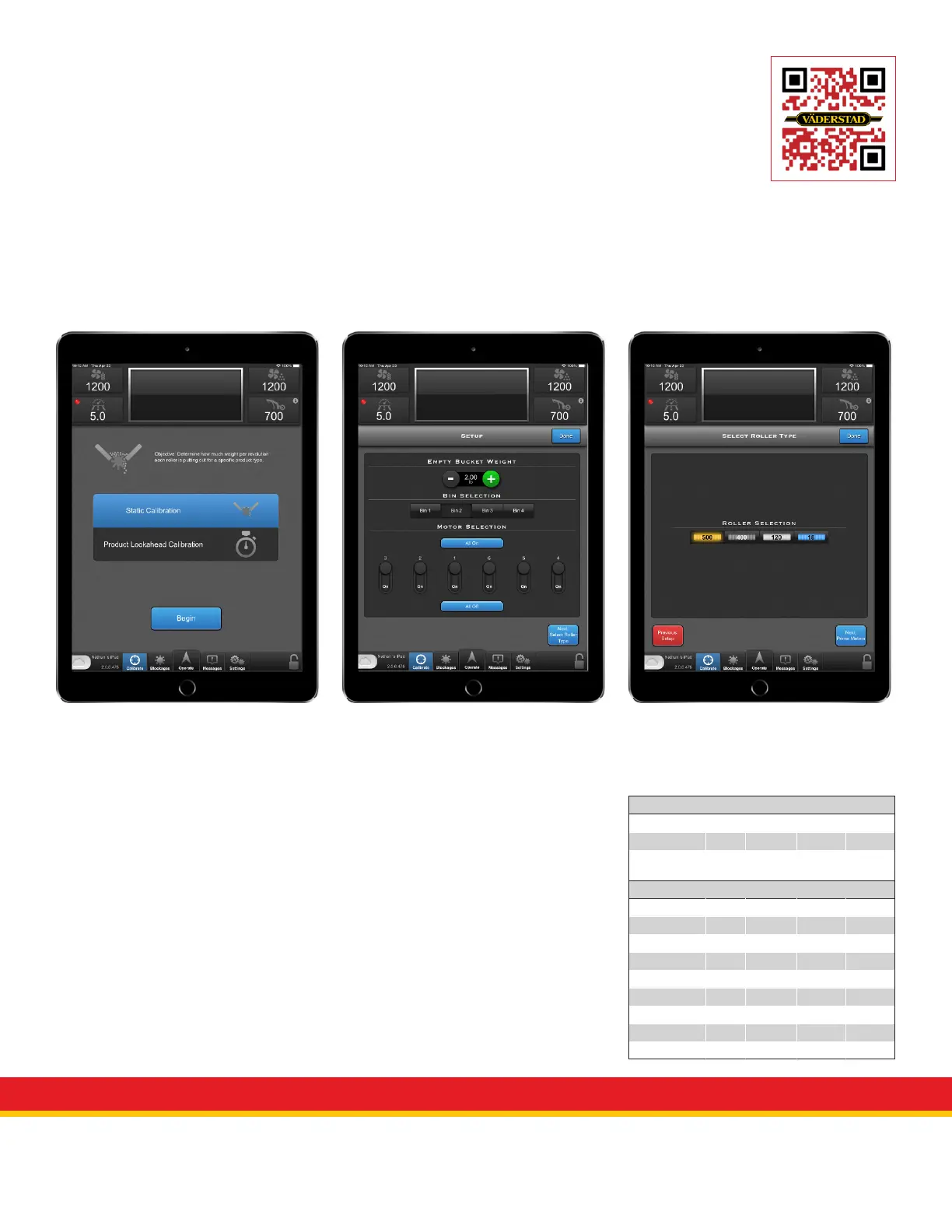
• To perform a Static Cal:
Select the “Calibrate” button to access
the calibrate screen.
Select “Static Calibration” then
“Begin”
Measure the weight of your
calibration bucket and enter the
number into the empty bucket weight.
Select the bin you are going to
calibrate and how many meters
sections you wish to run. It is
recommended to run all sections
when using factory calibration bucket.
Select “Next: Select Roller Type”
Select the type of roller you have
installed in your machine.
Select “Next: Prime Meters”
View QuickStart video
Fenix III Meter Rollers
Color Blue Grey Black Yellow
Volume cc 18 cc 120 cc 400 cc 500 cc
Roller Output
(lbs/ac)
Low
(1-12)
Medium
(6-60)
High
(30-350)
Ultra
(40-400)
Product
Fertilizer • • •
Canola •
Barley •
Oats •
Large Bean •
Flax •
Wheat •
Inoculants •
Peas •



 To Next Page