13Operating Manual VRT 392
08:00 12:00
15 °
20 °
25 °
Room temperature
Time
Period
08:00 12:00
15 °
20 °
25 °
Time
Period
23
4
1
Set back
temperature
Room temperature
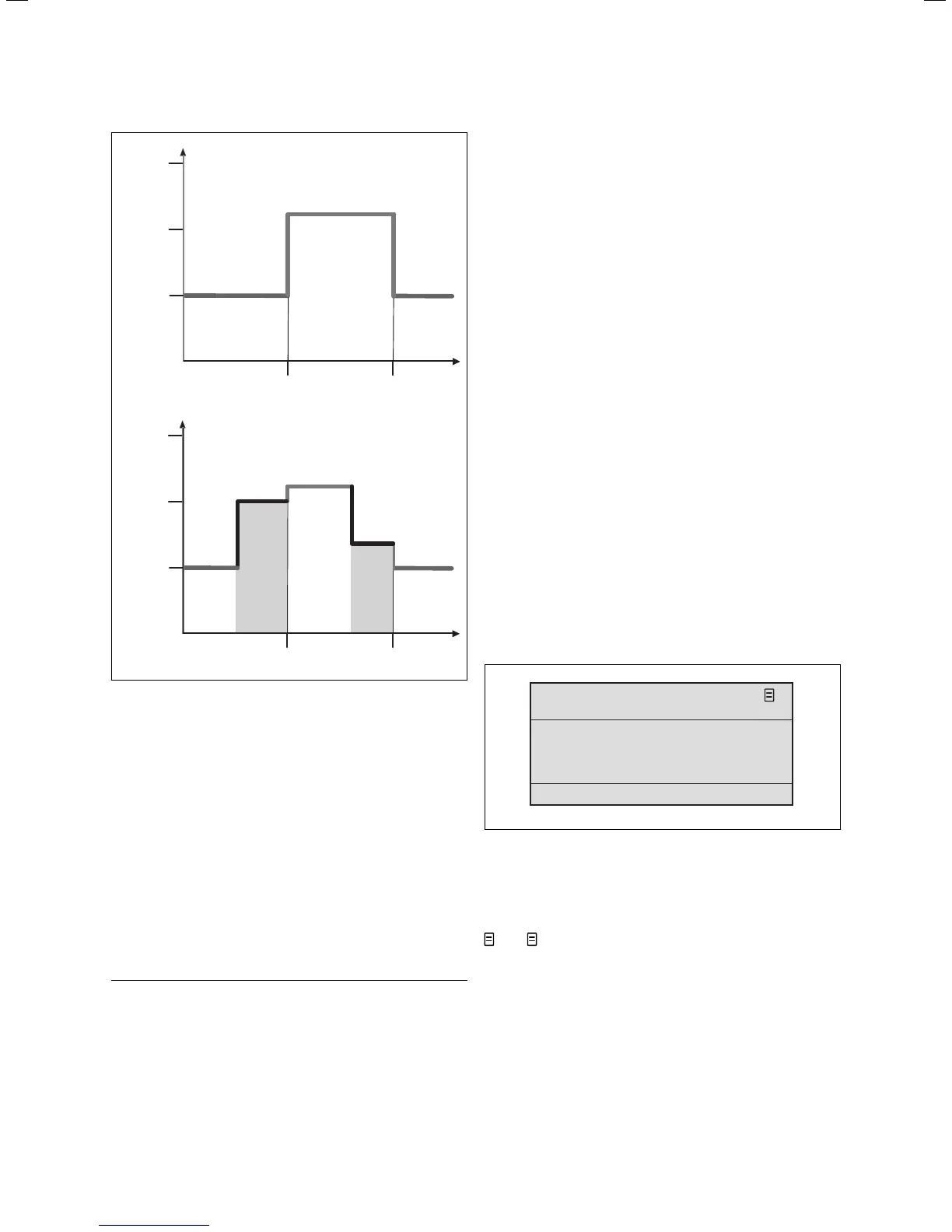
Fig. 4.11 Duration of validity of target value changes
(here: room temperature)
The upper diagram in Fig. 4.11 shows a programmed time
window (see Chapter 4.7.1) with associated room
temperature (21 °C).
In the lower diagram at (1) the room target value is
changed (20 °C). This room target value is used until the
start of the time window.
From here (2) the control system uses the room target
value of the time window (21 °C).
At (3) the room target value is set (17 °C).
This value is used for the control system until the end of
the time window (4).
After the time window, the control system uses the set-
back temperature (15 °C) again.
h
Note!
The same characteristics apply in the same way
for the hot water target value.
4.5 Level for the user, level for the installer
The VRT 392 has two levels for display/input. Each level
contains several different screens where the parameters
can be displayed, adjusted or changed.
– Level for the user
It serves to display and set/change the fundamental
parameters. The setting/changing of the parameters
can be carried out by the user without any special
previous knowledge and during normal operation.
– Level for the installer
It serves to the display and set/change specific
parameters and is limited to the installer.
4.6 Screens in the level for the user
The screens in the level for the user are arranged in the
same sequence as shown in the following table 4.4.
This table shows which parameters can be changed.
Examples of this can be seen in Chapter 4.7 and
onwards.
This is the way you get from the default display to the
first screen "basic data" of the user level:
⇒ Click with one or both dials.
You get to the basic display.
⇒ Turn the left-hand dial clockwise by one or two
notches.
Day of week
We
12 : 00
> Set day of week
21 . 06 . 06
Basic data
1
Date
Time
Summer/winter time changeover
Auto
Fig. 4.12 Screen "basic data"
(example: select day of the week)
By turning the left-hand dial you scroll from one screen
to the next.
Other screens apart from those shown in Table 4.4, e.g.
3 or 6, only appear if accessories are installed and if
their control is done by the VRT 392.
Operation 4



 To Next Page