9Operating manual VRT 392f 0020044239_01
4.3.1 Show various screens
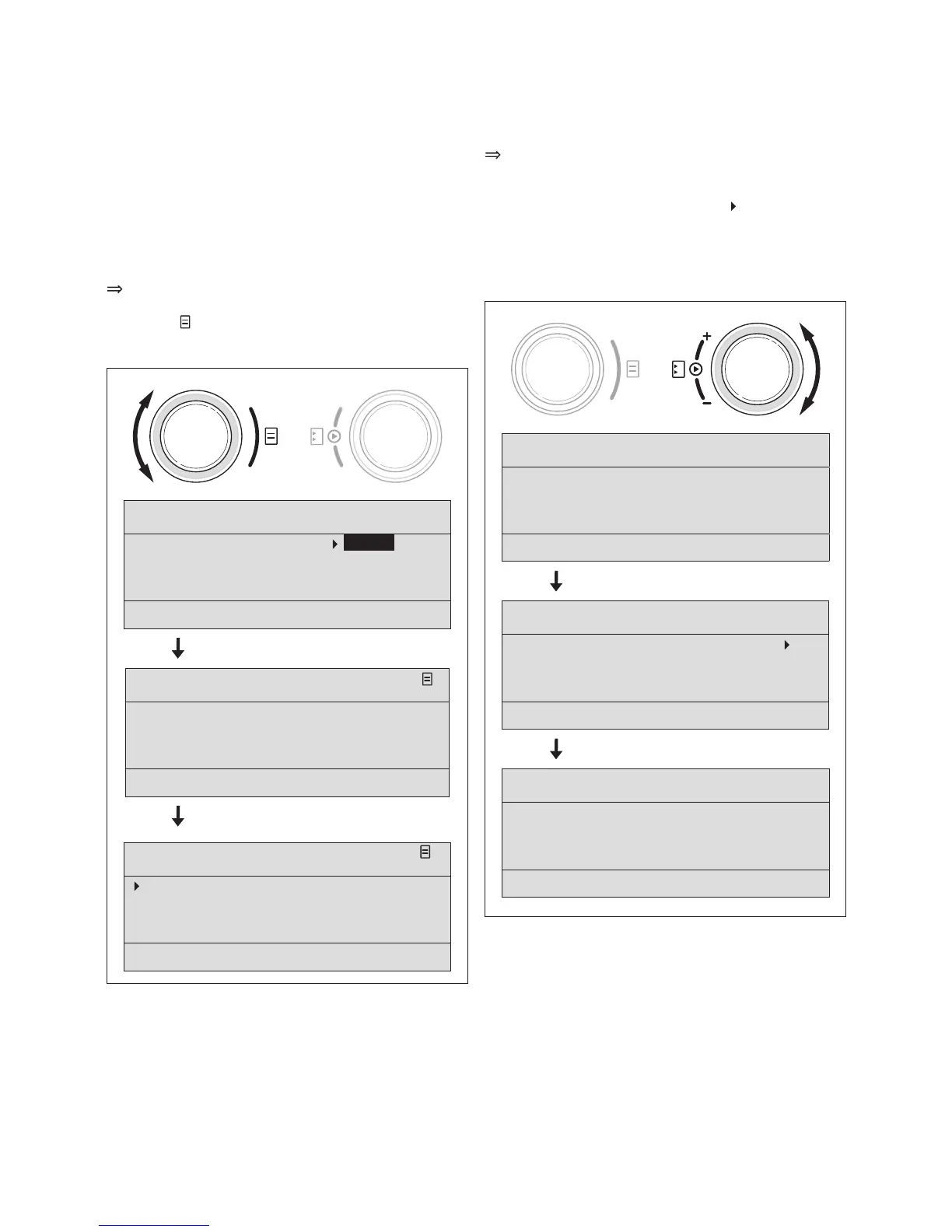
By turning the left-hand dial you can page through the
individual screens of the display like a book.
Example:
You are now located in the basic display. A description of
how to navigate to the basic display is provided in
Section 4.3.3.
Turn the left-hand dial clockwise by one notch.
The screen 1 appears in the display together
with the basic data setting options.
Th. 12.01.06
11:46
HC1 22.0 °C Auto
Hot water 56.0 °C Auto
> Change room temperature
Basic data
1
Date 21. 06. 06
Day We
Time 12 : 00 o'clock
Summer/Winter changeover Auto
> Select day
HC 1
Time programme
2
Mo
1 06 : 00
- 10 : 40 21.5 °C
2 :
- :
3 :
- :
> Select day of week
Fig. 4.4 Display of the various screens
4.3.2 Changing parameters
Turn the right-hand dial to scroll through the
parameters within the screen.
The position is indicated by the cursor
(see Fig. 4.5).
If a parameter (e.g. a date with day, month, year)
consists of several elements, scroll from one element to
the next by turning the right-hand dial.
Th. 12.01.06
11:46
HC1 21.0 °C Auto
Hot water 56.0 °C Auto
> Change room temperature
Th. 12.01.06
11:46
HC1 21.0 °C
Auto
Hot water 56.0 °C Auto
> Change operating mode
Th. 12.01.06
11:46
HC1 21.0 °C Auto
Hot water 56.0 °C Auto
> Change target hot water
Fig. 4.5 Scroll to various different modifiable parameters
Operation 4



 To Next Page