EasyManua.ls Logo

Valcom V-2006A - User Manual

Valcom V-2006A
12 pages
Print Icon
To Next Page IconTo Next Page
Loading...
VSP – One-Way Paging
Issue 14
1 947100
VALCOM ONE-WAY PAGING
SYSTEM DESIGN/INFORMATION
GENERAL
These instructions provide the basic information
required to properly install a One-Way paging system
manufactured by Valcom, Inc.
Valcom One-Way Paging Equipment may be used with
any 1A2, Electronic Key, PABX Telephone Systems,
or with one or more dedicated single line telephone
sets.
SYSTEM OVERVIEW
Purpose
Provides telephone accessed single or multizone
paging.
Applications
Electronic Key Systems
PABX
Stand alone systems
1A2
VALCOM
ONE-WAY
CONTROL
UNIT
ONE-WAY
SPEAKER
A
SSEMBL
Y
POWER
SUPPLY
TELEPHONE
SYSTEM
ONE-WAY PAGING SYSTEM BLOCK DIAGRAM
FIGURE 1
Features
1, 3, 6, 9, and 24 (expandable with V-2925A in 24
zone increments for up to 96) zone page control
units available.
One-way all call to all speakers available.
Volume controls and amplifiers in each speaker.
No high power amplifier required.
Standard CAT 3, 5, 5E twisted pair cable
(typically 22 or 24 AWG) is used for speakers.
Existing twisted pair house cables / feed cables
may be used without introducing crosstalk.
See Multi-Path Information for systems up to 360
zones.
Access Methods
Electronic Key System line button (C. O. circuit
required).
PABX loop trunk port (trunk circuit required).
Page port.
Station level access available (with appropriate
adapter).
Stand alone with dedicated single line sets.
1A2 line button (line card required on most units).
Capacity
All units are one talkpath and one link.
V-1094A, 1 zone (page port access only).
V-2000A, 1 zone with an integrated power supply.
V-2001A, 1 zone with an integrated power supply,
override capabilities and featuring two integrated
tone generators for night ringing and time clock
tones.
V-2003A, 3 zones with all call, background music
capabilities, override capabilities, two integrated
tones for night ringing and time clock signaling
plus integrated power supply.
V-2006A, 6 zones with all call, up to 3 group
calls, override capabilities, background music
capabilities, two integrated tone generators for
night ringing and time clock tones plus integrated
power supply.
V-2924A, 24 zones with all call, background
music capabilities.
V-1109RTVA, 9 zones with all call.
Each of the units listed above will drive up to 40
Valcom one-way amplified speaker assemblies per
zone (150 on V-1094A, V-9937, V-1101A, V-2000A,
V-2001A, V-2003A and V-2006A). Additional
speakers may be added to a zone by using a V-1094A.
Each V-1094A allows the addition of 150 more
amplified speaker assemblies to that zone.

Other manuals for Valcom V-2006A

Questions and Answers

  • D
    Dr. Christine SmithJul 30, 2025
    What to do if programmed feature is not working on Valcom Microphone?
    • J
      Jerome BrownJul 31, 2025
      If the programmed feature on your Valcom Microphone isn't working, the first step is to review the V-2006A programming for that specific option. If needed, reprogram the zone accordingly to ensure the feature is correctly set up.
  • C
    Cindy GrossAug 5, 2025
    How to fix no background music on Valcom Microphone?
    • D
      Donald GarciaAug 5, 2025
      If you have no background music on your Valcom Microphone, you can try the following: * Adjust the music volume control (adjustment POT R6). * Use a telephone test set to monitor the V-2006A background music input to confirm music is present. * Check the programming to ensure the zone is programmed for background music. * Check the switch settings to ensure the access method from the phone system matches the V-2006A switch settings (Page Port, C.O. Port …).
  • D
    dale05Aug 12, 2025
    What to do if there is no speaker output from Valcom Microphone?
    • M
      Maria GloverAug 12, 2025
      If there's no speaker output from your Valcom Microphone, you can try the following: 1. Check the AC power source and the AC line fuse on the V-2006A (remember to disconnect power before removing the fuse). 2. Connect a tone generator (cable tracer) to the zone output audio pair on the V-2006A block to verify if the tone plays over the speakers or horns.
  • T
    teresasnyderAug 17, 2025
    What to do if I cannot access zone on Valcom Microphone?
    • G
      Gary Frey PhDAug 18, 2025
      If you cannot access a zone on your Valcom Microphone, you can try the following: 1. Monitor the access port from the phone system using a telephone test set in monitor position to verify that the port is passing DTMF. 2. Monitor the paging zone output on the V-2006A block with a telephone test set to verify that audio is present when paging.
  • D
    David WilliamsAug 25, 2025
    How to fix cannot access paging on Valcom Microphone?
    • P
      Peter BrownAug 25, 2025
      If you cannot access paging on your Valcom Microphone, here are a couple of things you can check: 1. Check the V-2006A switch settings. Verify that the phone system connections and programming are consistent with the V-2006A switch settings (Page Port, C.O. Port). 2. Remove the V-2006A Tip and Ring connections from the telephone system. Set switches 1 & 2 for Loop Start (down). Set switch 6 for C. O. Port Access (up).

Summary

General Information

System Overview

Access Methods and Capabilities

Access Methods

Lists the various ways to access the Valcom paging system.

Capacity

Details the zone and speaker capacity of Valcom paging units.

Features

VoIP Adapters

Dimensions and Environment

Dimensions

Provides physical dimensions for Valcom control units.

Environment

Specifies operating temperature and humidity ranges for Valcom equipment.

Control Unit Power Requirements

Speaker Power Requirements

One-Way Self-Amplified Speaker Styles

System Design for Various Telephone Systems

Valcom Power Units (VPU)

Explains Valcom Power Units (VPU) and their role in system design and power calculation.

Page Port Access Methods

E-Key or PABX Page Port Access

Details access to paging systems via E-Key or PABX page ports.

Station Level Paging

Describes how to use station level adapters for paging access.

System Installation Guide

General Installation Notes

Provides basic understanding for wiring and connecting paging equipment.

Precautions

Advises against locating equipment near electrical noise sources.

Mounting Guidelines

Specifies recommended mounting locations and methods for control equipment.

Speaker Spacing Recommendations

Details spacing guidelines for different types of Valcom speakers.

Speaker Coverage and Noise Levels

Track and Pendant Speaker Coverage

Describes coverage areas for track and pendant style speakers.

Noise Level Definitions

Categorizes ambient noise levels for paging system planning.

Speaker Cabling and Power Runs

Speaker Cabling

Details cable requirements for Valcom amplified speakers.

Power Cable Runs

Specifies crucial guidelines for power cable runs for speaker operation.

System Components and Operation

Bridges and Backboxes

Discusses mounting support for ceiling speakers.

Volume Adjustments

Explains how to set and adjust volume levels for speakers and systems.

System Operation Circuit Description

Describes the basic circuit functions of Valcom paging control units and speakers.

Technical Assistance and Support

Problem Solvers and System Enhancements

Automatic Volume Control (V-9933 A)

Details the noise sensing volume control for automatic adjustment.

Remote Microphone (V-9934)

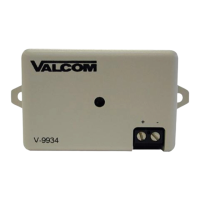
Describes the remote microphone accessory for paging.

Stacking Feedback Eliminator (V-9964)

Explains the feedback eliminator for preventing system feedback.

Enhancement to Existing Paging Systems

Guidance on integrating Valcom with existing 25/70/100V systems.

Advantages of Distributed Amplified Systems

Speaker and Bridge;Backbox Compatibility

Valcom One-Way Page Control;Interface Feature Chart

Valcom V-2006A Specifications

General IconGeneral
BrandValcom
ModelV-2006A
CategoryMicrophone
LanguageEnglish

Related product manuals